


The project settings contain all settings and customization of a project. A dialog to modify the project settings can be accessed in two ways:
Select "Project | Project Settings..." from the top menu
Select a project's root node in the Model Browser and choose "Project Settings..." from the context menu
The project settings dialog itself is divided into different categories each providing an individual settings page. Here is an overview on the different settings:
Auto-counter patterns: Identifiers which are automatically assigned for selected model elements, see Auto-counter Patterns
Checklist templates: Provides predefined checklists for use in the project, see Checklist Template Definition
Cybersecurity: Settings for cybersecurity data in the project such as security attributes, threat categories, mappings, and attack tree settings. For more details refer to the Ansys medini Cybersecurity guide.
Dynamic constraints: Validation rules defined for project, see Constraint validation
FTA: Labels and other settings for FTA, see Fault Tree Analysis (FTA) for more details
Failure Rate Catalogs: Failure rate prediction handbooks that are used in the project, see Reliability Prediction for details
Failure Rate Units: Definition of the time unit for failure rates, see Adjusting the Unit of Failure Rates
Guideword Templates: Define templates for HAZOP, limitations, and weakness analyses, see Guideword Template Definition
Mission Profiles: Stress profiles for failure rate prediction, see Mission Profiles for Failure Rate Prediction
Operational situation catalogs: Predefined situations that are used during hazard and scneario analysis, see Analysis based on Operational Situation Catalogs
Profiling: Additional properties for all concepts of the tool, see Profiling mechanism.
Project Information: Shows information about the storage location for the selected project and the date of the last modification.
Risk Matrices: Risk evaluation for FMEA, see Using Risk Matrices
Safety Mechanisms Catalogs: Predefined safety mechanisms, see Safety Mechanisms and Predefined Catalogs
Task Repository: Connection to ticket systems such as Redmine or trac. For details, see Task Management & Commenting.
Auto-counters are available for a number of elements, e.g. for the hazardous events (scenario entries) in the hazard analysis, FTA events, safety requirements, functions, and so on. Note that not all elements in the tool have auto-counters and if an element does not appear in the list, it cannot have an auto-counter ID.
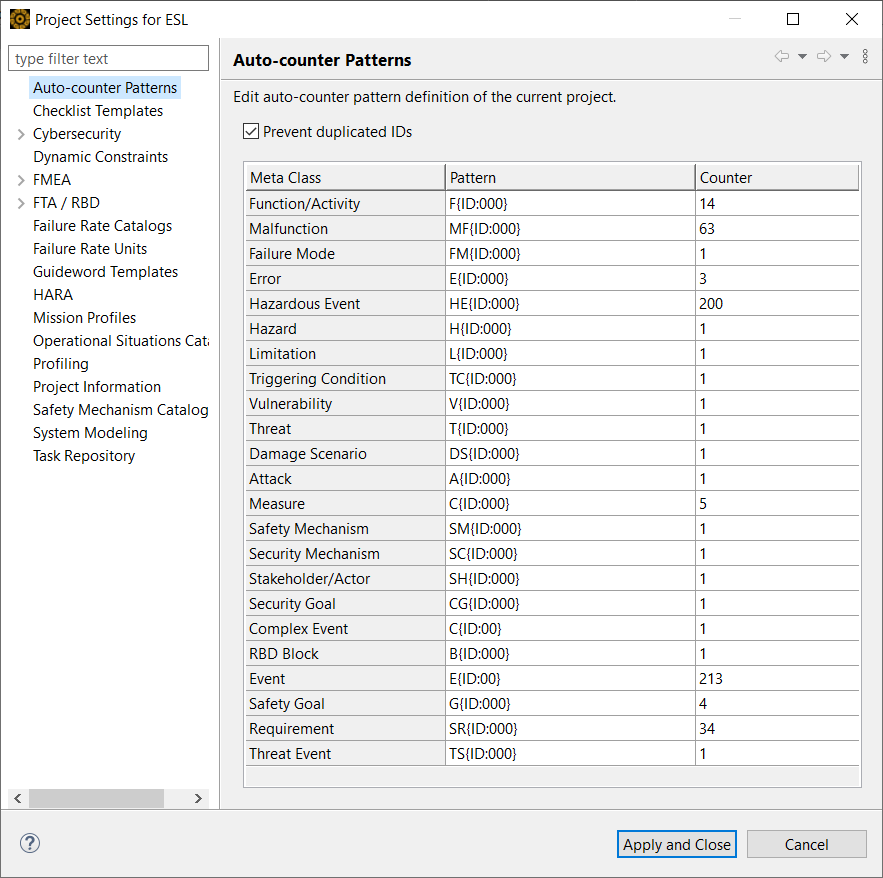
By clicking into the column "Pattern" you may modify the default pattern according to your needs. An auto-counter pattern is using the following format:
[<text>] '{' 'ID:' <format> '}' [<text>]
where <format> is a sequence of zeroes ('0') defining the character length of the ID reference part.
Examples:
Pattern: HE{ID:000} resulting values: HE001, HE120
Pattern: RQ{ID:0000}-Safety resulting values: RQ1001-Safety, RQ0001-Safety
Pattern: {ID:00} resulting values: 01, 10
If you do not want IDs for the elements to be automatically assigned, simply put in an empty string in the pattern field.
In the remaining column you may specify the current starting value for the selected counter. The next creation of an object will use this pattern/number. The new starting value will be in effect after saving the modified auto-counter settings. Note that existing elements will not be touched when changing the pattern, only newly created ones will receive the given pattern/number.
You have an option to prevent the assignment of duplicated IDs via the option shown above the table. If the option is enabled, the next free number pattern will be effectively used as new ID. That means, the value given is actually the start point to search for the next unassigned ID. If the option is disabled, changing the starting value to a smaller value as the current settings may result in duplicated IDs since no check is performed when an element is created. The default is ON to prevent duplicated IDs.
Note that it is also possible to define more complicated and hierarchical auto-counter patterns. However, expert knowledge about the internal meta-models of medini analyze is required in order to do so. Please contact the Ansys support team to inquire more details.
In this category you can specify which failure rate catalogs (handbooks) shall be used for the project. After clicking on "Add" all available catalogs are shown, after selecting the desired one and clicking on "OK" the catalog will be made available in the project.
Supported standard prediction models include the Siemens-Norm 29500 (versions 2011 and 1996), the Military Handbook 217F (Notice 2), the FIDES Guide (2009) and the IEC TR 62380 (same as: RDF2000 issue 2003, UTE-C 80-810). Please contact ANSYS Germany GmbH in order to obtain information about other standards and customization of prediction models according to corporate standards.
Please note, as different catalogs may result in different FIT failures for the same type of element, the concurrent usage of multiple catalogs may require additional alignment factors.