


Measures are the generic concept in medini analyze to express all means to prevent, detect, control, mitigate or correct failures of a system. Measures are managed in so-called measure collections and referenced from an FMEA in the current design controls columns (via measure groups), the FMEDA/Diagnostic Coverage Worksheets for detection of faults as well as from FTA events.
Measure collections can be created as follows:
Select any package in the Model Browser and in the context menu, select > > .
A dialog opens that asks for a name and type of the collection. Currently three different types of measure are distinguished:
General Measures (Prevention/Detection). General measures should be used for all prevention/detection measures of the FMEA.
Safety Mechanisms. This type is used for mechanisms that are build into the system and provides a diagnostic coverage (DC) to quantify the detection capabilities. They are referenced from an FMEDA/DC worksheet, but the FMEA can also use them.
Security Mechanisms. This type is used for measures and mechanisms applicable to security analyses, e.g. Security FMEAs, Attack Trees, or Threat Analyses.
Note that the type determines which kind of measures/mechanisms can be contained in the collection and cannot be changed afterwards.
Create or import measures in the collection using the normal table control buttons on the right side. All measures have an ID, name, description for FMEA a status, target completion date, and detection (from RPN).
If you have set up a (safety) plan in your project, you can consistently link the target completion date against a milestone instead of a fixed date. The milestone reference allows you to automatically update all target dates if your actual date for the milestone changes.
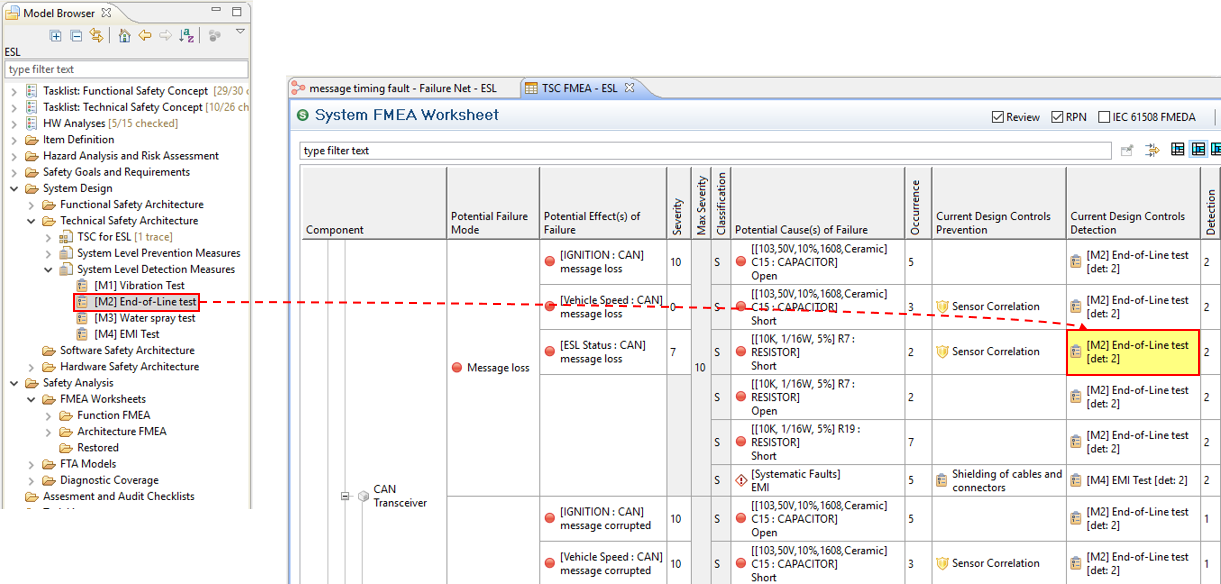
If you want to associate a measure as current design control (prevention or detection) to an FMEA, just drag and drop it into the corresponding columns of a worksheet or select it using the selection buttons/double-click. Note that the detection values are used as a default value there and can be overridden as required.
For more information on FMEDA, refer to section FMEDA and Diagnostic Coverage Metrics.
Measure collections can be imported from a CSV file or an Excel table. To trigger the import, a measure catalog in the model browser needs to be selected and the action "Import-> From CSV/Excel..." has to be triggered via the context menu. Alternatively, the import can be triggered from within an opened table editor (button on the right side of the table).
The import wizard is similar to other Excel data import wizards. See Using the CSV/Excel import wizard for a detailed description.
Safety mechanisms can be managed in measure/mechanism collections as described in Measures and Design Controls. These collections contain the actual safety mechanisms used in an FMEDA (Diagnostic Coverage analysis) or FMEA.
In addition, medini analyze supports the definition of predefined safety mechanism catalogs. These catalogs can be managed in the project settings. In the default templates, the catalogs of safety mechanisms listed e.g. in IEC61508 and ISO 26262 part 5 are provided with the installation. See Project Settings for a description of the generally available settings. These catalogs can serve as basis for custom catalogs.
To create a new catalog open the safety mechanisms catalog page in the project settings and choose "Add". Use the buttons on the right side of the lower table to add, remove or reorder the mechanisms. Safety mechanisms can also be imported using the CSV/Excel import (please see Import of data in Excel/CSV-Format).
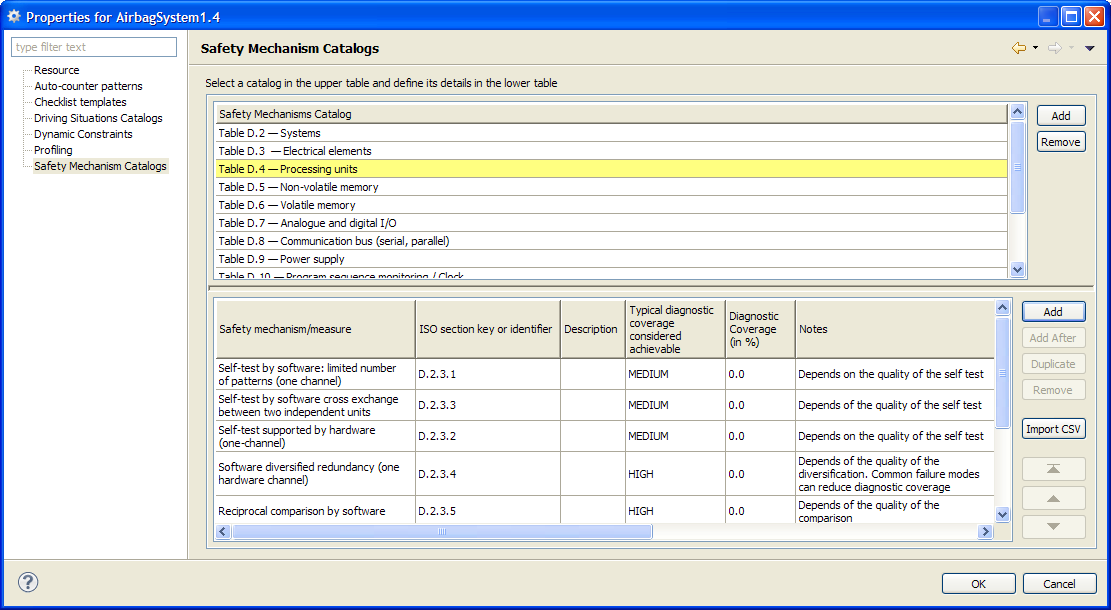
A safety mechanisms catalog contains following columns which can be extended by custom profile properties (please see Profiling mechanism):
Safety mechanism/measure: Name of the safety mechanisms
Section key or identifier: Identifier of the mechanism or reference to a section in a safety standard
Description: Description of the mechanism
Typical diagnostic coverage considered achievable: A qualitative estimate for the achievable coverage of the mechanism. Select a category from the drop-down list which provided the following values:
NONE: if no typical coverage can be given
LOW: for mechanisms with a low coverage
MEDIUM: if typical coverage of mechanisms is medium
HIGH: for mechanisms considered to have a high coverage
For the standard safety mechanism catalogs these levels correspond to those defined in the safety standards (IEC 61508 and ISO 26262).
SPF Diagnostic Coverage: Default coverage of single point faults when assigned to (permanent) failure modes in an FMEDA/DC Worksheet.
LF Diagnostic Coverage: Default coverage of latent faults when assigned to (permanent) failure modes in an FMEDA/DC Worksheet. This field is used especially for the HW Metrics of ISO 26262.
Transient SPF Diagnostic Coverage: Default coverage of single point faults when assigned to transient failure modes.
Transient LF Diagnostic Coverage: Default coverage of latent faults when assigned to transient failure modes. This field is used especially for the HW Metrics of ISO 26262.
Detection: the detection value that this mechanism can achieve in the context of an FMEA in the range of [1..10], default is 0 (not used).
Notes: for comments to be attached to the safety mechanisms
Catalogs of configured safety mechanisms can either be created when selecting a mechanism from a catalog while editing a Diagnostic Coverage worksheet or by using the appropriate entry in the context menu in the Model Browser.
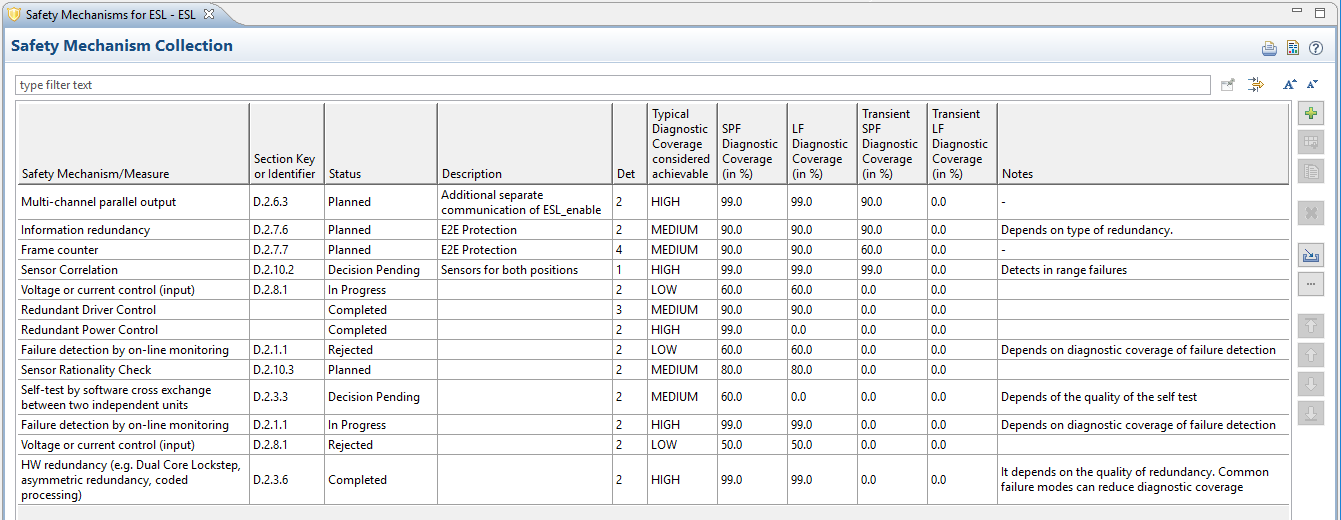
The editor which is opened provides the same columns as described for the safety mechanisms catalog above. The editor is used to set specific parameters and configurations for the mechanisms used in the system.