
Applying Power Integrity Rules
To change EMI Scanner Power Integrity rules:
- Launch EMI Scanner.
The EMI Scanner window appears, on the Rules tab.
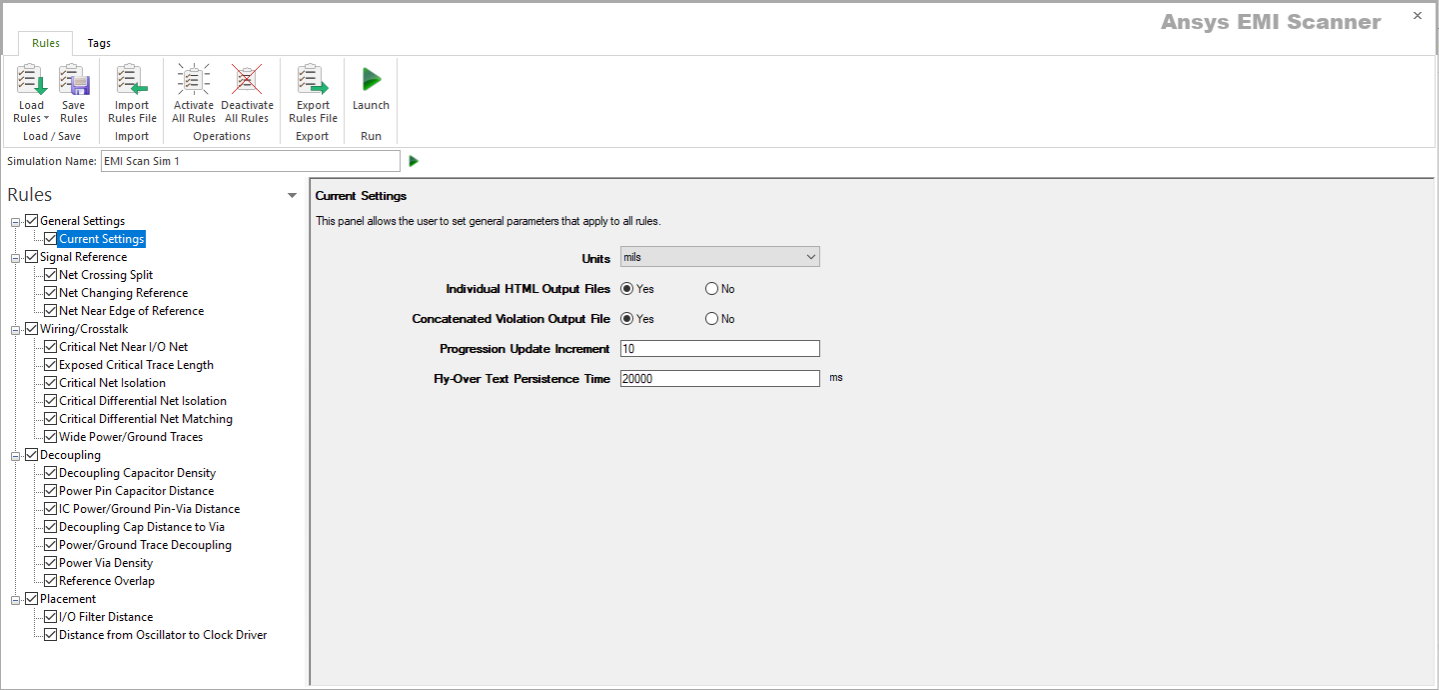
- Click Load Rules and select a profile containing Signal Integrity rules (e.g., Default SI Rules Profile).
- From the Rules pane, select one of the seven subcategories under Power Integrity:
- Wide Power/Ground Traces – displays the Wide Power/Ground Traces rule configuration.
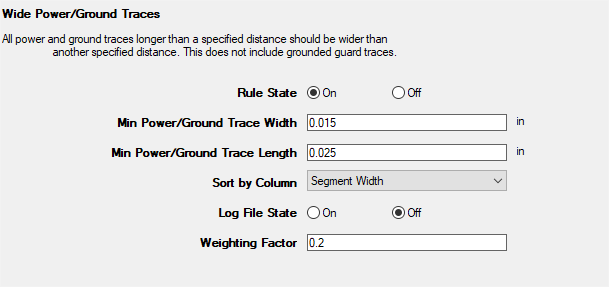
This rule states that all power and ground traces longer than a specified distance should be wider than another specified distance.
From here, you can set the following:
- Rule State – toggles Wide Power/Ground Traces rules on or off.
- Min Power/Ground Trace Width – sets the minimum width limit for all power/ground traces (except grounded guard traces).
- Min Power/Ground Trace Length – sets the minimum length limit for all power/ground traces (except grounded guard traces).
- Sort by Column – specifies the column by which results are sorted.
- Log File State – determines whether EMI Scanner creates a log file with additional details (intended for use in debugging).
- Weighting Factor – specifies the weighting factor (0<factor<=1) that is applied to violations of this rule when assigning a rank. A violation's rank is its own "degree of badness" multiplied by the weighting factor. See Exporting EMI Scanner Results and Analyzing EMI Scanner Results Using iQ-Harmony.
- Decoupling Capacitor Density – displays the Decoupling Capacitor Density rule configuration.
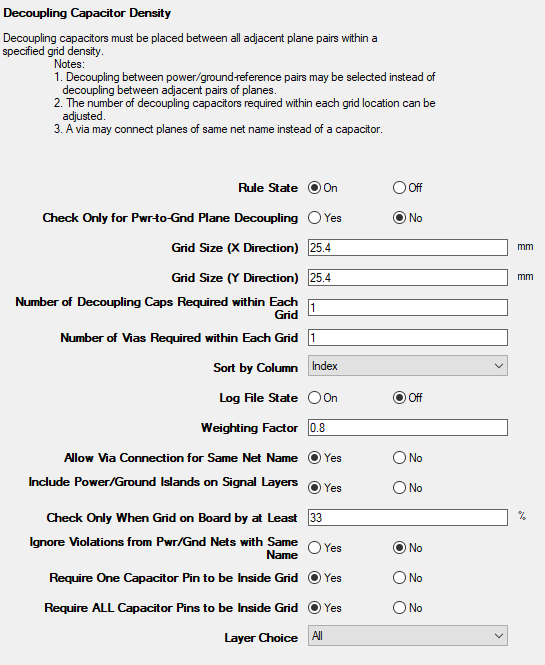
This rule states that decoupling capacitors must be placed between all adjacent plane pairs within a specified grid density.
From here, you can set the following:
- Rule State – toggles Decoupling Capacitor Density rules on or off.
- Check Only for Pwr-to-Gnd Plane Decoupling – sets whether to ignore plane-to-plane decoupling and check only for decoupling capacitors between power and ground planes.
- Grid Size (X Direction) – specifies the size of the grid used to check for decoupling capacitors. Used in conjunction with Grid Size (Y Direction).
- Grid Size (Y Direction) – specifies the size of the grid used to check for decoupling capacitors. Used in conjunction with Grid Size (X Direction).
- Number of Decoupling Caps Required within Each Grid – specifies the number of decoupling capacitors connecting between planes that are required within each grid location.
- Number of Vias Required within Each Grid – specifies the number of vias connecting between planes that are required within each grid location. You must select Allow Via Connection for Same Net Name to use this option.
- Sort by Column – specifies the column by which results are sorted.
- Log File State – determines whether EMI Scanner creates a log file with additional details (intended for use in debugging).
- Weighting Factor – specifies the weighting factor (0<factor<=1) that is applied to violations of this rule when assigning a rank. A violation's rank is its own "degree of badness" multiplied by the weighting factor. See Exporting EMI Scanner Results and Analyzing EMI Scanner Results Using iQ-Harmony.
- Allow Via Connection for Same Net Name – determines whether EMI Scanner allows a via in place of a decoupling capacitor when the two planes are the same net name.
- Include Power/Ground Islands on Signal Layers – specifies whether to check for decoupling on power/ground islands.
- Check Only When Grid on Board by at Least – specifies the percentage of a grid that must be on the board in order for it to be checked.
- Ignore Violations from Pwr/Gnd Nets with Same Name – determines that only one plane of a given name is checked for violations (e.g., if two planes are "gnd" and a violation occurs between gnd and another layer, only one violation is reported).
- Require One Capacitor Pin to be Inside Grid – changes how EMI Scanner determines whether a component is inside or outside the grid. See Technical Note.
- Require ALL Capacitor Pins to be Inside Grid – changes how EMI Scanner determines whether a component is inside or outside the grid. See Technical Note.
- Layer Choice – specifies the layers to include in this rule analysis.
- Power Pin Capacitor Distance – displays the Decoupling Capacitor Distance from IC Power Pin rule configuration.
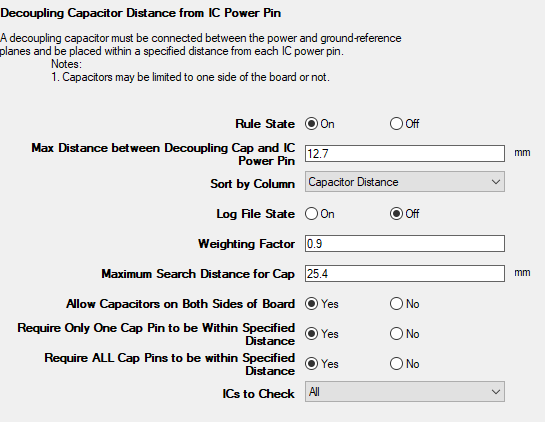
This rule states that a decoupling capacitor must be connected between the power and ground-reference planes and be placed within a specified distance of each IC power pin.
From here, you can set the following:
- Rule State – toggles Power Pin Capacitor Distance rules on or off.
- Max Distance Between Decoupling Cap and IC Power Pin – specifies the maximum distance between an IC power pin and its decoupling capacitor.
- Sort by Column – specifies the column by which results are sorted.
- Log File State – determines whether EMI Scanner creates a log file with additional details (intended for use in debugging).
- Weighting Factor – specifies the weighting factor (0<factor<=1) that is applied to violations of this rule when assigning a rank. A violation's rank is its own "degree of badness" multiplied by the weighting factor. See Exporting EMI Scanner Results and Analyzing EMI Scanner Results Using iQ-Harmony.
- Maximum Search Distance for Cap – specifies the maximum search distance for a capacitor. A larger search box increases the chances of EMI Scanner finding capacitors, but can slow processing time.
- Allow Capacitors on Both Sides of Board – allows EMI Scanner to include capacitors on both sides of the board to satisfy this rule.
- Require Only One Cap Pin to be within Specified Distance – changes how EMI Scanner determines whether a component is inside or outside the grid. See Technical Note.
- Require ALL Cap Pins to be within Specified Distance – changes how EMI Scanner determines whether a component is inside or outside the grid. See Technical Note.
- ICs to Check – specifies the types of components to include in this rule analysis.
- IC Power/Ground Pin-Via Distance – displays the IC Power/Ground-Reference Pin Distance to Via rule configuration.
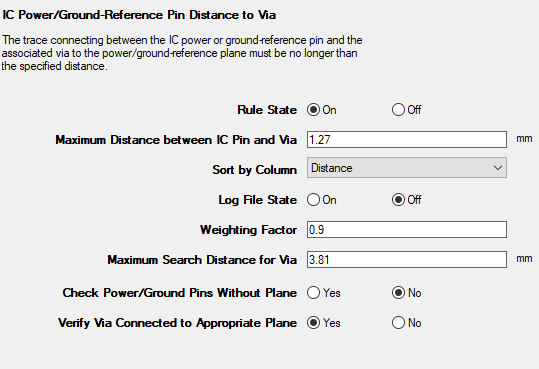
This rule states that the trace connecting the IC power or ground-reference pin and the associated via to the ground/reference plane must be no longer than a specified distance..
From here, you can set the following:
- Rule State – toggles IC Power/Ground Pin-Via Distance rules on or off.
- Maximum Distance Between IC Pin and Via – specifies the maximum distance between the IC power or ground-reference pin and the via to the power or ground-reference plane.
- Sort by Column – specifies the column by which results are sorted.
- Log File State – determines whether EMI Scanner creates a log file with additional details (intended for use in debugging).
- Weighting Factor – specifies the weighting factor (0<factor<=1) that is applied to violations of this rule when assigning a rank. A violation's rank is its own "degree of badness" multiplied by the weighting factor. See Exporting EMI Scanner Results and Analyzing EMI Scanner Results Using iQ-Harmony.
- Maximum Search Distance for Via – specifies the maximum search distance for a via when a violation is found. This allows users to quickly determine if the via is barely outside the original requirement and therefore not a serious violation.
- Check Power/Ground Pins Without Plane – specifies whether to check the distance between the IC power/ground pin and its via when the power/ground plane has not been completed yet.
- Verify Via Connected to Appropriate Plane – specifies whether or not EMI Scanner verifies that the via connects to an appropriate plane (shape). Selecting 'no' speeds up processing.
- Decoupling Cap Distance to Via – displays the Decoupling Capacitor Distance to Via rule configuration.
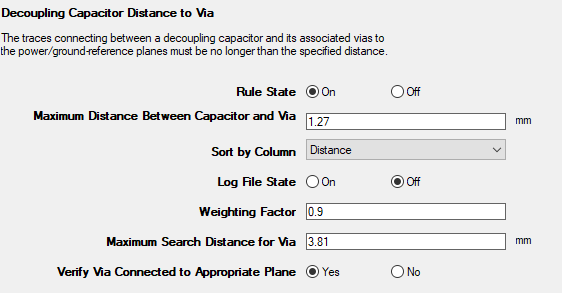
This rule states that the traces connecting a decoupling capacitor and its associated vias to the power/ground-reference planes must be no longer than a specified distance.
From here, you can set the following:
- Rule State – toggles Decoupling Capacitor Distance to Via rules on or off.
- Maximum Distance Between Capacitor and Via – specifies the maximum distance between the capacitor pin and the via to the power or ground-reference plane.
- Sort by Column – specifies the column by which results are sorted.
- Log File State – determines whether EMI Scanner creates a log file with additional details (intended for use in debugging).
- Weighting Factor – specifies the weighting factor (0<factor<=1) that is applied to violations of this rule when assigning a rank. A violation's rank is its own "degree of badness" multiplied by the weighting factor. See Exporting EMI Scanner Results and Analyzing EMI Scanner Results Using iQ-Harmony.
- Maximum Search Distance for Via – specifies the maximum search distance for a via when a violation is found. This allows users to quickly determine if the via is barely outside the original requirement and therefore not a serious violation.
- Verify Via Connected to Appropriate Plane – specifies whether or not EMI Scanner verifies that the via connects to an appropriate plane (shape). Selecting 'no' speeds up processing.
- Power/Ground Trace Decoupling – displays the Power/Ground-Reference Trace Decoupling rule configuration.
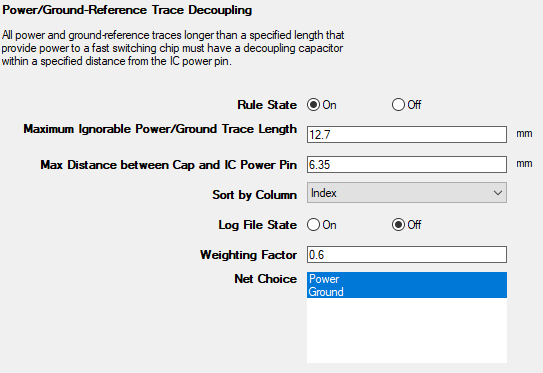
This rule states that all power and ground-reference traces longer than a specified length that provide power to a fast switching chip must have a decoupling capacitor within a specified distance from the IC power pin.
From here, you can set the following:
- Rule State – toggles Power/Ground-Reference Trace Decoupling rules on or off.
- Maximum Ignorable Power/Ground Trace Length – specifies the maximum allowable power/ground trace length that may be ignored. All traces longer than this length must meet this rule's requirement.
- Max Distance Between Cap and IC Power Pin – specifies the maximum distance between the capacitor pin and the power or ground-reference pin.
- Sort by Column – specifies the column by which results are sorted.
- Log File State – determines whether EMI Scanner creates a log file with additional details (intended for use in debugging).
- Weighting Factor – specifies the weighting factor (0<factor<=1) that is applied to violations of this rule when assigning a rank. A violation's rank is its own "degree of badness" multiplied by the weighting factor. See Exporting EMI Scanner Results and Analyzing EMI Scanner Results Using iQ-Harmony.
- Net Choice – specifies the nets to include in this rule analysis. Select one, or Ctrl+click to select multiple nets.
- Power Via Density – displays the Power Via Density rule configuration.
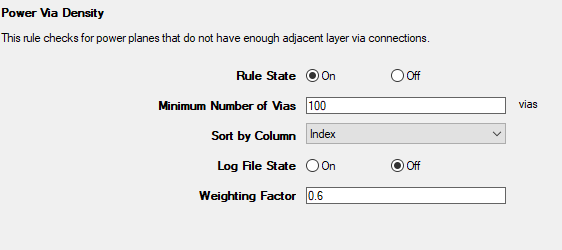
This rule checks for power planes that do not have enough adjacent layer via connections.
From here, you can set the following:
- Rule State – toggles Power Via Density rules on or off.
- Minimum Number of Vias – sets the minimum number of vias required to connect adjacent power planes.
- Sort by Column – specifies the column by which results are sorted.
- Log File State – determines whether EMI Scanner creates a log file with additional details (intended for use in debugging).
- Weighting Factor – specifies the weighting factor (0<factor<=1) that is applied to violations of this rule when assigning a rank. A violation's rank is its own "degree of badness" multiplied by the weighting factor. See Exporting EMI Scanner Results and Analyzing EMI Scanner Results Using iQ-Harmony.
- Wide Power/Ground Traces – displays the Wide Power/Ground Traces rule configuration.
- Rules are automatically saved for the current EMI scan. To save them for a future scan, click Save Rules.
- You can display a description of a rule parameter at any time by hovering the cursor over it.
- Units of measure are set in General Settings.