
Applying Placement Rules
To change EMI Scanner Placement rules:
- From the Rules pane, select one of the two subcategories under Placement:
- I/O Filter Distance – displays the I/O Filter Distance to I/O Connector rule configuration.
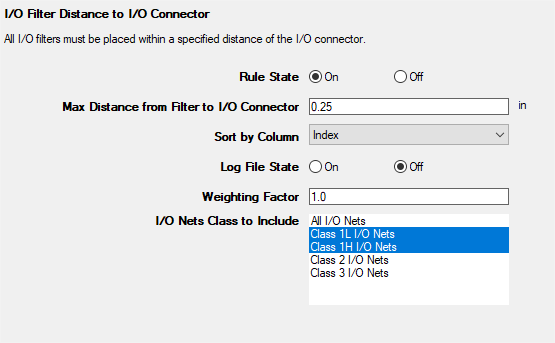
This rule states that all I/O filters must be placed within a specified distance of the I/O connector.
From here, you can set the following:
- Rule State – toggles I/O Filter Distance rules on or off.
- Max Distance from Filter to I/O Connector – specifies the maximum distance a filter may be placed from the I/O connector.
- Sort by Column – specifies the column by which results are sorted.
- Log File State – determines whether EMI Scanner creates a log file with additional details (intended for use in debugging).
- Weighting Factor – specifies the weighting factor (0<factor<=1) that is applied to violations of this rule when assigning a rank. A violation's rank is its own "degree of badness" multiplied by the weighting factor. See Exporting EMI Scanner Results and Analyzing EMI Scanner Results Using iQ-Harmony.
- I/O Nets to Include – specifies the type(s) of I/O Nets to include. Select one, or Ctrl+click to select multiple types. See Technical Note.
- Distance from Oscillator to Clock Driver – displays the Distance from Oscillator to Clock Driver rule configuration.
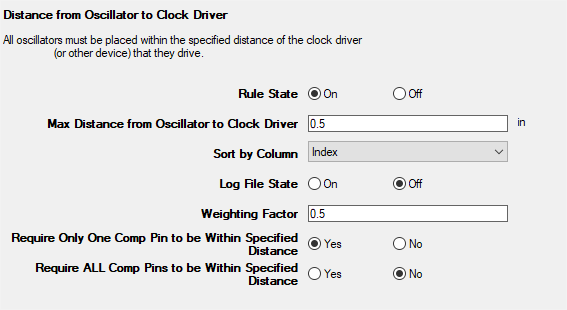
This rule states that all oscillators must be placed within a specified distance from the clock driver or other device that they drive.
From here, you can set the following:
- Rule State – toggles Distance from Oscillator to Clock Driver rules on or off.
- Max Distance from Oscillator to Clock Driver – specifies the distance within which all oscillators must be placed of the clock driver (or other device) that they drive.
- Sort by Column – specifies the column by which results are sorted.
- Log File State – determines whether EMI Scanner creates a log file with additional details (intended for use in debugging).
- Weighting Factor – specifies the weighting factor (0<factor<=1) that is applied to violations of this rule when assigning a rank. A violation's rank is its own "degree of badness" multiplied by the weighting factor. See Exporting EMI Scanner Results and Analyzing EMI Scanner Results Using iQ-Harmony.
- Require Only One Comp Pin to be Within Specified Distance – changes how EMI Scanner determines whether a component is inside or outside the grid. See Technical Note.
- Require ALL Comp Pins to be Within Specified Distance – changes how EMI Scanner determines whether a component is inside or outside the grid. See Technical Note.
- I/O Filter Distance – displays the I/O Filter Distance to I/O Connector rule configuration.
- Rules are automatically saved for the current EMI scan. To save them for a future scan, click Save Rules.
Note:
- You can display a description of a rule parameter at any time by hovering the cursor over it.
- Units of measure are set in General Settings.