Sanitizing Layout
Sanitize Layout is an operation for cleaning power and ground nets in order to fix certain alignment problems as well as complexities that may slow down simulation. It works by uniting the planes and traces for each net to be cleaned. Once the united planes are formed, portions that display trace-like properties are converted into traces. Under certain conditions, these traces are extended in order to improve their connection with vias, pads, and the remaining planes. Lattices originally formed from multiple traces become planes with cutouts after the sanitization process.
To sanitize the layout in the active project:
- Click Tools.
- From the Inspection Tools area, click Sanitize Layout... Alternatively, open the SIwave Workflow Wizard and click Sanitize Layout for Simulation.
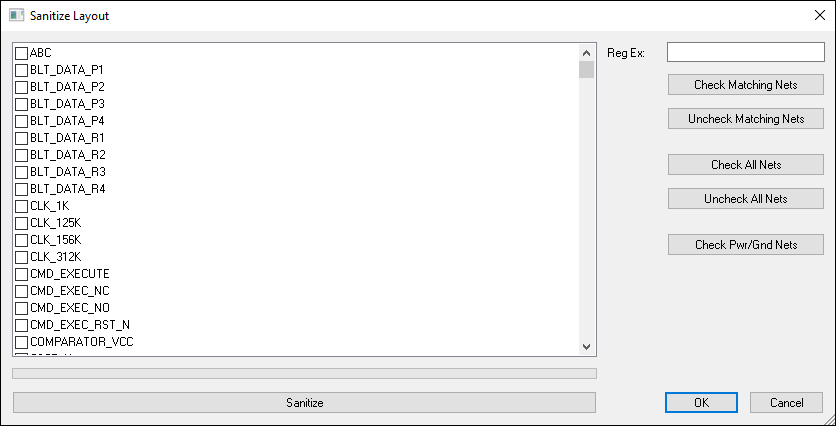
- You can add nets directly from this window.
- Check All Nets – click to select all nets.
- Uncheck All Nets – click to deselect all nets.
- Check Pwr/Gnd Nets – click to select power and ground nets only. This is the default selection.
- Reg Ex – use this field to type a regular expression and search for nets. Click Check Matching Nets to select matches, or click Uncheck Matching Nets to deselect matches.
- Click Sanitize to run Sanitize Layout on the selected nets.
- Click OK.
The Sanitize Layout window opens, with all power and ground nets selected.