
The Geometry Simplification Settings Window
Most of the settings unique to IC Mode can be configured from the Geometry Simplification Settings window.

Opening the Geometry Simplification Settings Window
To open the Geometry Simplification Settings window, navigate to the Layout tab and select Settings.
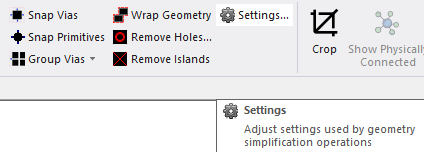
From the Geometry Simplification Settings window, users can adjust the following settings.
Via Snapping
-
Select a Snapping Method from the drop-down menu (Snap By Area Factor selected by default).
- Snap By Area Factor - Via groups are snapped by a maximum area equal to the Tolerance times the surface area of the via group being snapped.
- Snap By Distance - Via groups are snapped by a maximum distance of the Tolerance.
- Enter a value in the Tolerance field (e.g., 3).
- Check the Remove Dangling Vias box to delete vias that have no connectivity or have connectivity only to a single layer (checked by default).
Primitive Snapping
-
Enter a value in the Tolerance field, including the unit of measurement (e.g., 0.05um).
- Check the Check Connectivity box to ensure snapping does not violate the connectivity of the original objects (checked by default).
Via Grouping
-
Select a Grouping Method from the drop-down menu (Group By Proximity selected by default).
- Group By Proximity - Groups vias that are spaced similarly. Vias are not grouped if the distance between them exceeds the Tolerance.
- Group By Range - Groups vias based on whether a potential member is separated by no more than the Tolerance from any other member.
- Enter a value in the Tolerance field, including the unit of measurement (e.g., 100um).
- Check the Check Containment box to detect and prevent electrical shorts (checked by default).Note:
Check Containment analyzes the placement of via primitives. When the possibility of a short is detected, Check Containment splits the group to prevent a short.
Geometry Wrapping
Enter a value in the Tolerance field (e.g., 1um).
Remove Small Metal Islands
Enter a value in the Tolerance field (e.g., 5 um2).
Convert Polygons To Circles
Enter a value in the Minimum Area Ratio field (e.g., 0.75).
Remove Small Lines
Enter a value in the Tolerance field (e.g., 5e-06um).
Remove Small Fragments
- Check the Remove Small Fragments box to enable the feature.
- Enter a value in the Tolerance field (e.g., 0um2).
For other instructions on the usage of the Layout Editor, keyboard commands, and simple tasks, refer to Getting Started with Ansys Electronics Desktop.