


Normally all failures/weaknesses are directly annotated at elements in a design model. However, there are a few exceptions to this rule where failures are maintained in so called failure collections. There are basically two cases where these collections can help:
A model is not available: In certain situations it might be required to collect a list of malfunctions, errors, etc. without knowing the design model around these failures. Failures in these collections can be referenced from an FMEA, FMEDA, FMECA, or FTA. That means, these collections are the (temporary) container of the failures. For example, in an SEooC development a number of potential failures or unintended negative outcomes can be collected during an FME(D)A without knowing the full design model. Later, if the model becomes available, the failure list can be reviewed or failures can be moved to the final model scope.
Furthermore, Hazards, Errors, and Triggering Conditions are exclusively contained collections (see also Hazard Analysis and Risk Assessment).
Failures used as library: Failure collections can be used as library/catalog when conducting a safety analysis. Predefined lists of e.g. typical malfunctions or failure modes are a quick and consistent way to assign failures to elements. Hence, these collections provide a means to build knowledge bases and realize best practices. During analysis, failures can easily be dragged and dropped onto a design model element or FME(D)A worksheet. For details refer to Working with failure collections.
All four failure types of medini analyze (hazards, malfunctions, failure modes, and errors), weaknesses (limitations, vulnerabilities), and triggers (triggering conditions) can be contained in collections. One collection can contain only one type of element.
Collections for failures, weaknesses, and triggering conditions can be created on any package. In order to create a collection do the following:
Right-click to open the context menu on a package and go to the "New -> Collection" sub-menu
Select the collection you want to create. Note that the choices in the collection sub-menu is influenced by the selected perspective. For example, an entry to create a vulnerabilities collection will not show up in the Safety perspective. Only the Analysis perspective will show all entries
A dialog opens and asks for a name of the collection. If you have selected "Failure collection", another choice for the type of failure is required (i.e. hazards, malfunctions, failure modes, or errors).
Confirm with OK to create the collection
After creation a table editor will open where entries can be added, edited, and removed. Depending on the collection type the columns will vary. Most elements have in common ID, Name, Kind, Description, Severity, and Occurrence (used for FMEA) and show their additional fields as columns (e.g. failure rate for failure modes). In addition, profile columns can be shown as in other table editors, see Profiling mechanism for details.
If failures/weaknesses are connected to other failures/weaknesses of the failure net e.g. as root causes, external causes, or effects, the table editor allows to show and edit also the cause/effect relationships. Note that by default these columns are hidden, but can be activated via the normal context menu of the table header. Please see Working with the failure net for more details.
After setup of a failure collection there are few important points to understand when working with these:
Drag and drop of malfunctions and failure modes from a collection into a design model or the FMEA column "Potential failure" will copy the failure into the target element. This is useful if the collection is used as a library/catalog. References to or from the failure are ignored and not copied.
Drag and drop of a failure from a collection into a another collection of the same type will move the failure (keeping any relations).
Selecting failures in the cause and effect columns of an FME(D)A worksheet will reference the failure in the collection (as probably expected). Note that this creates a relationship between the failure modes of a design model and the referenced failure in a collection. Hence, the failure net will span into the collection. This is per-se not a problem, but you should be aware that these failures are maintained "external" to your design models.
Dragging failures into an FTA will also reference the failure in the collection. Note that in this case there is no support for derivation of the probability from e.g. failure modes, except by setting it directly at the event. See also section Fault Tree Analysis (FTA) for further details.
Therefore, we recommend to clearly distinguish collections that are used as library/catalog and those used instead of a design model.
Failure/weakness collections can be filled by importing from a Comma Separated Value (CSV) file or an Excel sheet. To trigger the import do the following:
Select the collection in the Model Browser and choose "Import -> From CSV/Excel" from the context menu
Alternatively, the import can be triggered from within an opened table view for the failure collection:
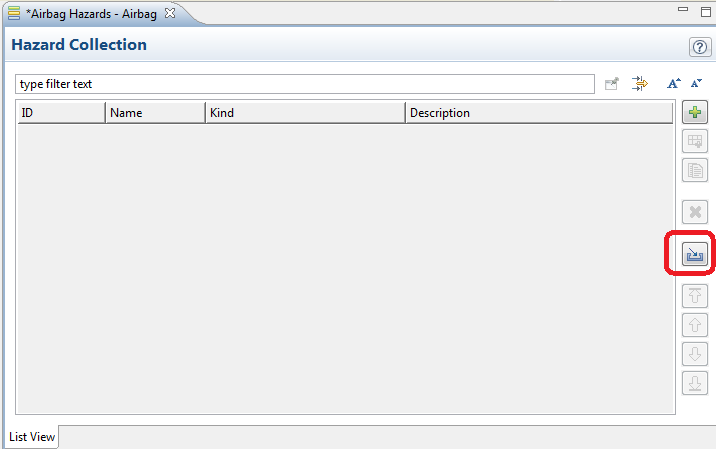
After the wizard opens, follow the normal CSV/Excel import steps as described in Import of data in Excel/CSV-Format.