


The ISO 26262 safety domain profile was the first built into the tool and is the most complete one. It comprises all relevant adaptations from the Item Definition, Hazard Analysis and Risk Assessment (part 3) over system design with requirement decomposition (parts 4 and 9) to PMHF and Single Point/Latent Fault (SPF/LF) Metrics and Hardware/Software Interface (HIS) (parts 5 and 6). This safety domain profile can be tailored also to fit ISO 25119 using a customized risk graph as well as commercial vehicles havnig requiremens on FMEDA regarding IEC 61508.
The ISO 26262 default project template consist of the following package structure:
Item Definition
This package supports the specific element "Item" as described in Item Definition. In addition SysML models can be created or imported here to describe the preliminary architecture or refined safety designs as well as FMEA via MSR-XML (see Import of FMEA data (MSR-XML Format)).
Hazard Analysis and Risk Assessment
This package supports the creation of the HARA according to ISO 26262-3.
Safety Goals amd Requirements
The safety requirements hierarchy of functional, technical, HW/SW requirements is available in this package.
System Design
System Design models can be created or imported here as needed. There are two default sub-packages which have the same capabilities:
Hardware Models
Software Models
Safety Analysis
All safety analysis such as FMEA, FTA, and HW Architectural Metrics (SPF/LF Metrics) are stored in this sub-structure:
FMEA Worksheets
FTA Models
Diagnostic Coverage
The following table lists the set of default dynamic constraints delivered with the default ISO 26262 template:
| Id | Message | Description | Quick-fix |
|---|---|---|---|
| 0002 | xxx is safety related and has no safety goal assigned | Checks if each safety related hazardous event has a safety goal assigned | Use the ASIL-wizard for xxxand assign or create a safety goal |
| 0003 | xxx has no functional safety requirement specified | Checks if for each safety goal at least one functional safety requirement is specified | Use the goal modeler to add a contribution relation from a requirement to the safety goal xxx (you may have to create a requirement too). If such a contribution does already exist, check whether the related requirement is afunctional requirement (in the requirements table editor) |
| 0004 | xxx has no FTA traced | Checks if each safety goal has a FTA traced | Perform a FTA for the safety goal xxx and add a trace between the TLE of the fault tree and the goal xxx |
| 0005 | xxx has no unique identifier | Checks if every safety requirement has an unique identifier | Open the requirement xxx in the goal modeler and change it's ID (there may be no ID or a duplicate ID) |
| 0006 | xxx is not associated to a hazardous event | Checks if each safety goal is associated to a hazardous event | Go to Hazard and Risk analysis and create a new hazardous event that is related to the safety goal xxx; assign xxx during the ASIL-determination |
| 0007 | xxx has no name set | Checks if each System/Function Model element has a name set (except for connectors) | Go to the System/Function Model editor by double-clicking on the error message and specify a name for the highlighted System/Function Model element |
| 0008 | xxx is not connected | Checks if each System/Function Model port is connected | in System/Function Model add a connection to the port xxx or remove the port |
| 0009 | xxx is not correctly decomposed | Checks if a valid decomposition has been applied | Check whether the xxx has been decomposed into independent requirements and whether the ASIL values for them are correct |
| 0010 | xxx has no justification given for the estimated ranking of exposure for the ISO ASIL | Checks that each ranking of exposure from E0 to E2 has an justification given for the estimation | Use the ASIL-wizard again for the hazardous event xxx and enter the required justifications |
| 0011 | xxx has failure mode with category 'no part' and failure modes with other categories. | Checks that either all failure modes of a FMEDA component xxx have category 'no part' or none | use the FMEDA editor to correct the components failure mode(s) |
| 0012 | xxx ASIL does not match to ASIL of associated goal | Checks that the ASIL of a hazard matches the ASIL of an associated goal | re-execute the ASIL wizard for the hazardous event xxx or change the ASIL of the associated safety goal |
| 0013 | xxx Hazard has no item traced | Checks that each Hazard model is traced to an item | Add a trace between the hazard model and the item it is related too |
| 0014 | xxx has an invalid ASIL. ASIL has to be the same or higher than of goals it contributes to | Checks if safety requirements have the same or higher ASIL than of goals they contribute to | Change the ASIL of the requirement xxx to match the ASIL of the related safety goal |
| 0015 | FTA connection is part of a loop | FTA models should not contain loops | redesign the fault tree in order to reflect a clean tree structure |
| 0016 | The decomposing requirement xxx is allocated to the same System/Function Model or software element as its neighbor | Checks that no decomposing requirement is allocated to the same System/Function Model or software element as its neighbour | Change the allocation of the requirement xxx to hardware elements in order to prevent assigning requirements of the same decomposition to the same hardware element |
| 0022 | Decompositions of xxx increase ASIL | Checks that decomposition does not increase ASIL | Modify the ASIL of the requirements into which xxx is decomposed |
| 0024 | The failure rate distribution percentages for the failure modes of xxx do not add to 100.0%. Value is: yyy | Checks that failure rate distributions add to 100.0% for each System/Function Model element | Choose Edit Failure modes for the element xxx and change the distribution of the failure rates to add up to 100% |
| 0026 | There is a checked task in checklist xxx which misses a reviewer. | Checks that for every checked task in a checklist a reviewer is set. | update the reviewer field in the checklist |
| 0027 | A checked task in checklist xxx misses a properly set checking date. | Checks that for every checked task in a checklist a check date is set. | update the date field in the checklist |
| 0028 | There is a checked task in a checklist which has no model artifacts assigned although the corresponding checklist template says so. | Checks that checklist tasks have model artifact assigned in case the corresponding checklist template has assigned artifact types for this task. | Assign an artifact to the indicated checklist entry |
| 0029 | xxx has an invalid ASIL. ASIL has to be the same or higher than of requirement it contributes to. | Checks if safety requirements have the same or higher ASIL than of requirements they contribute to | modify the ASIL of the contributing requirement (i.e. increase it) |
| 0030 | xxx has an invalid ASIL. ASIL of sub requirement has to be the same or higher than of it's parent | Checks if sub requirements have the same or higher ASIL than of it's parent | Increase the ASIL of the sub-requirement to match the ASIL of its parent requirement |
| 0031 | There are events (xxx) with same id as ''yyy". | Checks in an FTA model whether two events with the same id exists. | Depending on what the events describe it must be checked whether both express the same failure cause. If this is the case, a transfer gate must be used instead to express multiple occurring events correctly. |
| 0032 | ''xxx'' has no unique identifier | Checks if every safety goal has an unique identifier. | Identify the safety goals that have the same ID and change it to a new unique ID. Eventually, adjust the auto-counter to not assign this ID again. |
| 0033 | ''xxx'' has no (unique) identifier | Checks if every hazardous event has an unique identifier | Identify the hazardous events that have the same ID and change it to a new unique ID. Eventually, adjust the auto-counter to not assign this ID again |
| 0034 | ''xxx'' has no (unique) identifier | Checks if every function has an unique identifier | Identify the functions that have the same ID and change it to a new unique ID. Eventually, adjust the auto-counter to not assign this ID again. |
| 0035 | ''xxx'' has no (unique) identifier | Checks if every malfunction has an unique identifier | Identify the mal-functions that have the same ID and change it to a new unique ID. Eventually, adjust the auto-counter to not assign this ID again. |
| 0036 | The "xxx" has no (unique) number | Checks if every FMEA worksheet has an unique number | Identify the FMEA-sheets that have the same sheet number or no number at all and change it to a new unique number. |
| 0037 | Number of inputs for ''xxx'' is less than its threshold set | Checks that FTA voting gates have at least as much inputs as the threshold set | Change either the threshold to a lower value via the properties view of the voting gate or increase the number of inputs to the voting gate by connecting more incoming events to it. |
| 0038 | ''xxx'' has no target set | Checks that FTA transfer gates have a target set | Set a target gate in the properties view of the transfer gate or delete the transfer gate from the model. |
| 0039 | The threshold of zero for ''xxx'' is not allowed | Checks that FTA voting gates do not have threshold of zero | Change either the threshold to a value which is not zero via the properties view of the voting gate or delete the voting gate from the model. |
| 0040 | To high failure mode coverage for yyy given for ''xxx'' wrt. its safety mechanisms. | Checks in DC sheets for valid failure mode detection coverage wrt. safety mechanisms. | Select either another (lower) coverage value or an additional safety mechanism for the failure mode. |
| 0041 | ''xxx'' has no unique name | Checks in FMEA tables that failure modes have unique names within the same scope. | Identify the failure modes that have the same name in the same scope and change one of them to a new unique name. |
| 0042 | ''xxx'' has failure rate 0.0 | Checks for SysML elements that are "HW Parts" with failure rate 0.0 | Change the failure rate of xxx in the model part editor to a value greater than 0.0 or change the Category of the element |
| 0043 | ''xxx'' has failure rate 0.0 | Checks for FMEA components with failure rate 0.0 | Change the failure rate of xxx in the FMEA table editor to a value greater than 0.0. |
| 0044 | ''xxx'' has failure rate 0.0 | Checks for FTA events with failure rate 0.0 | Change the failure rate of xxx in the FTA model to a value greater than 0.0. |
| 0045 | ''xxx'' has failure rate 0.0 | Checks for FMEA failure modes with failure rate 0.0 | Change the failure rate of xxx in the FMEA table to a value greater than 0.0. |
| 0046 | ASIL for "xxx" is lower than required by its parent | Checks for System/Function Model elements that ASIL of xxx is same or higher than ASIL of parent unless part has independence flag set (ISO 26262-4 7.4.2.3) | Either provide an independence argument for "xxx" or increase the ASIL to the ASIL of the parent. If the ASIL is computed, recompute the ASIL on the model level. |
| 0047 | No independence comment given for "xxx" | Checks that System/Function Model elements have independence comment if independence flag is set. | Either provide independence argument or remove independence argument flag from "xxx" |
| 0048 | ASIL of "xxx" is lower than required by its requirements | Checks that ASIL of System/Function Model element is same or higher than required by its requirements (ISO 26262-4 7.4.2.2) | Increase the ASIL of "xxx" or change the requirement allocation accordingly. |
| 0049 | "xxx" has no independence argument requirement specified | Checks if for each decomposed safety requirement an independence argument requirement is specified | Either provide an independence argument for "xxx" or remove the decomposition in which "xxx" is involved. |
| 0050 | "xxx" has no safety goal defined | Checks that all worksheets do have at least on safety goal defined | Define one or more safety goals for "xxx". |
| 0051 | Metric target values for "xxx" does not fit to highest ASIL of worksheet's goals. | Checks that metric target values fit to highest ASIL of worksheet's goals. | Provide metric target values in compliance with the highest ASIL of worksheet's goals. |
| 0052 | "xxx" increases ASIL. ASIL should be the same than of requirement(s): "yyy" | Checks that contribution does not increase ASIL | Either decrease ASIL of "xxx" (if acceptable) or increase ASIL of requirement(s) "yyy" or remove the contribution(s). |
| 0053 | "xxx" calculates individual metrics but has no goal assigned | Checks that all hardware metrics worksheets which calculate individual metrics have at least one safety goal assigned | Error that might happen during merge of models. Assign at least one safety goal to the worksheet |
| 0054 | "xxx" has safety goals selected for evaluation which are also selected for sibling for same failure mode | Checks that sibling failure entries for the same failure modes have disjoint evaluated goal selections | Error that might happen during merge of models. Deselect a safety goal in one of the evaluation groups to make it disjoint. |
| 0055 | "xxx" is safety related for safety goals which are not configured for the hardware metrics worksheet | Checks that component entries are marked as safety related only for safety goals the worksheet is analyzing | Error that might happen during merge of models. "xxx" component(s) can be unchecked as "not safety related". |
| 0056 | "xxx" is evaluated for safety goals which are not configured safety related for the component | Checks that failure entries are evaluated only for safety goals the component is safety related for | Error that might happen during merge of models. Check evaluation groups and deselect safety goals which are not added to the component or add them to the component as safety related. |
| 0057 | "xxx" has safety mechanisms selected which are not configured for the corresponding failure mode | Checks that failure entries have only safety mechanisms selected which are also configured for the corresponding failure mode | Error that might happen during merge of models. Add safety mechanisms to failure mode. |
| 0101 | "xxx" is unconnected | Check whether each gate in the FTA is connected towards the top-level event | Error indicating unconnected subtrees that might exist after refactoring of fault trees |
| 0102 | "xxx" is an unconnected event | Check whether each event in the fault tree is connected to a gate or another event | Error to show orphaned events that could exist after gates have been restructured |
| 0103 | Gate "xxx" has no input | Check that each gate has at least one input | Error might happen after deleting gate inputs explicitly or after removing failure modes which were represented as events |
| 0104 | "xxx" is not shown on any diagram | Checks whether FTA element is shown on diagram | Information for events/gates not appearing on any FTA diagram |
| 0107 | The partnumber "xxx" is duplicated. | Checks whether each part number is uniquely allocated to a single type | Error to indicate manually changed part numbers so that the part-block relation is consistent in terms of the part number |
| 0108 | "xxx" has a part number but no type is assigned | Checks for parts with part number but no type assigned | Warning that could result e.g. from deletions of block types from a library |
Please note the Quick-fixes shown in the table are only typical solutions - for some errors further different solutions may exist.
The ISO 26262 profile extends SysML elements with an ASIL value and automated derivation feature. The assigned value for an element depends on the following factors:
ASIL of the requirements allocated to the System/Function Model element (see Safety Requirement Allocation and Traceability)
Independence of the element from other sub-elements in the same containing element. An argumentation has to be given to prove that the failures in one sub-element to not result in failures in any neighbouring sub-elements (cf. Editing Properties of Model Elements).
In addition, an explicit ASIL value may have been already assigned to an element of the SysML model - e.g. because this element has been used in a different item, too.
Ansys medini analyze takes all these aspect into account to compute the resulting ASIL for each element of the system resp. hardware architecture. The ASIL calculation is initiated as follow:
Select Safety -> Compute ASIL for System Elements... from the context menu of a SysML model in the Model Browser
In the upcoming wizard select how existing user-defined ASIL values shall be handled. The tool offers three options:
Always recompute and update all ASIL values
Recompute and update only the ASIL values of those components which do not have manually set ASIL values
Recompute and update all ASIL values but keep manually set values in case they are higher as the computed value
Confirm and Finish the update.
Please note the ASIL calculation has always to be initiated manually - changing the set of requirements assigned to an element or manually modifying the ASIL of an element does not automatically update all ASIL values in the model. Always do a recalculation after such changes!
The ASIL values for the elements of the SysML model are displayed on the diagram as well as in the Model Browser.
Please note the display of ASIL values in the diagram can be toggled on or off with the ASIL button in the tool bar of medini analyze:

An Item is according to ISO 26262 "... a system or array of systems or a function to which ISO 26262 is applied". All information related to the item can be managed in the "Item Definition" package of the medini analyze automotive projects.
The "Item Definition" Package may contain the following kinds of information:
a verbal description of the item (item as first class object beside other models)
the specification of the item's functions, their malfunctions and relations (in SysML)
the specification of the (draft) architecture of an item (in SysML)
arbitrary documents containing additional information related to the item
references (URI) to external documents/artifacts related to the item
any custom defined properties that may be used to augment the item definition
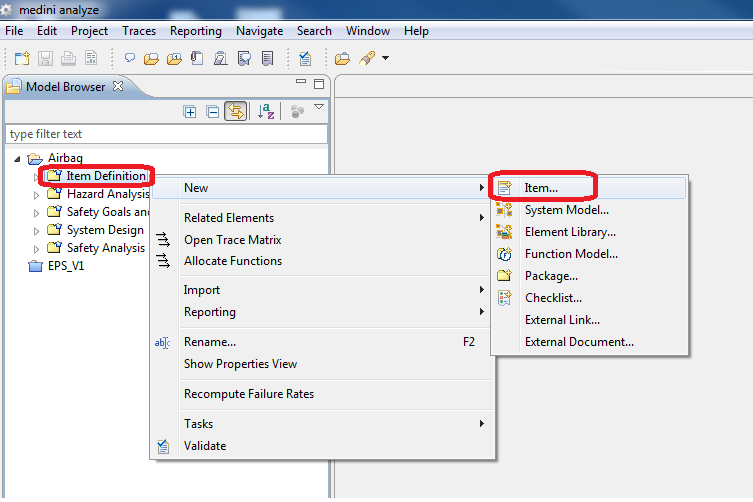
A new item is created using the context menu of the "Item Definition" package in the Model Browser.
The created item appears in the model browser inside the "Item Definition" package. If you select Open new elements in editor after creation, or if you have selected Window > Preferences > Model Browser > Always open new elements in editor after creation, the item editor opens automatically. You can also open the item editor by:
double-clicking the item in the Model Browser
using the context menu of the item in the Model Browser and selecting Open Editor.
The item editor allows you to provide a textual description of the item. Furthermore, the name of the item can be changed with the item editor. The changes are saved either explicitly by choosing File > Save from the main menu or by closing the item editor. In the latter case, the tool asks whether you want to save the changes. The item editor is depicted in the following figure.
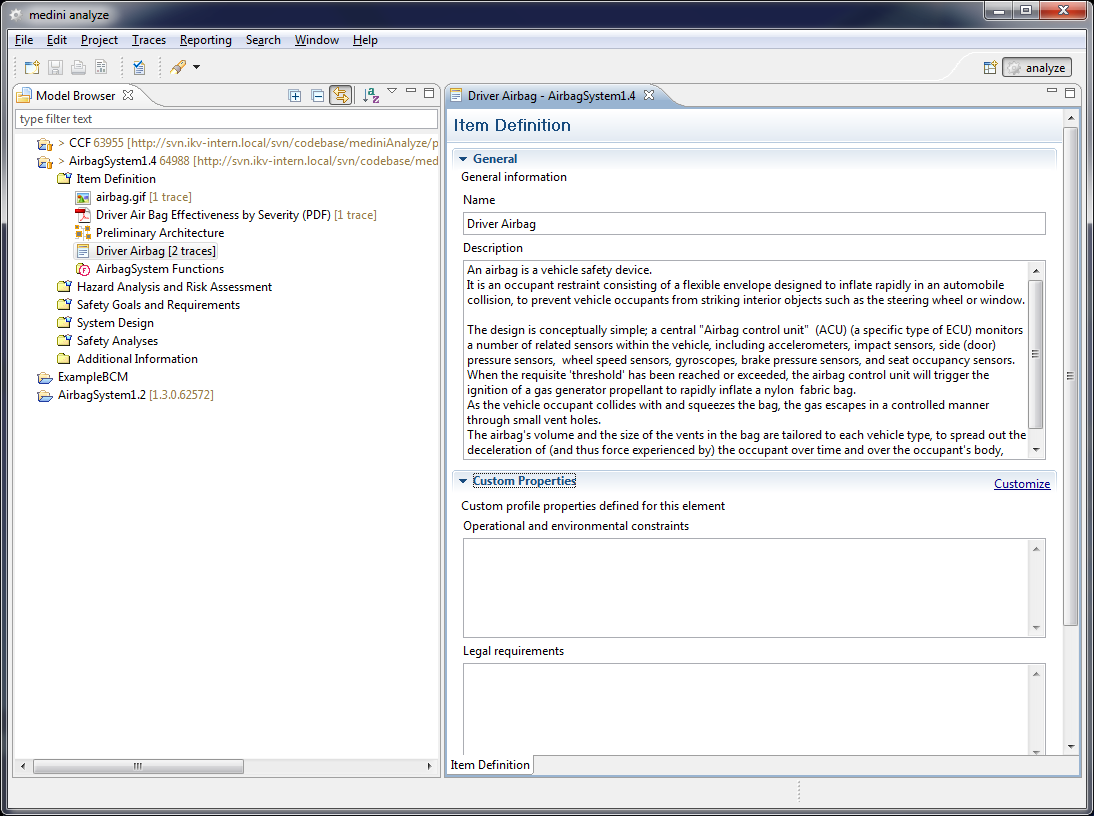
The item editor without customization contains the properties "name" and "description". It is possible to add properties which are useful to provide additional properties of the item. See Custom properties definition for further details.
Note, multiple items can be created in the same "Item Definition" package of a project. However, it is recommended to have only strongly related items, which have many aspects in common, within the same project (e.g. Front Airbag and Side Airbag).
In most cases, the item definition is accompanied by a rough sketch of the envisaged item architecture. The model of the architecture can be created directly in the "Item Definition" package via the context menu "New->System/Function Model...". The new model will appear in the package and the graphical architecture editor will be opened automatically.
For more details on the system/function modeling see System Design Models.
Traces are bidirectional relations between elements. medini analyze allows to establish such traces between arbitrary elements. Concerning the item definition, traces are typically used for two purposes:
relate a particular system/function model (architecture) to an item
relate external documents or resources to an item
Besides traces within the "Item Definition" package, traces may also link elements of this package to elements in any of the other packages as required.
Traces can be created and manipulated using the Trace matrix or the quick-link feature. See Traceability for details.
For the allocation of functions to elements of the system architecture a dedicated allocation relation is available. Choose the entry "Allocate Elements" from the context menu of the "Item Definition" package or of the function model itself. In the upcoming dialog select the system architecture model to which the functions shall be assigned. As a result an allocation editor consisting of the item's functions and the system model elements will be opened.
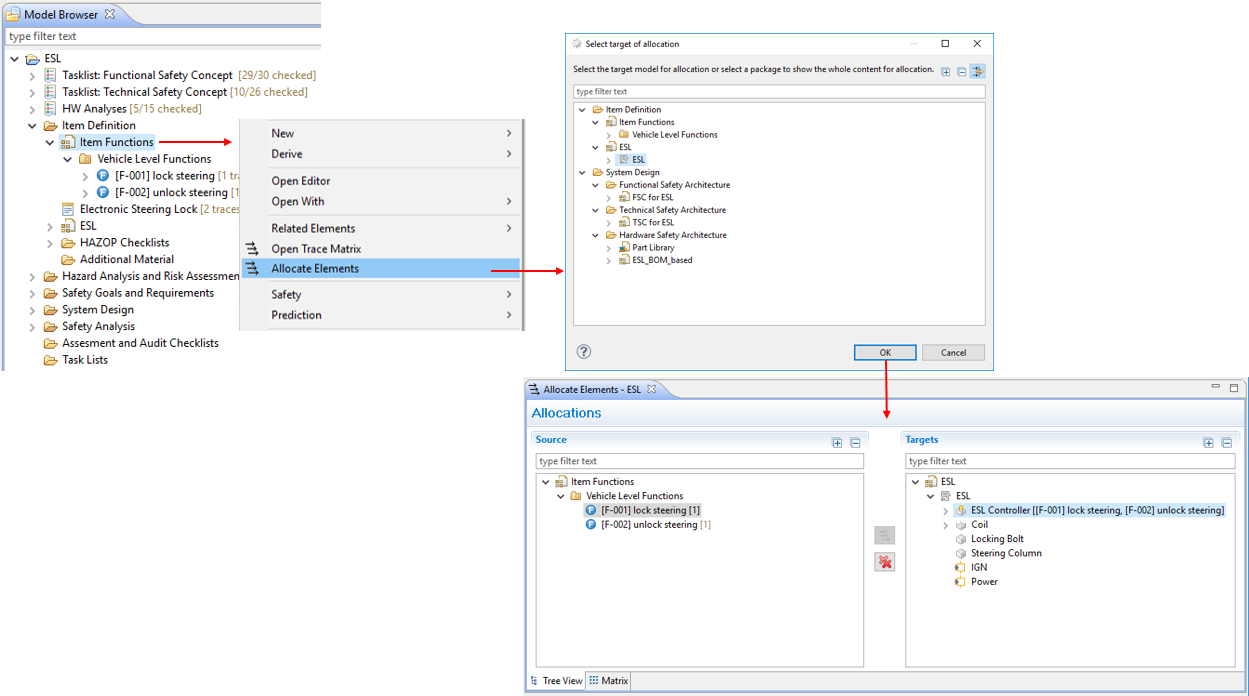
The allocation editor supports a tree-view and a matrix page to create and delete allocations. Please refer to Allocation and Traceability for more details.
The Single Point Fault (SPF) and Latent Fault (LF) HW architectural metrics can be computed using the DC Worksheet as described in FMEDA and Diagnostic Coverage Metrics. The worksheet has an option to compute also the Safe Failure Fraction (SFF) and Diagnostic Coverage (DC) from IEC 61508.
The corresponding worksheets can be derived from any SysML model or directly created in the "Diagnostic Coverage" package of the ISO 26262 template.