


The import and export of FMEA in the MSR-XML format is supported (see http://www.msr-wg.de/medoc/). This format is used by other FMEA tools such as IQ-FMEA (APIS), SCIO/PLATO e1ns (Plato), etc. and guarantees a seamless access to functions, failures, and design controls done outside of Ansys medini analyze.
Note: the MSR-XML format is meant to transfer or archive FMEA data but not to do roundtrip engineering with multiple FMEA tools. As a consequence you cannot edit and export the imported XML file, then re-import it in the original tool and expect a smooth integration of changes.
To trigger the import, a package that supports MSR-XML import has to be selected in the model browser. Currently, the following default packages (and any of their sub-packages) support this function:
SysML models
FMEA Worksheets
The action "Import -> FMEA from MSR-XML..." from the context menu opens the MSR import wizard.
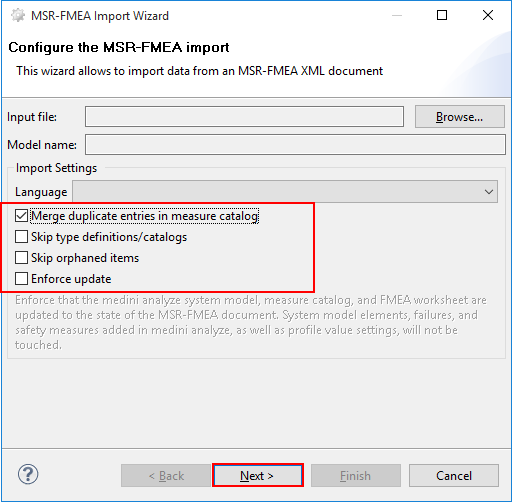
Via the wizard, an XML file in MSR-XML format can be selected for import. The model name is obtained form the data in the file. It is furthermore possible to select a language for the imported data from a list of available languages.
If the XML file is valid MSR-XML, three models are created: in medini analyze: a SysML model, an attached FMEA worksheet, and a measure catalog. All models are named according to the name provided within the XML file. The location of the models will be in the package on which the import was triggered and in the default package for FMEA/SysML models.
In these three models, the following elements of the MSR-XML are mapped to (newly created) elements in the medini analyze models during import:
Structure elements map to parts in the SysML model
Functions and faults map to functions (activities) and malfunctions
Characteristics map to characteristics parts
Task Sets map to measure groups
Tasks (detection/prevention) map to measures
RPN data and task-sets are imported into the FMEA spreadsheet corresponding columns
The following options can be set to control the behavior of the import:
Merge duplicated entries in measure catalog - If this option is checked, the same measures (identified by their names and detection value) in the MSR-XML will be merged into one measure in the medini analyze model.
Skip type definitions/catalogs -If this option is checked, type definitions in the MSR-XML are ignored and not imported.
Skip orphaned items - If this option is checked, orphaned items in the MSR-XML will be ignored and not imported.
Enforce update - This option has an effect only if the import is triggered as an update to a previously executed import (see Update of MSR-XML data).
The completion status of the import is visualized on the next page of the wizard. If problems are detected they are shown here.
Previously imported FMEA-MSR XML data can be updated. The update functionality can be triggered at the context menu of any model package in the model browser that has been created at a previously executed import.
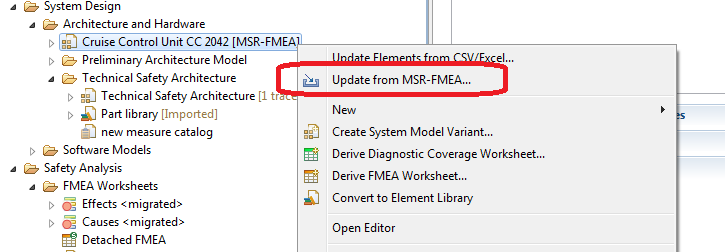
The update action opens the same dialog as explained in Import of FMEA data (MSR-XML Format). Please refer to this section also for the options of the wizard.
In case the update is triggered, the data of the selected MSR-FMEA XML file is merged with the data that was imported previously and potentially updated or extended in medini analyze. In case of conflicting changes, the elements remain as in medini analyze, unless the option "Enforce update" has been selected in the import wizard. If that option is set, all modified elements will be reset exactly to the data they have in the FMEA-MSR XML file.
Note: The behavior of the FMEA-MSR XML update including the "Enforce update" option is similar to the behavior of other import possibilities that allow update (see for example Updating Imported SysML Models).
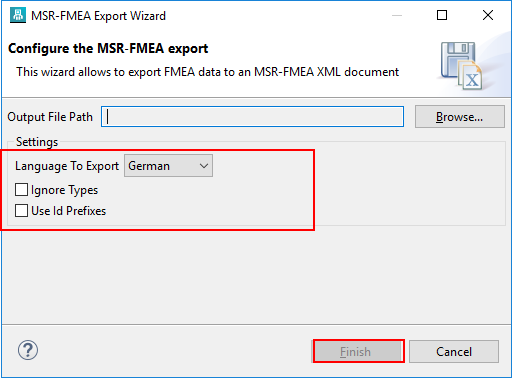
To trigger the export, any FMEA has to be selected in the model browser. The action "Export -> FMEA to MSR-XML..." from the context menu opens the export wizard.
The models and elements in medini are mapped to elements of the MSR-XML as the following:
Parts in SysML are mapped to Structure elements
Functions (activities) and malfunctions map to Functions and faults
Characteristics parts map to Characteristics
Measure groups map to Task Sets
Measures map to Tasks (detection/prevention)
RPN data are mapped to corresponding RPN and task-sets
The following options can be set to control the behavior of the import:
Language - The selected language is the target language in the MSR-XML file, so basically the language tag that is used to write all data. Note: this has no effect on the FMEA data themselves,
Ignore Types - If this option is checked, type definitions are ignored and not exported to the MSR-XML file.
Use Id Prefixes - If this option is checked, all internal identifier in the MSR-XML file are prefixed in a way that its is easier to trace them back to the originating objects in the medini FMEA. Note: this has no effect on the FMEA data themselves, it is rather an option that can be used when debugging the output file in case of issues.
Note: the MSR-XML format is meant to transfer or archive FMEA data but not to do roundtrip engineering with multiple FMEA tools. As a consequence you cannot import the MSR-XML file in another tool, edit and export it there, re-import it to medini and expect a smooth integration of changes.