


In order to complete the system design, the relations between the different design models can be specified. This comprises for example:
allocation of functions to the system (architecture/hardware) model
the identification of hardware signals that are processed or produced by the software
the allocation of software components onto ECUs that execute that software
The allocation concept is available for SysML models only and allows in general to establish a directed relationship between two elements. Note that all other relationships from SysML to other models, such as safety requirements, are traces (see below). The allocation editor can be triggered from the context menu of the Model Browser for a source model or scope. After selecting a target model for allocation the allocation editor opens:
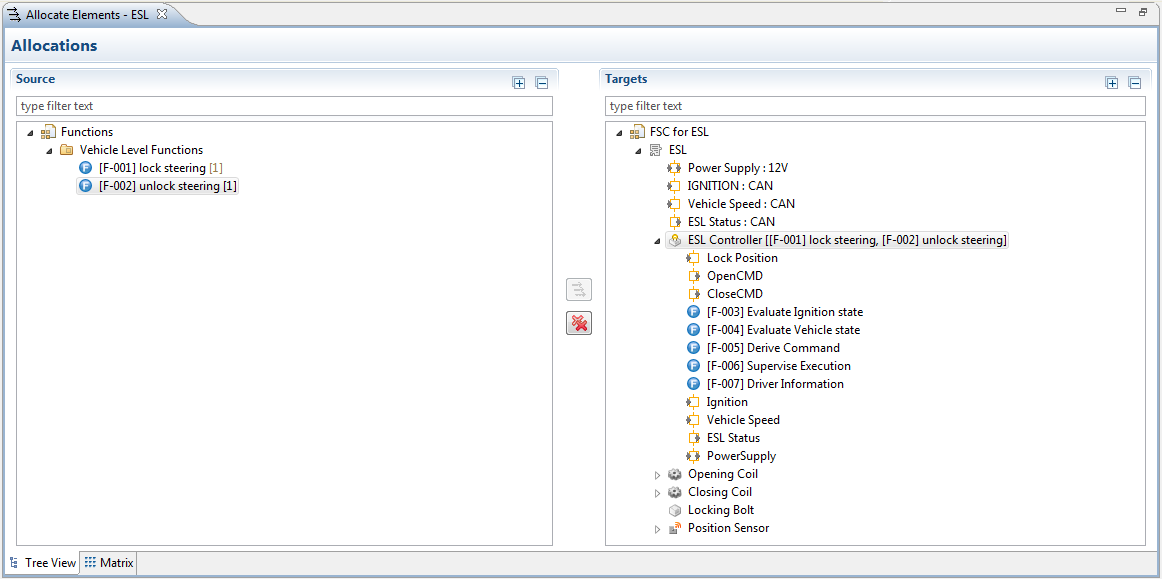
This editor provides two pages with the same functionality as a tree-based editor and as matrix. The tree view page is convenient for larger models (e.g. IP Design model allocations), since it allows to create multiple allocations at once based on the selection in the tree views.
Note that this view also has a context menu to "Reveal Allocated Elements" and navigate to or open the selected elements.
Other assignments (to non-SysML models) can be done using traces. Traceability can be used as a generic way to create allocation relationships between system design models and elements of any other package in the same medini analyze project.
Useful traceability links typically include:
Allocating requirements, safety goals and mechanisms to elements of the system design (see also Safety Requirement Allocation and Traceability)
Tracing external or referenced documents to elements of the system design (e.g. product fact sheets to the ECU they are specifying)
Traces to safety analysis elements (see Safety Analysis)
For more details on creating, managing, deleting and using traces see Traceability.
Note that all allocation relations described above are available as separate entries in the related elements menu. Thus it is possible to specifically navigate traces between system design models and safety requirements using the context menu Related elements > Allocated System/Function Model Elements, Related elements > Allocated Requirements, and Related elements > Allocated Functions/Activities.