
Component Dialog Wizard Standard Toolbar
You can use the standard toolbar to perform these functions in the Component Dialog Wizard:
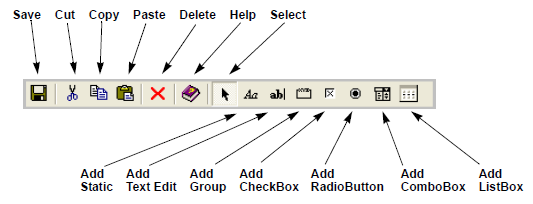
- Save – Save all changes made to the component dialog box.
- Cut, Copy, Paste, Delete – Perform basic editing functions.
- Help – Start help for the Component Dialog Wizard.
- Select – Return to select object mode.
- Add Static – Create a static for the component dialog box.
- Add Text Edit – Create a text edit for the component dialog box.
- Add Group – Create a group for the component dialog box.
- Add Checkbox – Create a check box for the component dialog box.
- Add Radio Button – Create a radio button for the component dialog box.
- Add ComboBox – Create a combo box for the component dialog box.
- Add ListBox – Create a list box for the component dialog box.