
Material Properties
When adding a new material or editing an existing material, the material properties list contains several editable fields.
The editable properties depend on whether you have selected Active Project or All Properties:
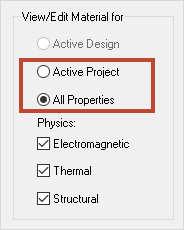
Material Property Types
Each property contains a Type field. The type can be one of the following:
- Simple – The property takes a simple value.
- Tensor – A full 3x3 matrix general tensor, which may or may not be symmetrical.
- Nonlinear – The property varies according to a DE, JE, or BH curve.
- Vector – The property requires a magnitude and direction.
- Custom – Properties that do not fit into one of the these types.
Anisotropic and Matrix material properties are not compatible with SIwave. The options will be removed in a future release.
Change a property's type by clicking it and using the drop-down menu:
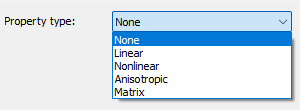
Not all types are available for all properties.
Consult the following topics for more information:
- Defining Tensor Material Properties
- Defining Nonlinear Material Properties
- Defining Vector Material Properties
- Defining Custom Material Properties
Editing Active Project Properties
Most often, you will want to modify a material's properties for the Active Project:
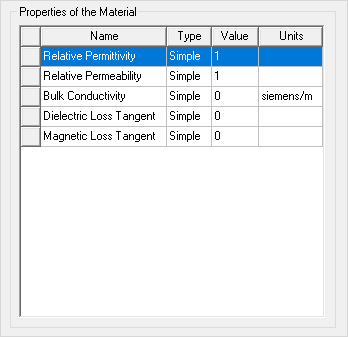
Materials in the Active Project have the following properties:
- Relative Permittivity
- Relative Permeability
- Bulk Conductivity
- Dielectric Loss Tangent
- Magnetic Loss Tangent
For conducting materials:
- Specify the bulk conductivity.
For dielectric materials:
- Specify the relative permittivity, relative permeability, and dielectric loss tangent (if applicable). See: Editing Frequency-dependent Material Properties.
Editing All Properties
Selecting All Properties allows you to modify the Electromagnetic, Thermal, and Structural physics for a material. Use the check boxes to select the type(s) of properties you would like to edit.
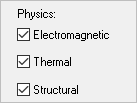
Editable Electromagnetic properties include:
- Electric Coercivity
- Magnetic Coercivity
- Magnetic Saturation
- Lande G Factor
- Delta H
- Core Loss Model
- Mass Density
- Composition
- Magnetostriction
- Inverse Magnetostriction
Editable Thermal properties include:
- Thermal Conductivity
- Mass Density
- Specific Heat
- Thermal Expansion Coefficient
- Thermal Material Type
- Solar Behavior
Editable Structural properties include:
- Mass Density
- Young's Modulus
- Poisson's Ratio
- Thermal Expansion Coefficient
In addition to editing these physics properties, you can view and edit thermal and spatial modifiers.