
Defining Custom Material Properties
When adding a new material or editing an existing material, the material properties list contains several editable fields.
Two of those fields, Magnetostriction and Inverse Magnetostriction, have the Custom value type.
To define these custom material properties:
- From the View/Edit Material window, find a magnetostriction property and click its Edit button.

The Magnetostriction or Inverse Magnetostriction window appears.
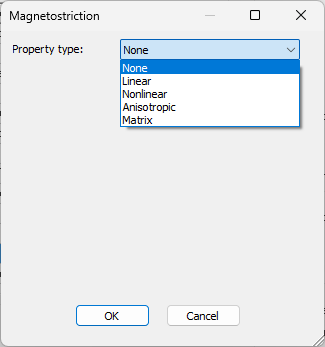
- Use the Property Type drop-down menu to select None, Linear, or Nonlinear.
Note:
Anisotropic and Matrix properties are not compatible with SIwave.
The window updates with an appropriate input properties for the property type:
Property Type: None Linear Nonlinear Magnetostriction N/A Magnetostrictive Coefficient
H Max
H Min
Multicurves – Input as Lambda-H curves vs. Stress. Inverse Magnetostriction N/A Inverse Coefficient
Sigma Max
Sigma Min
Multicurves – Input as either B-H curves vs. Stress or B-Sigma curves vs. H. - Enter the applicable values and click OK.
- Click OK again to close the View/Edit Material window.