
Editing Frequency-dependent Material Properties
SIwave can define frequency-dependent materials using the Djordjevic-Sarkar Model.
This model uses an infinite distribution of poles to model the frequency response, and in particular the nearly constant loss tangent, of low-loss dielectric materials. The model requires information about the relative permittivity and loss properties of the dielectric at two measurement frequencies: a low frequency and a high frequency. You can provide this information in different ways. The low frequency loss can be specified either as the loss tangent at the low measurement frequency, or by providing the DC conductivity of the dielectric material. The high frequency permittivity can be given either as the permittivity at the high measurement frequency, or the limiting value of the permittivity at optical frequencies. SIwave interpolates or extrapolates the effective permittivity and loss tangent values at other frequencies from this data.
To define a frequency-dependent material:
- From the Home tab, click Edit Materials.
- From the Select Definition window, add a material or edit an existing material.
The View/Edit Material window appears.
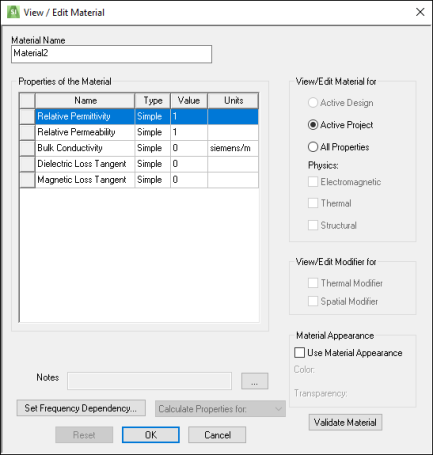
- Click Set Frequency Dependency.
The Djordjevic-Sarkar Model Input window appears.
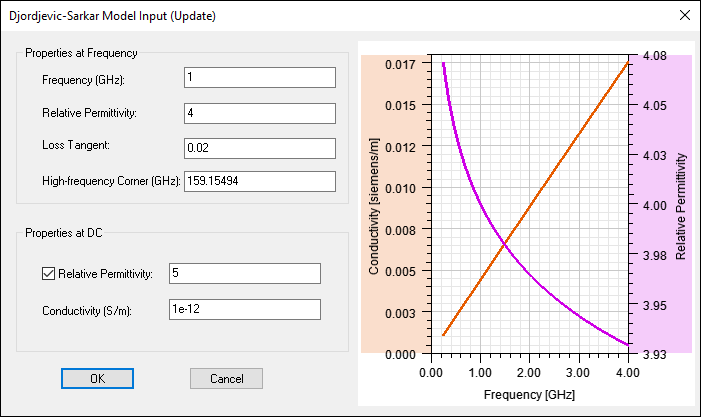
- Set the options as appropriate:
- From the Properties at Frequency area, enter the Frequency, Relative Permittivity, Loss Tangent, and High Frequency Corner.
Note:
Ansys recommends a Frequency of 1 MHz or higher and a Loss Tangent less than 0.1. The High Frequency Corner marks the transition frequency; above this frequency, the permittivity quickly approaches its high frequency (optical) limit. The value of the High-frequency Corner should be higher than the Measurement Frequency.
- From the Properties at DC area, select whether or not to specify Relative Permittivity. Enter a value for Conductivity.
- The graph on the right previews your input.
- From the Properties at Frequency area, enter the Frequency, Relative Permittivity, Loss Tangent, and High Frequency Corner.
- Click OK.
The View/Edit Material window updates with the frequency-dependent information:
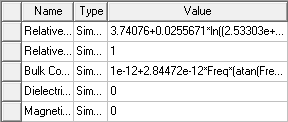
- Click OK to save your changes.
- Click OK again to exit the Select Definition window.