
Computing HFSS 3D Layout Simulations
The HFSS 3D Layout feature can be utilized to perform highly accurate 3D, full-wave simulations of signal and power delivery nets in PCBs and IC packages using Ansys HFSS solver technology. This flow is optimized for planar geometry and will, by default, include any capacitors, inductors and resistors attached to the subset of geometry selected for simulation. Most port configurations considered legal for SIwave/PSI simulations are automatically converted into port configurations understood by the HFSS solver (which makes running different solvers on the same project setup trivial).
Running a simulation with HFSS 3D Layout typically involves the following steps:
- Identify power/ground nets.
- Select power/ground nets for analysis.
- Enter a value for the plane extent in the Auto Extent Distance
field, and click the Automatically
Draw Region Extent icon just to the left of the numeric entry field
to apply the extent to the selected signal nets.
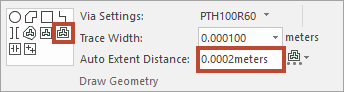
The geometric shape of the extent is outlined on the design.
- Define HFSS 3D Layout options and launch the SYZ solver.
- View HFSS 3D Layout results using Results > HFSS 3D Layout > SYZ.
You can also: