
Editing Layer Properties
Layer properties can be adjusted using Layer Stackup Editor or Layer Stackup Wizard.
Layer Stackup Editor
Layer Stackup Editor is SIwave's tool for making bulk updates to layers. The bottom pane contains the editing controls.

The Edit Selected Layer(s) area allows you to select one or multiple layers and edit any of the following:
- Color
- Name
- Type (dielectric, metal, or wirebond)
- Material (any existing material; see: Adding a New Material)
- Dielectric Fill
- Translucency
- Thickness (when thickness is changed, the stackup's elevation is recomputed)
- Roughness (metal layers only)
To change any of these layer properties:
- Select the layer(s).
Note:
To select all layers of a particular type, click the Select All drop-down menu and select Dielectric, Metal, or Wirebond.
- Change a property and click the Update button to its right to apply the changes.
- If appropriate, click the Edit Material Properties button to open the Material Properties window where you can add, delete or modify materials.
- If appropriate, click the Invert Stackup button to invert the complete set of layers in the stackup.
- If appropriate, enable the Conformal Coat
check box to add conformal coat layers. These layers are a set of dielectric
layers on the top and bottom of all packages and PCBs in the design.
They have a default material of "SolderMask" and a default thickness
of 15 microns. They are shown with a Layer Type of "CONFORMAL_COAT".
Note:
If dielectric layers are already present above the top layer and below the bottom layer, their material is changed to SolderMask and the layer type is changed to Conformal Coat.
- Use the Units drop-down menu to select the units for the layer. The display panel in the bottom-right area shows the changes in the layer stackup as they are being made.
- If needed, enable the Copper Weight check box to view the metal layer thicknesses as an equivalent copper weight. 1 oz of copper is used to fill a one foot square up to a height of 35 microns. So, 1 oz. is 0.035 mm, 2oz is 0.07 mm, 3 oz is 0.105 mm and so on.
- When you're done making changes, click OK.
Layer Stackup Wizard
Layer Stackup Wizard is primarily used for trace calculations. However, you can use it to make limited property changes:
- Thickness (when thickness is changed, the stackup's elevation is recomputed)
- Material (any existing material; see: Adding a New Material)
To change these properties:
- Double-click a layer in the stackup.
to open the Edit Layer Properties window.
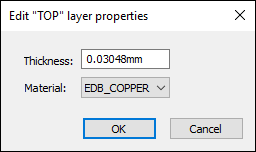
- Change the properties as appropriate and click OK.