


The function model is an extension of SysML design model and can be edited using the Model Browser or by the graphical editor (together with their relations and behavior). This section will describe only the editing via the Model Browser as quick way to specify the functions of a system (see also Functions in the diagram).
To create a function simply use the New menu:
Select the element on which to create the function (e.g. a model, package, or part). If you do not have a model yet, create one (see Creating a new SysML Model)
Open the context menu with a right click and go to New -> Function
Enter a name for the function. If desired, check the option to open the editor after creation for editing of further properties
Confirm the creation with OK.
Each function will automatically get an unique ID assigned. You can manually change the ID or influence its behaviour as described in Auto-counter Patterns.
Relations between functions are modelled using the requires dependency, i.e. a SysML dependency with stereotype <<requires>>. The Dependencies section in the property view/form editor can be used to link functions or the SysML Dependency Net Editor.
Functions are available as extension to SysML by means of a stereotyped Activity. Nevertheless, the tool allows you to seamlessly create functions in conjunction with the structural model. That means functions can be contained in packages, blocks, and parts, which is a slightely broader interpretation of SysML 1.x.
To create a functions on a diagram, select Function from the tool palette in the graphical system design editor. Insert the function onto the diagram or element where the function shall be contained:
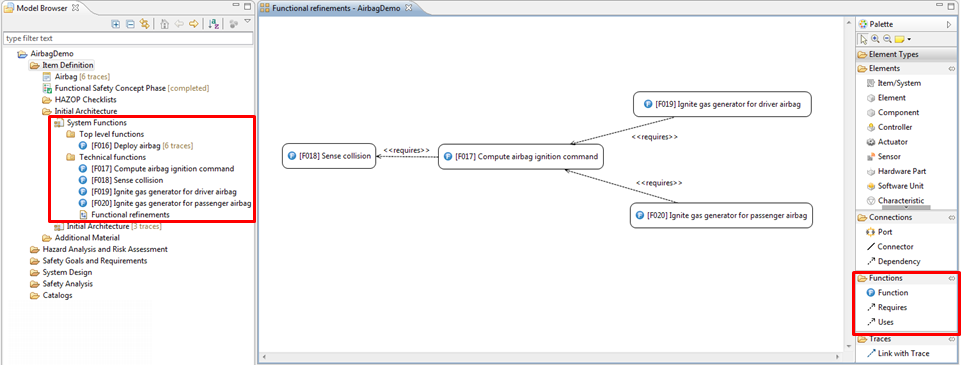
The dependencies of a functions should be defined clearly in order to know the impact during analysis of the design. By default there exist two relations between functions and other elements:
Requires relation: stereotyped dependency to other functions/elements that are mandatory for this function to operate correctly.
Uses relation: additional dependency to any other element or resource that is used by the function
In addition to the relationship of the function, they can contain malfunctions. These can be edited via the property view directly or via the Model Browser.
Since functions are realized as specialization of SysML activities, they can contain an action flow that models the detailed functional flow (see SysML Activities and Actions for details).