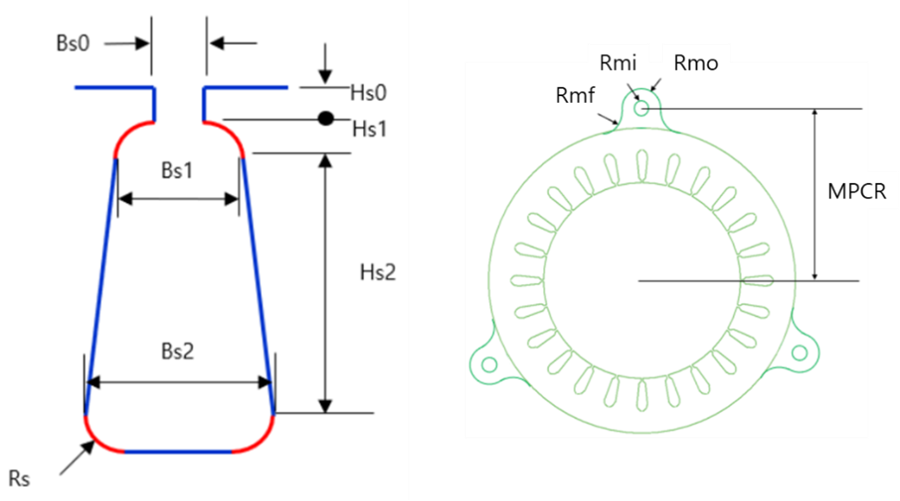
You can use the Stator tab to edit the parameters and dimensions of the Stator.
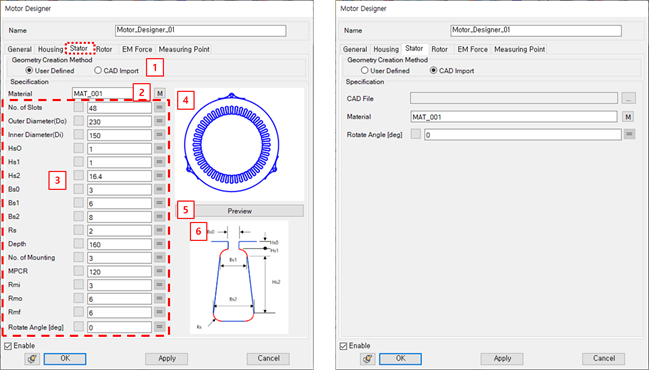
Figure 14.348: Parameters in the Motor Designer Stator tab
| Parameter | Description | Dimension |
| 1. Geometry Creation Method |
Use to set the geometry creation method. - User Defined : Create a stator body to input stator dimensions - CAD import : Importing a stator body | N/A |
| 2. Material | Use to set the material property. | N/A |
| 3. Stator Dimensions | Use to set the dimensions of stator to create 3D CAD. If the user selects the Stator Mounting Type as PressFit Type, the Number of Mounting, MPCR, Rmi, Rmo and Rmf fields are disabled. | N/A |
| 4. Preview Window | Use to show the stator in 2D. | N/A |
| 5. Preview | Use to update the dimensions. | N/A |
| 6. Specification | Use to check the stator dimensions definition. | N/A |