DOE method properties and batch simulation for DOE are defined in the DOE Simulation dialog as shown in the figure and table below.
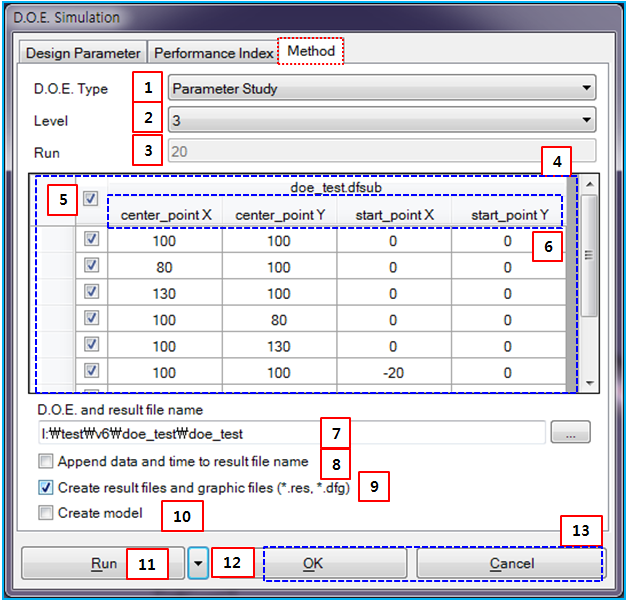
Figure 9.82: Description of Method properties in DOE
| Parameter | Symbol | Description | Dimension (Range) |
| 1. DOE Type | N/A | Use to set the method of DOE as shown in Figure 9.83: DOE Methods. The DOE Type and Level determine the number of trials and DOE table. | N/A |
| 2. Level | N/A | Use to set the level which is related to the sample number of each design parameter. |
N/A (Integer) |
| 3. Run | N/A | Use to show or set the trial number. When DOE type is set to , the trial number can be defined by user. |
N/A (Integer>0) |
| 4. DOE Table | N/A | Use to show the set of design parameters for each trial or change the value of design parameter of the specific trial. |
N/A (Real) |
| 5. Check Box | N/A | Use to enable or disable a specific trail. | N/A |
| 6. Design Parameter | N/A | Use to show the name of design parameter. | N/A |
| 7. DOE and Result… | N/A |
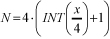
Use to define the file name and path for Simulation Output Files. The DFDOE file is generated during the batch simulation including other simulation result files. The name of simulation result is determined as follows.
| N/A |
| 8. Append data and… | N/A | Use to append the date and time to the result file name. For more information, see Simulation Configuration Parameters. | N/A |
| 9. Create result files… | N/A | Use automatically to create the DFG, DFR and DFM files for the Motion Postprocessor. For more information about the files, see Simulation Output Files. | N/A |
| 10. Create model | N/A | Use to create the models for all trials. | N/A |
| 11. Run | N/A | Use to run the DOE simulation. First the models are generated for all trials. And then, stand alone solver is carried out for the trials. | N/A |
12.  | N/A | Use to export the files of DFG, XML, and DFS or open Simulation Configuration Parameters. | N/A |
| 13. OK/Cancel | N/A | Use to close the DOE simulation dialog with saving or without saving the parameters. | N/A |
The DOE methods are described in the table below.
Figure 9.83: DOE Methods