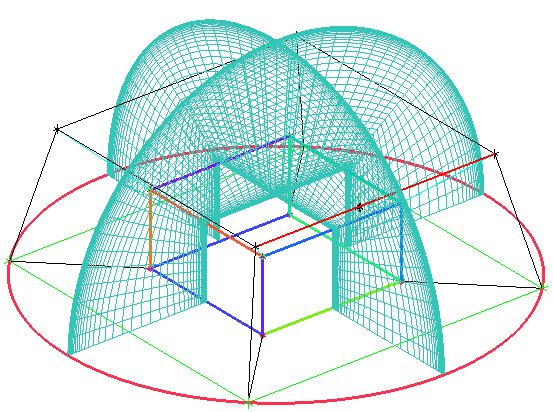
Viewing the volume mesh can provide another good visual diagnostic. Within blocking, this is done by means of a scan plane, where an I, J, K or radial Ogrid index plane is scrolled through the volume.
Display the Edges and Curves
 > >
> > Disable Pre-Mesh.
> Select Scan Planes.
> > The scan plane control window appears in the lower right hand corner of the screen. The scan plane is not planar. For instance, enabling # 0 displays all the nodes of constant I index, not constant X-coordinates. You need to click the up/down arrows for either Block Index or Grid Index to move the scan plane. Block Index increments one block at a time whereas Grid Index increments one node at a time.
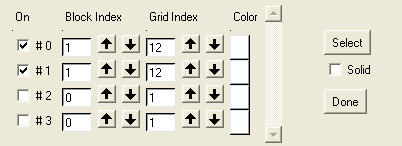
Enable On for the index plane, # 0.
# 0, # 1, # 2 represent I, J, K respectively. # 3 represents the radial (Ogrid) direction. In this model, I, J, K is more or less lined up with the global X, Y, Z coordinates respectively.
Increase the Grid Index for the # 0 index plane until the scan plane appears about half way through the model.
Note: When you increase the Grid Index, two planes will be visible at the same time. Along the radial (Ogrid) block, I is equal to 1 throughout the entire block.
Click in the scan plane control window.
Select one of the edges parallel to the current scan plane (an edge lined up along Y). See Figure 78: Scan Planes for the Mesh.
Note: The Select option enables the index plane perpendicular to any selected edge. In this case, the edge selected is a J edge and the resulting scan plane will be perpendicular to that edge and will display constant J nodes. The index plane # 1 is automatically enabled in the scan plane control window.
Continue to select and switch back and forth through the other planes as well.
Click to exit the scan plane control window.