
Components 2.0 (Beta)
A 2.0 component is a project-level definition that can include one or more 3D designs. It can be thought of as a collection of designs where different solvers can be used to solve for same component geometry. The individual designs in the 2.0 component are referred to as representations. Encryption can be added to the individual representations as they are added to the component, and the component as a whole can be encrypted.
The 2.0 component has its own file extension (.acmp2), and can easily be shared without creating an archive. If you create an archive of a project with a 2.0 component, it will automatically include the .aedb folder so that the component definition is included in the archive.
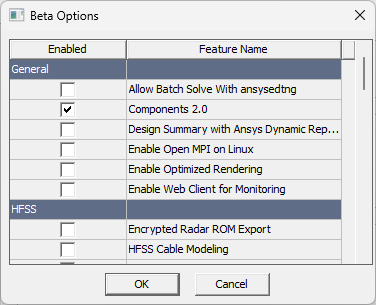
To access the Component 2.0 functionality, you must check the beta feature in the Beta Options dialog box:
- Open the Tools > Options > General Options window.
- Click the Beta Options button.
- From the General options, select Components 2.0.
To understand how to use a 2.0 component, see the following topics: