
Setting Up Design of Experiments
Follow this procedure to set up a Design of Experiments (DOE) analysis:
Choose the Variables for Design Exploration
You must define local or project variables as Optimization / Design of Experiments variables for the Design of Experiments setup to include the variable.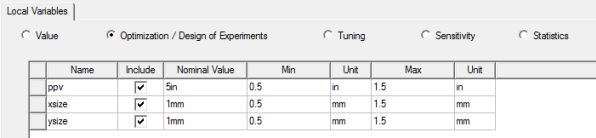
Add the Design of Experiments Setup
Right-click Optimetrics in the Project Manager pane and select Add > Design of Experiments. You can also use Twin Builder > Optimetrics Analysis > Add Design of Experiments. 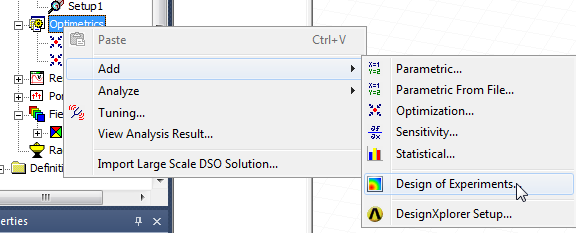
The Design of Experiments Setup dialog box appears. 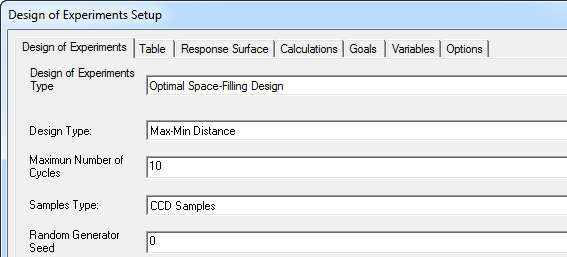
It has tabs for:
- Design of Experiments – Specify the sampling points and associated parameters.
- Table – Show the sampling points defined by the DOE settings you provide. If you selected a custom DOE type in the Design of Experiments tab, you can import data files as well as add or edit rows. You can also export files of DOE sampling points you have defined by any method.
- Response Surface – Specify the response surface type and refinement parameters.
- Calculations – Access Optimetrics calculations.
- Goals – Also includes cost functions calculations and norm type.
- Variables – Previously defined for Optimization/Design of Experiments as project or design variables, and whether to include them, treat as discrete, whether to use manufacturable variables, and the available levels.
- Options – To save solutions to the database and to use fast calculation-update algorithm.
Once you have set parameters and click OK, the Design of Experiments setup appears under the Optimetrics icon in the Project tree.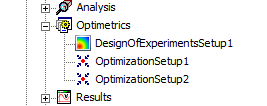
From here, right-click the DOE setup and select Analyze, Submit Job, or Validate for Large Scale DSO.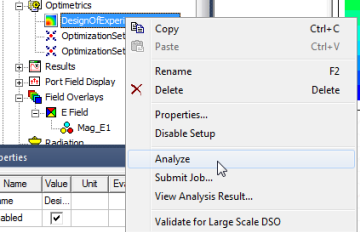
Related Topics
Table Tab for Design of Experiments
Response Surface Tab for Design of Experiments
Variables Tab for Design of Experiments
Setup Calculations for Optimetrics