
Table Tab for Design of Experiments
The Table tab in the Design of Experiments Setup dialog box displays a preview of the design points designed by your selections on the Design of Experiments tab. There is one column for each defined variable. Click Export to create a file of the table in a format you specify. 
If you have specified Custom as the Design of Experiments Type, the table is editable and the Table tab includes buttons for adding and deleting rows. The added rows are editable. You can add new rows by entering values in the * row of the table. You enter values in the input parameter columns. Once you have entered a value in one column in the * row, the row is added to the table and the values for the remaining input parameters are set to the initial values of the parameters. You can then edit that row in the table and change any of the other input parameter values if needed. Output parameter values are then calculated when the design is solved or updated.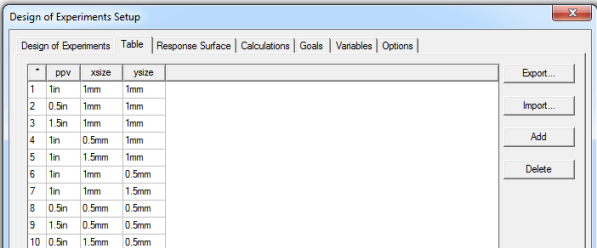
Depending on the context, the tables are read-only and filled automatically or they are partially or completely editable. The background color of a cell indicates if it is editable or not:
- A gray background indicates a read-only cell.
- A white background indicates an editable cell.
Output parameter values calculated from a simulation (a design point update) appear in black text.
The Custom Table view also includes an Import button. Import and export files can be:
- Comma delimited data (CSV) files.
- Tab delimited data (TAB) files.
- Ansoft Plot Data (DAT) files.
- Post Processor format data (TXT) files.
The table updates when you change your selections on the Design of Experiments tab.