
Variables & Declarations
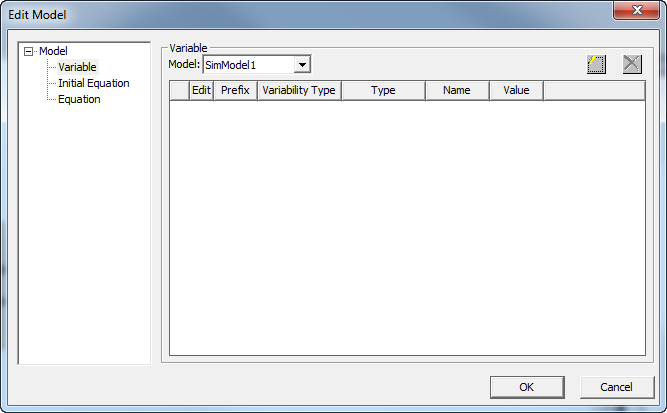
Use the Variables & Declarations dialog box under Modelica Model Editor to add, edit, or remove language-specific variables.
Related Topics
Adding a Variable
- Click Modelica Model Editor > Variables & Declarations to open the Edit Model dialog box.
- Click
 to add a row. The Edit Variable dialog box opens.
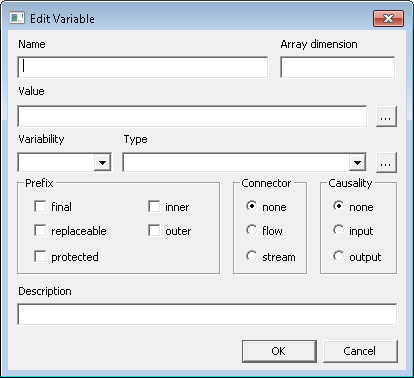
- Name – Enter a name for the variable.
- Array dimension – Enter the dimensions for the array with commas as separators. An example of a one-dimension array is 10. An example of a two-dimension array, like for matrices, is 10,5. An example of a four-dimension array is 10,5,2,6.
- Value – Enter a value for the variable or click
 to select a function call from the available packages.
 - Variability – Select an option from the drop-down list: parameter, constant, discrete.
- Type – Select an option from the drop-down list (Real, Integer, Boolean, String), or click and select a type from the available packages.
- Prefix – Add one or more prefixes from the available items: final, replaceable, protected, inner, outer.
- Connector – Select none, flow, or stream.
- Causality – Select none, input, or output.
- Description – Enter a description of the variable.
- Click OK.
- To add this variable to the model text, click Modelica Model Editor > Update Text from Diagram.
Editing a Variable
Click in the Edit column on the Equation panel  to edit a variable. Make your changes in the Variable dialog box and click OK.
Removing a Variable
Highlight a variable row in the Equation panel and click  to remove it.
In addition to the above, you can also use variables & declarations to edit equations and initial equations.
Variables & declarations also shows extended base class parameters, if any exist. You can change and modify these parameters.
Related Topics
Creating a Variable by Editing the Component Parameter Properties