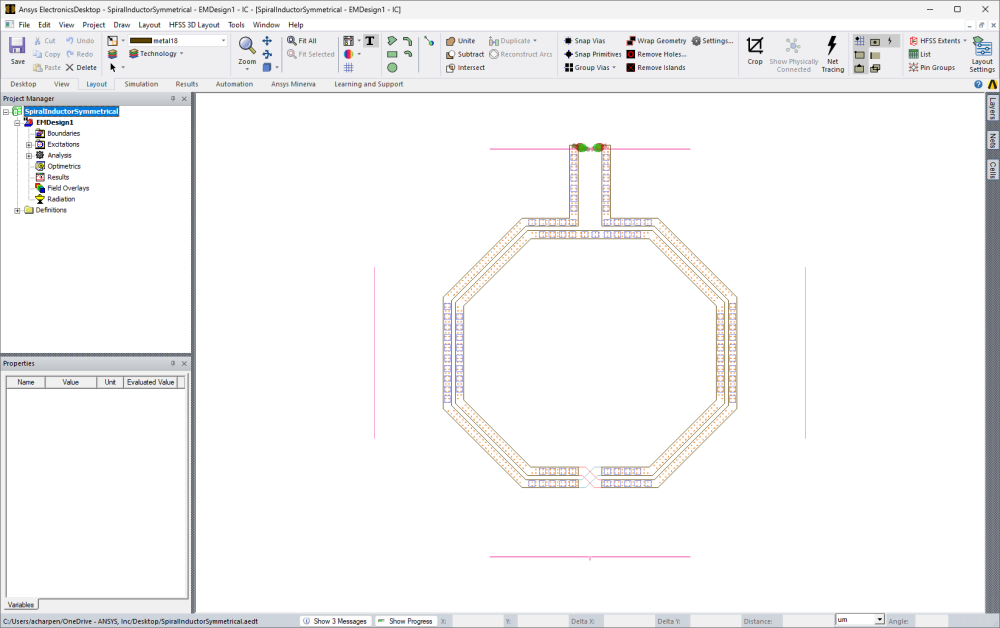
The Layout Editor shows a physical representation of a circuit. Layers are used in the editor to organize and manipulate sets of geometry and other visual indicators.
- Signal, negative signal, and dielectric are common physical layers.
- Symbol, error, and rats are non-physical layers.
The Edit Layers window stackup contains additional properties of the physical layers, such as material, thickness, and elevation. Geometrical information on these layers is used to generate masks for manufacturing.
IC Mode
The Layout Editor opens in either General mode (i.e., default) or IC mode. IC mode integrates ECAD Xplorer into the HFSS 3D Layout environment, preserving ECAD Xplorer's capabilities while allowing users direct access to most General mode, such as:
- HFSS 3D Model Extents
- Meshing
- Clip Planes
- Post Processing and Generating Reports
- Recording a Script to a File
- Parametrics
- Components (except for 3D Components)
In other circumstances, ECAD Xplorer features have been expanded to include HFSS 3D Layout capabilities, such as in the Edit Components window.
Finally, all of ECAD Xplorer's native features have been integrated and are accessible through shared topics, as well as through the following IC Mode-specific topics:
Refer to Switching to IC Mode.
IC Mode Workflow
IC mode typically uses this workflow:
- Import a GDSII file with a control file.
- Simplify the design using the tools available in IC mode: