
Creating a Component
You can create a component from pins, vias, and primitives. A bounding box shows the border of the component unless another component is a member of the new component. Complete these steps to join components.
- From the Layout Editor, select the components.
- Perform either of these steps to open the Create Component window.
- From the Draw menu, select Component > Create.
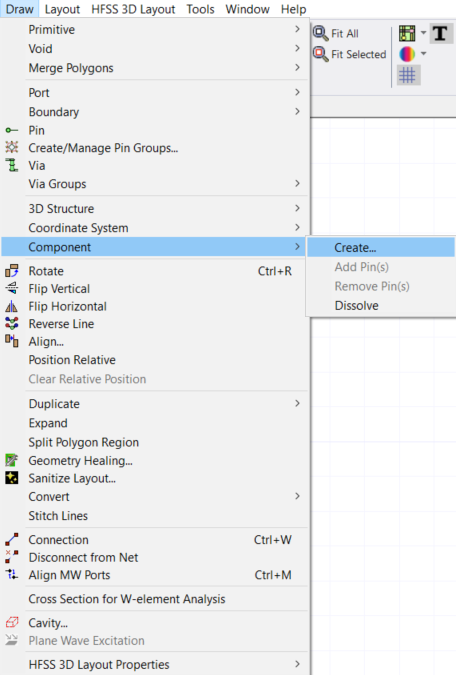
- From the Layout Editor, right-click and select Components > Create .
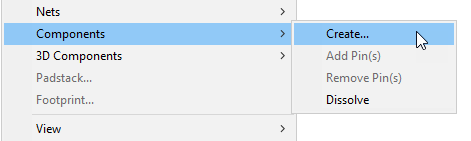
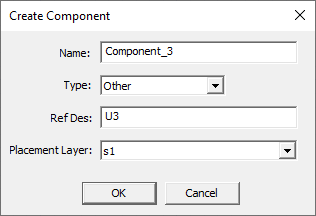
The Create Component window opens.
- From the Draw menu, select Component > Create.
- Once the Create Component window opens, enter the following information into the fields and drop-down menus.
- Name: — enter a name for the new component
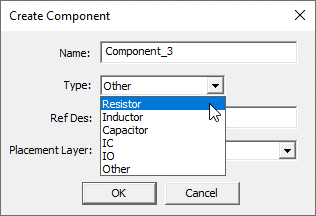
- Type: — chooseResistor, Inductor, Capacitor, IO, IC, or Other.
- Ref Des: — enter an alternative reference destination to identify this component in the active design
- Placement Layer: — select which stackup layer the component should be on
Note:
The type you choose determines the component’s model type.
Note:
This is optional. A reference destination is automatically supplied.
-
Click OK. The new component is listed in the dockable Components window.
The process is complete.