
Set up Interpolating Sweep Advanced Options
For Interpolating sweeps, the Setup Interpolating Sweep Advanced Options dialog lets you specify the following settings for a sweep:
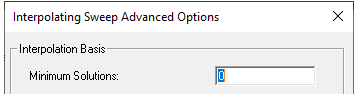
- The Minimum Solutions value is the minimum number of solutions that will be used for an interpolation basis of the desired frequency sweep. The finished sweep will satisfy both the desired error tolerance and the minimum number of bases. For example, if the minimum solutions is set to ten, then at least ten frequency points will be solved and used as a basis for the sweep even if the sweep converges before the ten points.
- Specify a Minimum Number of Sub Ranges. This
number acts as an initial condition on the sweep to force initial even
breakup of the null range into sub ranges. The end points and middle
of each subrange will be solved. This controls the points at which the
interpolating sweep is broken up and prevents redundant effort caused
by neighboring interpolating sweeps solving the same point. For example,
the 1GHz to 4GHz and the 4GHz to 9 GHz sweeps do not both solve the 4
GHz data point.

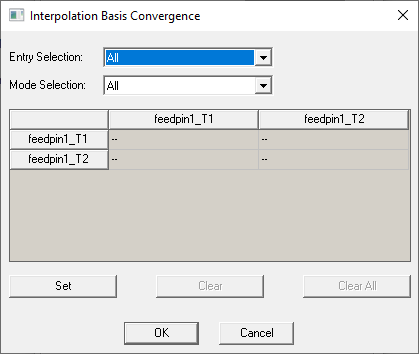
- Whether to use all or selected entries in the matrix
of data types for the convergence. To choose, click the Select Entries
button to display the Interpolation Basis Convergence dialog.
-
The Data Types for Convergence. The defaults selections
differ depending on the solution setup.
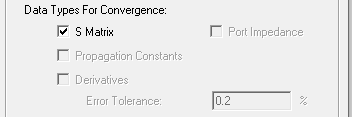
- S-Matrix - checked
- Port Impedance - unchecked.
- Propagation constants - checked.
- S-Matrix - checked
- Port Impedance - checked.
- Propagation constants - checked.
- S-Matrix - unchecked
- Port impedance - checked
- Propagation constants - checked
- S-Matrix - unchecked
- Port impedance - checked
- Propagation constants - checked
If the design contains them, you can select Derivatives. If you select Derivatives, you can also set the Error Tolerance, overriding the tolerance specified in the Edit Sweep dialog..
If a driven setup's ports-only setup changes and then the problem type switches between driven modal and driven terminal, HFSS resets the interpolation basis data types for the interpolating sweep.
Enforce Passivity – This applies to driven modal and Terminal
solutions. 
Select this check box to enable passivity enforcement
of an interpolating sweep at the requested sampling frequencies with
the specified error tolerance. For instance, tolerance of .001 means
simulation should attempt to reduce passivity to less than 1.001 at all
sampling frequencies. You can view passivity using the reporter. Passivity is enforced on 50 ohm renormalized single ended terminals for terminal projects and 50 ohm renormalized modes for modal projects.
When using passivity, you may want to increase the Max Solutions value.
During an interpolating sweep, HFSS first adds basis points (solution frequencies) until the convergence goal is reached, and then tests the sampling frequencies using the converged sweep for whether they meet the specified passivity requirement. The sampling frequency having the worst passivity violation is selected for solving. After solving for a passivity violation frequency, the solver adds the newly solved data to the interpolation basis.
If necessary, the solver returns to solving for convergence, limited by the maximum number of solutions for the sweep and resumes passivity checking after reestablishing convergence. Messages in the Solution Profile indicate when the interpolated solver is working toward convergence or working to resolve passivity. If any of the bases violates the passivity, the current sweep terminates with a warning message.
Enforce Causality(DC Point Required) -- This applies to Terminal solutions. Causality means that an output signal cannot start to change before the input signal changes. Causality can be enforced only when there is a DC point in the sweep. A design should follow "Best Practices for Accurate and Causal Broad Band Frequency Sweeps." In addition, you can select "Enforce Causality" so the sweep fits (rather than interpolates) the s-parameter results to a set of causal basis functions, thereby ensuring the extraction of a causal model..

You should follow recommended guidelines whenever setting up a numerical model in HFSS (provide correct material definitions, including information about frequency dependent behavior, and defining appropriate boundary conditions). Also when extracting s-parameter models for signal integrity designs, where providing passive and causal results is important, besides using this option, see "Best Practices for Accurate and Causal Broad Band Frequency Sweeps".
If you start and stop an interpolated sweep and change the convergence value and/or passivity tolerance, you may generate a non-repeatable sequence of frequencies in the basis. Both regular and passivity frequencies are used when re-evaluate convergence.
If you change sampling frequency delta subsequent passivity behavior may be totally different, since it is evaluated at new sampling frequencies.