
Options for Interpolating Sweeps
A wave port must be assigned for the Interpolating option to appear. For Interpolating sweeps, Edit Frequency Sweep options include:
General tab:
- Sweep Name
- Enabled check box
- Due to the ability to Use Q3D for DC Simulation in HFSS, the General tab includes a checkbox to Use Q3D to solve the DC point.
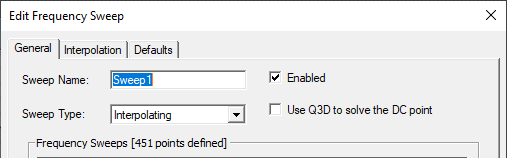
This feature accepts designs with gap type of lumped port, where the terminals touch planar faces. It is limited to RLC, finite conductivity and PEC for boundary. A Q3D DC solve will only use the classic/phi mesher. You can look at the S-parameter result for DC point, but no field will be available.
If Q3D is turned on, the project will succeed only if classic can mesh the original model. Models where tau succeeds but classic fails fail if you turn on Q3D. -
Performance of HFSS with/without Q3D can be compared only with classic mesh. One can not compare it to tau.
Note: Use Q3D to solve DC point provides network data only and cannot be used for fields overlays.
- Frequency Setup
- 3D Fields Save Options.
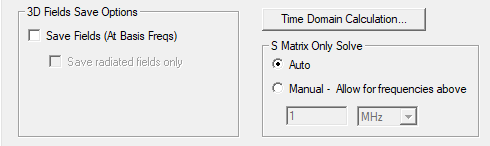
With Save Fields (At Basis Freqs not selected, the default is for Auto S Matrix Only Solve. Here, the solver automatically determines threshold of S-matrix only solve. The Manual option is available for situations when: -
If the direct solver is being used.
- If S-matrix only solve has a singularity matrix, you might want to increase the manual threshold.
-
If you want faster simulation, you might want to decrease the manual threshold.
- Save Fields (at Basis Freqs) selected:
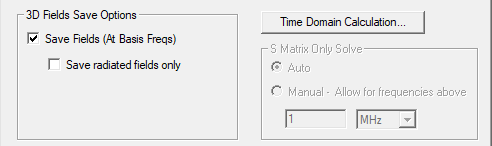
You can save fields or radiation only on the basis frequencies of the interpolating sweep. If you do so, the sweep will be available for selection by a target SBR+ design.This permits directivity and gain in the target SBR+ design.
Interpolation tab:
- Max Solutions
- Error Tolerance
- Click the Advanced Options... button to open the Interpolating Sweep Advanced Options dialog.
DC Extrapolation tab (appearing depending on the Design Settings for DC Extrapolation):
If you expect to use the same settings often, you can click Set Defaults on the Defaults tab. To use previously saved settings, click Use Defaults.