
Interpolation Basis Convergence
From the Setup Interpolations
Basis dialog box, select the Use Selected Entries radio
button to enable the Select Entries button. Select this to display
the Interpolation Basis Convergence dialog box. This dialog permits
you to specify the convergence basis.
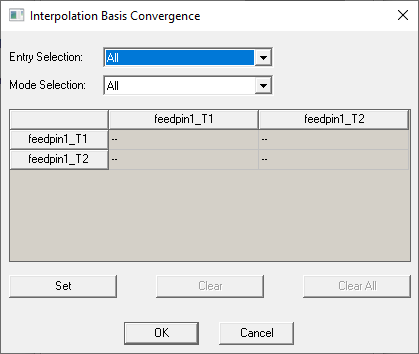
- Select one of the following from the
Entry Selections drop-down menu:
All
Selects all of the matrix entries at once. (The default).
Diagonal
Selects all of the diagonal matrix entries at once.
Off-Diagonal
Selects all of the off-diagonal matrix entries at once.
- If you chose All,
Diagonal, or Off-Diagonal,
you may fine-tune the matrix entry selection process by selecting one
of the following options from the Mode Selection
drop-down menu:
All
Selects all of the mode matrix entries. Select in conjunction with All, Diagonal, or Off-Diagonal entry selections.
Dominant Only
Selects only the dominant mode matrix entries. Select in conjunction with All, Diagonal, or Off-Diagonal entry selections.
Higher Order Only
Selects only the higher-order mode matrix entries. Select in conjunction with All, Diagonal, or Off-Diagonal entry selections.
As you select the wave ports for convergence, you use the Set, Clear, and Clear All buttons in connection with the Entry Selection and Mode Selection settings. These buttons are enabled when the wave port matrix state and selection settings permit them do something. For example, The Clear button is not enabled until there are entries in the wave port matrix to clear and those selections are permitted by the entry selection. The Set button is not enabled unless the available mode selections permit entries to be set.
You can also select individual entries in the wave port matrix by clicking on grid cells. This action displays a dropdown menu that lets you select ON or "-".
- Specify EntrySelections and Mode Selections as desired and click SET, or click individual wave port cells and select ON.
In the table location corresponding to the selection, the dash in the display is replaced by ON. For example, selecting the first element in the row list and the fourth element in the column list, and then Set Selection places an ON in the first row, fourth column. You can select one entry at a time via the dropdown in the matrix cell, or clear the entire table with the Clear All button. You can also Clear only the entries specified by the Entry and Mode selection settings (such as off-diagonal, higher order).
- Click OK to close apply the selections and close the dialog.