


In order to create tasks or comments, a specific repository needs to be available. medini analyze distinguishes between a local private repository and public shared server repositories which are used in a team. A local repository is always present and no configuration is required for it. It is managed within the workspace, that means, that each user workspace has its own local private task repository.
In order to connect to a server repository, the project settings have to be used. If the project settings view is opened (see Project Settings for infos on the project settings), the "Task Repository" entry needs to be activated. There, it is possible to select or de-select the associated server side task repository. Only one repository can be associated with the same project at a given time.
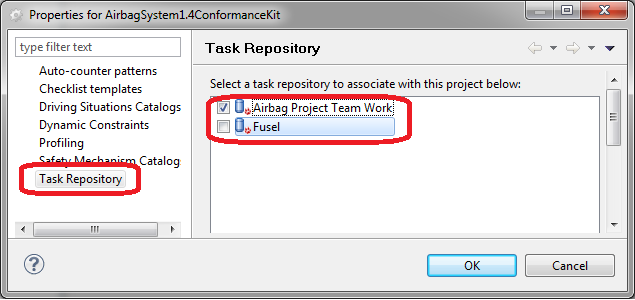
In the task repository dialog it is also possible to add new server task repository locations. For this, a connector for the server has to be present and selected. medini analyze comes with connectors for Bugzilla and Trac. Other connectors can be acquired from 3rd party vendors. The connector specific properties (e.g. server URL and user credentials) have to be provided.
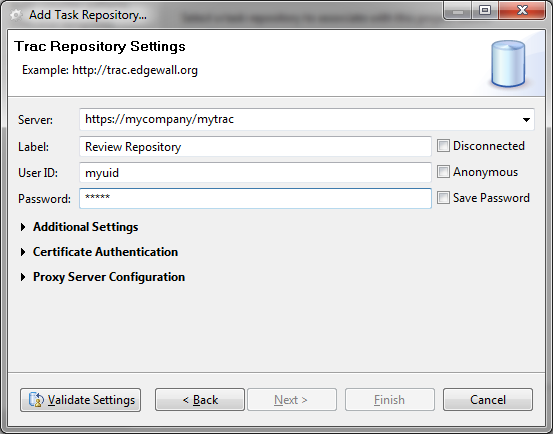
There are some situations in which the tool requires a reconnection of the server side public repository. Such situations may include:
A project has been exported and imported by another user. The new user has not configured the server side repository yet.
A project has been shared via a configuration management like SVN. The user who checks out the project has not configured the server side repository yet.
The server side repository is not reachable for some reasons.
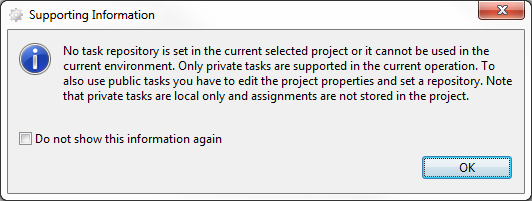
In these situations, the project still contains references to tasks in the repository as well as the repository URL. The tool tries to resolve the URL, if this is not possible, you are informed and continue the task management limited to private tasks.
Since version 3.2.4 the default installation comes with a connector for PTC Windchill RV&S (formerly Integrity) supporting 10.x up to 13.x. Similar to what is described in the PTC Windchill RV&S Integration, the Windchill task connector requires a mandatory mapping from medini tasks to an arbitrary, but apropriate Task type on the Windchill side. Please see Mapping Definition for a general description on how the type mapping works. The mapping for tasks works in a similar way and can be even defined in the same mapping file located in the workspace. There is no support to define a project based mapping though. However, you can define a mapping file per repository connection in the repository setup wizard.
<?xml version="1.0" encoding="ASCII"?>
<mapping:MappingDefinition
    xmi:version="2.0"
    xmlns:xmi="http://www.omg.org/XMI"
    xmlns:xsi="http://www.w3.org/2001/XMLSchema-instance"
    xmlns:mapping="de.ikv.medini.metamodel.mapping"
    xsi:schemaLocation="de.ikv.medini.metamodel.mapping mapping.xcore#/EPackage">

  <!-- Sample mapping from medini Task to Windchill Defect -->
  <typeMappings
      mediniType="Task"
      mappedType="Defect">
    <attributeMappings
        mediniAttribute="task.common.summary"
        mappedAttribute="Summary"/>
    <attributeMappings
        mediniAttribute="task.common.description"
        mappedAttribute="Description"/>
    <attributeMappings
        mediniAttribute="task.common.priority"
        mappedAttribute="Priority"/>
    <attributeMappings
        mediniAttribute="task.common.user.reporter"
        mappedAttribute="Created By"
        direction="in" />
    <attributeMappings
        mediniAttribute="task.common.user.assigned"
        mappedAttribute="Assigned User" />
    <attributeMappings
        mediniAttribute="task.common.date.created"
        mappedAttribute="Created Date"
        direction="in" />
    <attributeMappings
        mediniAttribute="task.common.date.modified"
        mappedAttribute="Modified Date"
        direction="in" />
    <attributeMappings
        mediniAttribute="task.common.priority"
        mappedAttribute="Priority" />
  </typeMappings>

</mapping:MappingDefinition>
The sample mapping above outlines how to map between Windchill fields and medini Task attributes. There is currently a fixed set of attributes on the medini side which you can map to as depicted in the list below. Please note that the fields "Project, "Type" and "State" are treated somewhat special and are internally handled even without any mapping. Though their mapping can be customized. Note further that you must save the mapping to a file that ends with .mapping, it is not sufficient to use .xml or anything else as file extension!
task.common.summary: the task definition or task name, typically a single-line short text
task.common.description: the detailed task description, typically a longer multi-line text
task.common.priority: a generic priority field, values are automatically taken from Integrity side (should be mapped to a pick-list)
task.common.user.reporter: the creator of the task, i.e. the "reporter", should be mapped to a "user" typed field in Integrity
task.common.user.assigned: the owner of the task, i.e. the user the task is assigned to, should be mapped to a "user" typed field in Windchill too
task.common.date.created: the creation date and time of the task, should be marked as an "in" attribute because this is always set on Windchill side
task.common.date.modified: the last modification date and time, should be marked as an "in" attribute because this is always set on Windchill side
task.common.date.completed: the completion date and time
task.common.date.due: the due date and time
task.common.component: a component or system the task is associated with, could be mapped for example to "Domain" or "Affected Area"
task.common.keywords: any kind of keywords or additional tags
task.common.product: typically the name of the repository or project reflected by the ticket system or ALM/PLM system, the Windchill connector by default maps the "Project" field to this attribute.
task.common.kind: typically the ticket kind, for example "Defect", "User Story" or others. The Windchill connector by default maps the "Type" field to this attribute.
task.common.status: typically the ticket status, for example "Closed", "Open" or others. The Windchill connector by default maps the "State" field to this attribute.
Although the mapping is rather flexible and allows you to adapt the connector to your specific setup, the kind of fields on both sides should match, i.e. it does not make sense to map an Windchill pick-list type to a user field in medini. Please note further that you might need an extra license for this feature.