


The System Weakness Analysis (SWA) provides a structured analysis methods for limitations (or vulnerabilities) in elements of the design. The SWA editor is an adaptation of the FMEA table structure drawing the focus on limitations instead of failures. Basically, that means the potential failure column is replaced by a "Known System Design Weaknesses" column, but the remaining column structure - such as cause/effect, measure groups, actions, AP/RPN, etc - is kept. Please refer to Failure Mode and Effects Analysis (FMEA) for a broader view on the FMEA capabilities including risk assessment.
As in FMEA, the SWA worksheet provides a structured table view of a system model. The structure of the SWA worksheet is synchronized with the underlying SysML model and entries cannot exist without a corresponding SysML element (cp. Creation of FMEA Worksheets).
In order to create an SWA for a model you have two options:
Derive a worksheet from a SysML model (or element). Just select "Derive | SWA Worksheet..." from the context menu in the Model Browser and specify the target package.
Create the SWA on a package with tag "System Weakness Analysis". Choose "New | SWA Worksheet..." from the context menu and select the corresponding SysML model in the upcoming creation dialog.
A newly created worksheet is initialized with entries for all elements of the corresponding model in the same way as an FMEA. The same holds for the complete risk assessment (see Setup of FMEA Risk Classification). However, note the differences that are explained in the following section (see SWA Worksheet Structure).
The SWA worksheet is divided into three pages: Cover , Worksheet, and Risk. The behavior is mostly as in FMEA, see also Setting up an FMEA Worksheet for details. The following settings can be made on the Cover page:
Kind: Selection of which model elements will be shown in the worksheet.
System will show everything, i.e. all structural and behavioral elements
Subsystem is the same as System, but indicates that the current analysis is not the complete picture
Component shows only structural elements in the worksheet, i.e. especially no functions/activities are shown
Function filters for behavioral elements, i.e. functions, activities, and actions
Analysis Depth: Selection of how many nesting levels shall be shown
Options: Provide additional filtering of specific rows/columns
Hide ports except when tagged with: filters out all ports of elements except for the ones associated with the specified tags
Hide action columns do not show any additional proposed/taken action columns. This is useful if actions are tracked with measures directly
Hide measure group information toggles additional information about the measure group, i.e. name, status, completion dates
Enable design controls for potential weaknesses lets you add measures to potential weaknesses without first creating a cause/effect net. For more information, see Adding Measures without Causes.
Criticality Assessment: RPN and AP are provided as criticality numbers using the same definitions as for FMEA. In more details:
Risk Priority Numbers (RPN) computation based on Severity, Occurrence, and Detection values
Action Priority (AP) computation based on Severity, Occurrence, and Detection values. See Action Priorities (AP) for more details.
Supplemental SWA for Monitoring and System Response provides the same switch between design/production and runtime/diagnostics that is defined in the VDA-AIAG guideline for FMEA.
The Worksheet page contains a table and options that are very close to FME(C)A worksheets. The following points should be emphazised in comparison to an FMEA:
The column Known System Design Weaknesses shows all weaknesses of an element. These are both Limitations as well as Vulnerabilities. This allows the usage of the SWA table either in a SOTIF analysis or cybersecurity context.
The column Triggering Conditions are actually causes and can also cover other concepts as triggering conditions. You might want to add malfunctions or other type of errors as enabler of a limitation.
Similarly, effects are not restricted to by malfunctions or any other type of failure - they can be other limitations, hazards, or event vulnerabilities.
Example
The following screenshot shows an example of a camera with characteristic "Nominal Range of View" that has two limitations: "Reduced Range of View" and "Massively Reduced Range of View". Both lead to slightly different effects and are caused by different triggering conditions:
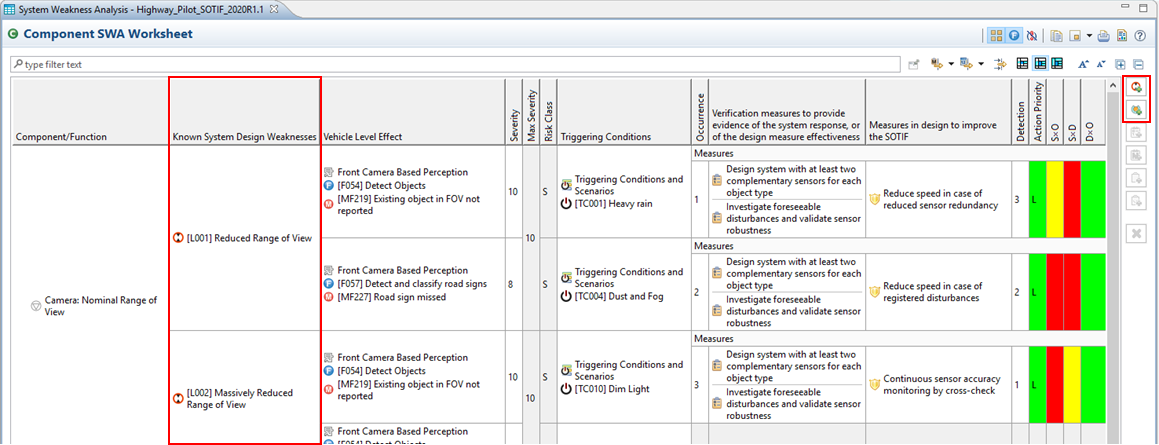
Note that there are actually two Add buttons in the button-bar on the right side of the table editor: the first will create a new limitation at the selected element, the second a vulnerability (as the icons indicate).