


The current tool version supports primarily SysML version 1.6 and hence is fully compatible with 3rd Party modeling tools for model import and update. Even though the standardization of version 2 is still ongoing at the Object Management Group, the tool implements already a hybrid approach to support certain concepts of the upcoming version. A full migration will happen once the standard is finalized.
In order to activate the new language features for SysML v2, you can do the following:
Open the project settings by selecting the project in the Model Browser and go to "Project Settings..." in the context menu
Open the "System Modeling" page and activate the option "Enable SysML v2"
In order to be effective, you have to close and re-open your graphical editors
After enabling version 2, the palette will look like the following:
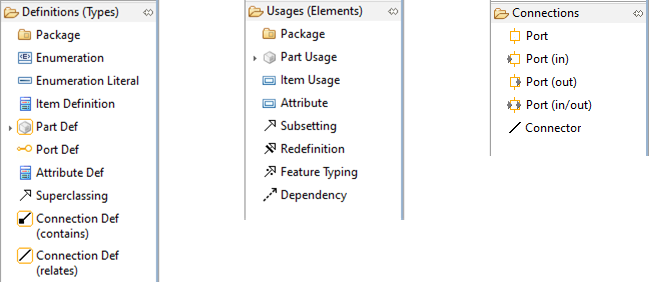
As can be seen, most of the structural concepts are extended. The behavior model for actions and activities are still based on SysML v1.x.
Note that a full introduction to the new language concepts is beyond the scope of this user guide. Please refer to https://github.com/Systems-Modeling/SysML-v2-Release for the latest publicly available version of the specification.