


This release of Ansys HPC Platform Services (HPS) offers the following new features and enhancements:
Docker Compose Changes
To make the Docker Compose setup more modular, the setup now consists of a main Compose file that references or includes multiple secondary Compose files. This is achieved using Docker Compose's
extendsandincludeattributes. (For more information, see Use multiple Compose files in the Docker documentation.)With different services living in their own Compose files, you now have the flexibility to configure individual services for different environments or workflows.
The logging is parameterized so that Compose files could work with different logging providers.
Podman Support
When deploying Ansys HPC Platform Core Services, you can use Podman instead of Docker to run containers. Podman is a secure, daemonless, Docker‑compatible container engine that can run containers without root privileges, reducing the risk of privilege‑escalation attacks. See Using Podman Instead of Docker to Run Containers in the Ansys HPC Platform Services Deployment Guide.
Component Updates
To support networking changes made by Broadcom, the Postgres container is no longer provided by Bitnami. The official Docker image is now used.
If you want to continue using Bitnami during this transition period, a compose file is provided for this purpose.
Traefik has been upgraded to version 3.6.8.
OpenFGA has been upgraded to version 1.11.6.
Project Management Improvements
To maximize storage capacity and keep the project ecosystem clean and manageable, the Housekeeper Service can be configured to routinely check for stale projects and automatically delete them after a specified period of time has passed. See Configuring Automatic Cleanup of Inactive Projects in the Ansys HPC Platform Services Deployment Guide.
Job Management Improvements
Templates for 2026 R1 applications are available in the Ansys HPC Manager web app. This includes the addition of a new template for Ansys optiSLang, enabling you to create optiSLang projects using Ansys HPC Manager.
Note: 2024 R1 applications are no longer supported.
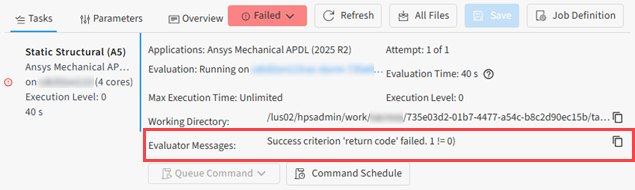
Messages and errors from the evaluator are now displayed in the job details view, providing timely feedback and a convenient way to view pertinent information without going to the evaluator log file. Messages can be easily copied to your clipboard for ease of sharing.
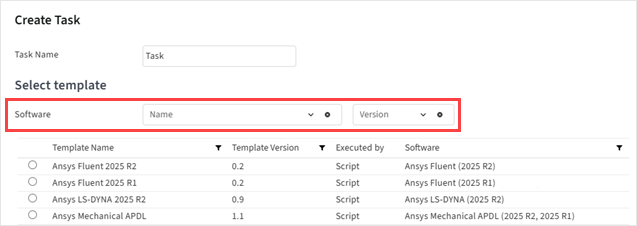
When creating a task from a template, new Software and Version filters enable you find and select the desired template more quickly.
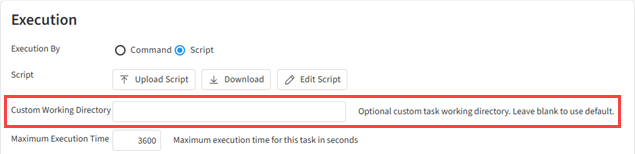
When creating a project or job, or specifying a task definition, you can optionally specify a Custom Working Directory for files generated during job execution. This puts you in control of how job files are managed. See Defining a Task in the Ansys HPC Platform Services User's Guide.
The Autoscaling Service can be configured to support the Slurm REST API, providing a modern and flexible way to submit jobs and interact with a Slurm cluster. The Slurm REST API uses JSON Web Tokens for authentication and authorization, eliminating the need to deploy the Process Launcher which is required in traditional workflows to run jobs as the submitting user. See Configuring Support for the Slurm REST API in the Ansys HPC Platform Services Deployment Guide.
See also: Route Creation Service (Beta)
Data Transfer Improvements
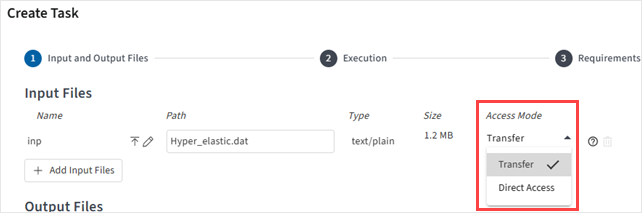
When specifying input files for a task, a new Access Mode setting enables you to specify whether an input file should be transferred to the cluster, or whether the input file already exists on the cluster and can be directly accessed there, avoiding unnecessary file transfers and maximizing efficiency. See Defining a Task in the Ansys HPC Platform Services User's Guide.
When files fail to get uploaded, the upload is automatically retried.
Autoscaling Improvements
To support the Resource Prediction feature in the Ansys Mechanical application, you can now configure the Autoscaling Service to extract CPU details from compute resources assigned to autoscaling cluster queues. See (Optional) Extract CPU Details to Support Resource Prediction for Ansys Mechanical Solutions in the Ansys HPC Platform Services Deployment Guide.
When a scheduler type is not specified in an autoscaling cluster configuration, the Autoscaling Service automatically attempts to detect the scheduler when possible.
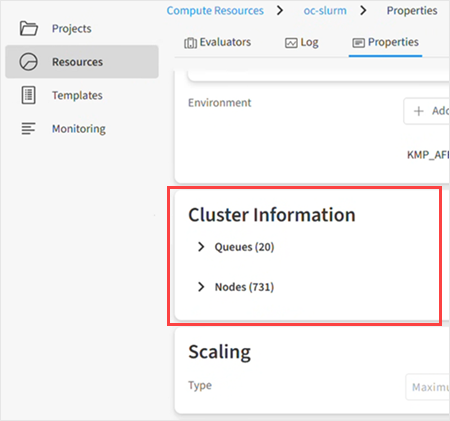
When viewing the properties of a cluster on the Resources page, a new Cluster Information section lets you see a list of Queues and a list of Nodes.
HPS Installer (Beta)
A new HPS Installer lets you create a complete setup of Ansys HPC Platform Services (HPS) using Python. The installer automates the deployment of all required services (Core Services, Evaluator, Autoscaling Service, Process Launcher), making setup of HPS faster and easier. See HPS Installer (Beta) in the Ansys HPC Platform Services Deployment Guide.
Should you choose to try the HPS Installer, your feedback is most welcome and may help Ansys improve the quality of the product.
Route Creation Service (Beta)
A new Route Creation Service (RCS) plugin allows you to interact with your running batch jobs through APIs (pyAnsys for example), or through web applications like the Ansys Fluent web app. For more information, see Route Creation Service (Beta) in the Ansys HPC Platform Services Deployment Guide.