This example buckling cyclic symmetry analysis presents a simplified ring-strut-ring structure used in many rotating-machinery applications.
The object is a simplified structure that experiences a thermal load emanating outward from the center. The inner ring is kept at a constant 600° F temperature, and the outer ring is kept at a constant 0° F. A linear eigenvalue buckling analysis determines when the struts will buckle as the temperature in the struts increases from 100° F to 500° F.
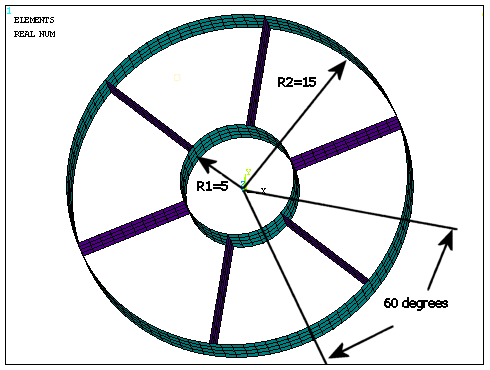
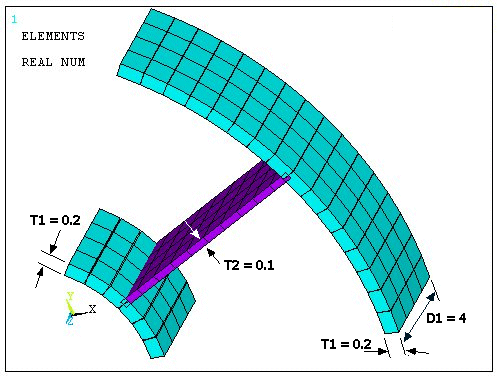
The geometric properties for this analysis are as follows:
The material properties for this analysis are as follows:
| Poisson's ratio (υ) = 0.3 |
| Density = 1e-4 |
| Coefficient of thermal expansion (α) = 5e-5 |
| Young's modulus (E) = 10e6 (at 0° F) |
| Young's modulus (E) = 4e6 (at 600° F) |
The Young's modulus value varies linearly between 0 and 600° F. All applicable degrees of freedom (DOFs) are used for the cyclic symmetry edge-component pairs. The first six mode shapes for all applicable harmonic indices are requested.
Use this input file (named input_cyclicExample02.dat, download: input_cyclicExample02.zip) to perform the buckling cyclic symmetry analysis example. The file contains the complete geometry, material properties and solution options for the finite element model.
! Cyclic Symmetry Buckling Example:
! Thermal loading emanating radially in a ring-strut-ring configuration

! ============================================
!  Set view and plot options
! ============================================

/view,1,1,1,2           ! Set the view direction
/plopts,minm,0          ! Disable display of minimum values
/plopts,date,0          ! Disable date and time stamp
/pnum,real,1            ! Display real constant set numbers
/number,1               ! Display node and element numbers

/prep7                  ! Enter the preprocessor

! ============================================
!  Define geometry and mesh or read from file
! ============================================

generateGeom = 1

*if, generateGeom, eq, 1, then

    ! Define geometry parameters
    r1 = 5 ! inner radius
    r2 = 15 ! outer radius
    d1 = 4 ! thickness
    nsect = 6 ! number of sectors
    alpha_deg = 360 / nsect ! angle of one sector
    alpha_rad = 2*acos(-1) / nsect

    ! Use cylindrical coordinate system
    csys,1

    ! Create keypoints and define geometry
    k,1,0,0,0
    k,2,0,0,d1
    k,3,r1,0,0
    k,4,r1,0,d1
    l,3,4
    arotat,1,,,,,,1,2,alpha_deg/2

    k,7,r2,0,0
    k,8,r2,0,d1
    l,7,8
    arotat,5,,,,,,1,2,alpha_deg/2
    arotat,2,,,,,,1,2,alpha_deg/2
    arotat,6,,,,,,1,2,alpha_deg/2
    a,5,6,10,9

    ! Set mesh options and define element types
    mshkey,1
    et,1,181 !element type: shell-181
    r,1,0.20 ! thickness of the inner and outer rings
    r,2,0.1 ! thickness of the strut
    esize,1.0 ! size of the element

    ! ============================================
    !  Define material properties and apply thermal loads
    ! ============================================
    ! temperature dependent Young's modulus
    ! temperature points: 0 degree and 600 degrees
    mptemp,1,0 !
    mptemp,2,600
    mpdata,ex,1,1,10e6 ! Young's modulus at 0 degree
    mpdata,ex,1,2,4e6 ! Young's modulus at 600 degrees
    mp,prxy,1,0.3,0.0 ! Poisson's ratio
    mp,dens,1,1e-4 ! density of the material
    mp,alpx,1,5e-5 ! coefficient of thermal expansion
    tref,0 ! reference temperature


    ! Apply temperature to inner ring
    asel,,loc,x,r1
    bfa,all,temp,600

    ! Assign material to the inner-outer ring
    asel,a,loc,x,r2 ! add outer ring to the selection
    aatt,,1

    ! Apply temperature to the strut
    asel,inve ! select stut by inverting selection
    bfa,all,temp,100 ! apply temperature to strut
    aatt,,2 ! apply thickness to the strut

    ! Mesh the model
    allsel
    amesh,all

    ! ============================================
    !  Apply boundary conditions
    ! ============================================

    lsel,,loc,z,d1/2 ! select lines passing through z=d1/2
    lsel,r,loc,y,alpha_deg/2 ! reselect the lines from the set that pass through alpha/2


    ! this gives us the mid-line of the strut
    ksll ! select keypoints a the mid-line
    nslk ! select nodes at those keypoints
    nrotate,all ! bring nodes to the cylindrical co-ordinate system

    ! fix uz and uy at the selected keypoints/nodes
    dk,all,uz,0
    dk,all,uy,0

    allsel

    ! Save the model database
    cdwrite, db, cyclicExample02, cdb

*else
    cdread, db, cyclicExample02, cdb,,,
*endif

eplot

! ============================================
!  Configure cyclic symmetry analysis
! ============================================

cyclic
/cycexpand,,on ! see the complete model
cyclic,status
cycopt,status

finish

! ============================================
!  Perform static analysis with prestress
! ============================================

/solution
antype,static
pstres,on
solve
finish

! ============================================
!  Perform buckling analysis
! ============================================

/solution
antype,buckle

bucopt,lanb,3
mxpand,3,,,yes
solve
finish

! ============================================
!  Post-process buckling results
! ============================================

/post1

! Print output loads and redirect output
set, list

set,first,,,,,,,order
plnsol,u,sum
The following table describes the input listing and the steps involved in the example buckling cyclic symmetry analysis in more detail.
| Step | Description | Command |
|---|---|---|
| 1. |
Generate the model with thermal settings. | |
| 2. |
Specify a cyclic symmetry analysis and configure the database accordingly. | CYCLIC |
| 3. |
Activate cyclic symmetry graphical expansion. | /CYCEXPAND,,ON |
| 4. |
Plot the elements. | EPLOT |
| 5. |
List the cyclic status. | CYCLIC,STATUS |
| 6. |
List the cyclic solution option settings. | CYCOPT,STATUS |
| 7. |
Specify a static analysis type with prestress effects. | |
| 8. |
Solve the prestress static analysis. | |
| 9. |
Specify a buckling analysis type. | |
| 10. |
Specify buckling analysis options | BUCOPT, LANB, 3 |
| 11. |
Specify mode expansion options. | MXPAND, 3, , , YES |
| 12. | Solve the buckling analysis. | SOLVE |
| 13. | Read the results from the smallest load factor. (This should correspond to the smallest frequency.) | |
| 14. |
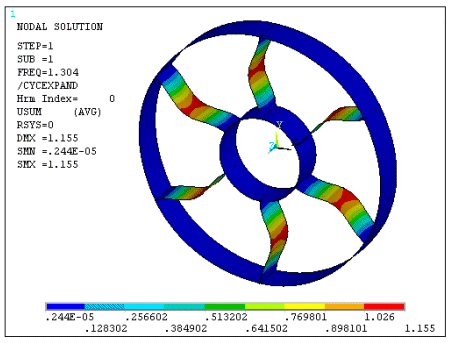
Plot the buckled mode shape. ---- This step completes the example buckling cyclic symmetry analysis. Your results should match those shown in Figure 5.2: Example Buckling Cyclic Symmetry Analysis Results. | PLNSOL, U, SUM |
The results of your analysis should match those shown here:
You can automatically solve for the critical strut temperature by iterating on the variable loads until the eigenvalue becomes 1.0 (or nearly 1.0 within some tolerance). The iterations ensure that the eigenvalue solution does not factor the stress stiffness matrix from the constant loads. The following flowchart illustrates the process:
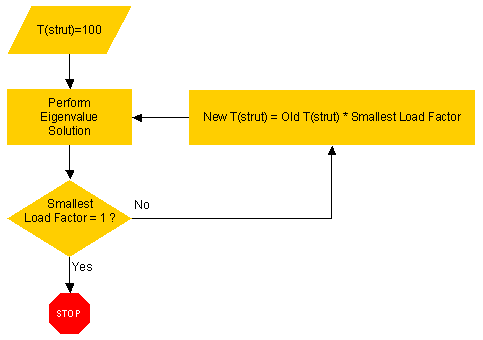
Use the /PREP7 portion of the previous input file (input_cyclicExample02.dat) to construct your model. After defining the model parameters--but before activating cyclic symmetry--define the arrays and the programming operations, as follows:
*dim,Tstrut,array,10
*dim,Tfact,array,10

*do,I,1,10

  /prep7

  *if,I,eq,1,then
    Tstrut(I)=100
  *else
    Tstrut(I)=Tstrut(I-1)*Tfact(I-1)
    cyclic,undouble
  *endif

  asel,,real,,2
  bfa,all,temp,Tstrut(I)
  allsel
After you have defined the iterative parameters, proceed with the cyclic symmetry portion of the analysis:
  cyclic
  /cycexpand,,on
  eplot
  cyclic,status
  cycopt,status
  /solution
  antype,static
  pstres,on
  solve
  finish
  /solution
  antype,buckle
  bucopt,lanb,3
  mxpand,3,,,yes
  solve
  finish
  /post1
  set,first,,,,,,,order
  plnsol,u,sum

  *get,loadmult,active,,set,freq
  Tfact(I)=loadmult

*enddo
The program then plots the data to determine the critical strut temperature:
*dim,data,table,10,2
data(0,1)=1
data(0,2)=2

*do,I,1,10

  data(I,0)=I
  data(I,1)=Tstrut(I)
  data(I,2)=Tfact(I)

*enddo

/AXLAB,X,Strut Temperature
/AXLAB,Y,Load Factor
/GROPT,DIVX,5
/GROPT,DIVY,5
/XRANGE,100,200
/YRANGE,0.9,1.4
/GTHK,CURVE,1
/GMARKER,1,3

*VPLOT,data(1,1),data(1,2)
The eigenvalues (frequencies) calculated for the buckling analysis represent the buckling load factors. The eigenvalues represent load factors for all applied loads.
The iteration strategy yields the following results:
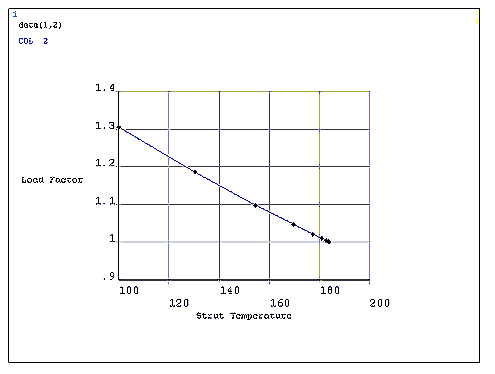
Table 5.1: Buckling Cyclic Symmetry: Load Factor Iteration Results
| Iteration | T° (Strut) | Load Factor |
|---|---|---|
| 1 | 100.00 | 1.3039 |
| 2 | 130.39 | 1.1845 |
| 3 | 154.44 | 1.0972 |
| 4 | 169.45 | 1.0461 |
| 5 | 177.27 | 1.0206 |
| 6 | 180.91 | 1.0089 |
| 7 | 182.52 | 1.0038 |
| 8 | 183.21 | 1.0016 |
| 9 | 183.50 | 1.0007 |
| 10 | 183.62 | 1.0003 |
A graph of the results shows the convergence at Load Factor = 1.0: