


Check the following time step issues:
Use a moderate initial time step size. If the initial time step is too small, it might be hard to find a useful search direction towards the first converged equilibrium. Note that the automatic step size control in LS-DYNA adjusts by retrying the step with a smaller step size if convergence fails due to an excessively big initial step size or another reason. The program cannot increase step size, even though doing so may resolve the convergence problem in some cases.
In cases like transient dynamic analyses that may require a very small time step
to resolve a rapid event, it is good practice to also decrease
DTMIN on *CONTROL_IMPLICIT_AUTO, to perhaps 1
% of the smallest target time step. This adjustment gives LS-DYNA the possibility
to halve the time step at least once if a retry is necessary.
If the solution of an implicit time step fails, causing a time step reduction
(RETRY), then converges nicely with the reduced time-step size, causing a time step
increase, but then fails again, causing a retry, then convergence, etc., as shown in
the next figure, this may indicate that the given maximum time step is too large. In
such cases, reducing the maximum time-step size (given by LCID 700 with the attached
control cards) may be an effective solution to this type of slow convergence. This
can also be combined with less aggressive settings of
*CONTROL_IMPLICIT_AUTO (reducing ITEOPT and
ITEWIN).
Figure 11.10: Implicit solution statistics, by the Tab Form function of the D3hsp View tool in LS-PrePost.
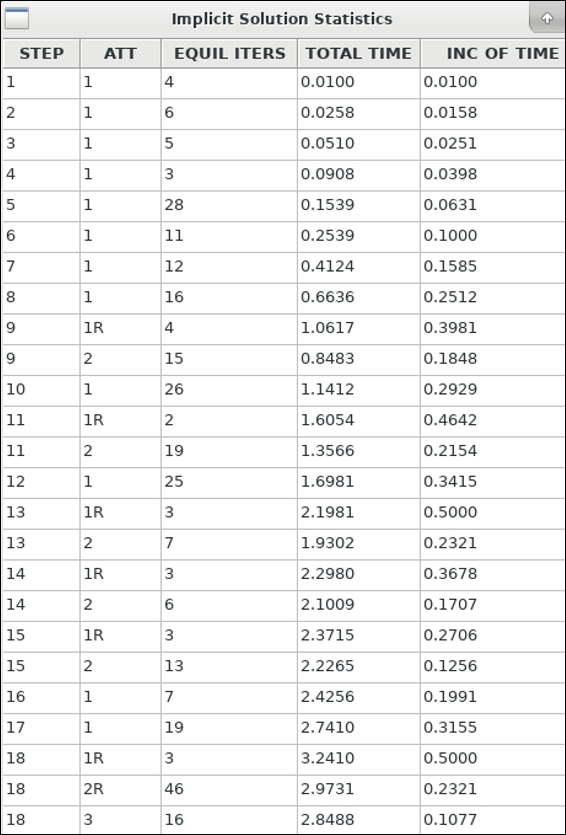
In the example shown above, the maximum allowed time step was too big (0.50) for an efficient solution (but after many RETRIES, still Normal termination was obtained).