


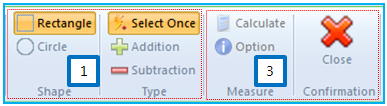
The Mass feature is used to measure the total mass and mass moment of inertia and center position of selected bodies. This feature is available in a subsystem and at least one body must be selected to use the mass feature. The feature is operated in four steps as follows.
Figure 2.16: Operation steps for the Mass feature
| Step | Operation |
| 1st step | Define how to select bodies as shown in the above figure. There are several methods for mouse dragging and selection. The default methods are rectangular selection and to select bodies once. This step is not mandatory. |
| 2nd step | Select bodies in the working window or Subsystem Navigator. |
| 3rd step | Click Calculate to measure the mass properties as shown in the figure above, or click Close to exit the operation. |
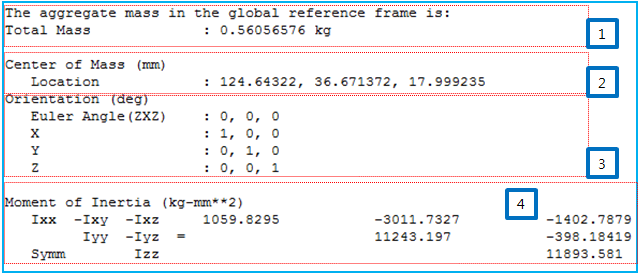
| 4th step | Check the calculated mass properties in the output window messages, as shown in Figure 2.18: Message for mass measurement in Output window. |
This feature supports various options for selecting bodies as summarized in the following table.
Figure 2.17: Properties of the Mass feature
| Symbol | Name | Description |
 | Rectangle | Set the selection type to rectangle. The cursor is dragged with a rectangular shape. |
 | Circle | Set the selection type to circle. The cursor is dragged with a circular shape. |
 | Select Once | Select the bodies for which to calculate mass properties. Previously-selected bodies are ignored with this option. |
 | Addition | Add the selected bodies to the set of bodies for which to calculate mass properties. |
 | Subtraction | Remove the selected bodies from the set of bodies for which to calculate mass properties. |
 | Calculate | Calculate the mass properties of the selected bodies and display the results in an output window message as shown in Figure 2.18: Message for mass measurement in Output window. |
 | Option | Set the reference frame to measure the mass properties by using the Transform Picker. |
 | Close | Exit the operation. |
The total mass of  can be calculated as follows.
 | (2–1) |
where  is the mass of ith body.
The center of mass can be calculated as follows.
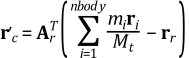 | (2–2) |
where  and
and  are the orientation and position of the reference frame that is
defined from the option. If the reference frame is not defined, the orientation is
the identity matrix and the position is zero.
are the orientation and position of the reference frame that is
defined from the option. If the reference frame is not defined, the orientation is
the identity matrix and the position is zero.  is the center position of ith body. As
shown in Figure 2.18: Message for mass measurement in Output window, the
orientation shows the orientation matrix of the reference frame.
is the center position of ith body. As
shown in Figure 2.18: Message for mass measurement in Output window, the
orientation shows the orientation matrix of the reference frame.
The mass moment of inertia can be calculated as follows.
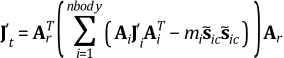 | (2–3) |
 | (2–4) |
where,  and
and  are the orientation matrix and mass moment of inertia of
ith body.
are the orientation matrix and mass moment of inertia of
ith body.