


Working with version-controlled Tables
Version control ensures that changes made to folders, records, and data are tracked and managed.
When version control has been enabled on a Granta MI Table, the records in the Table all have a version state which determines whether or not users can see and/or edit them.
| Version state | Description |
|---|---|
| Unreleased |
This is the 'unapproved' version of the record. Unreleased records are not visible to Read users. When MI Viewer is in Edit Mode, Write users can:
|
| Released | This is the 'approved' version. Released records:
|
| Superseded | This is a released version of the record that has been 'superseded' by a
later released version. Superceded records:
|
| Withdrawn | This is a version of the record that was released and subsequently
'withdrawn'. Withdrawn records
|
Records may be moved from one state to another as follows:
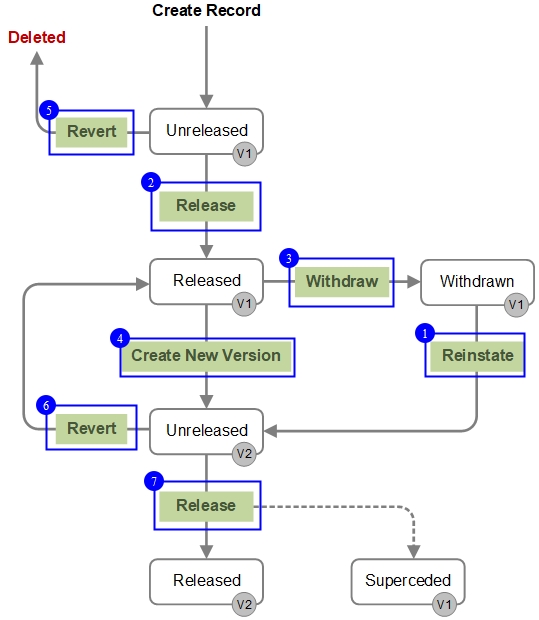
- Reinstating a record, folder, or Table
- Releasing a record, folder, or Table
- Withdrawing a record, folder, or Table
- Creating a new, Unreleased version
- Reverting a record, folder, or Table
- Reverting a record, folder, or Table
- Releasing a record, folder, or Table
Note also that the Bulk Edit Version Control tool can be used to Release, Revert, Withdraw, or Reinstate a number of records at the same time.