


Withdrawing a record, folder, or Table
Records, folders, and Tables that are Released may be withdrawn.
When you withdraw a Released version:
- Its version state is changed to Withdrawn.
- The version number does not change.
Withdrawn records:
- Cannot be edited.
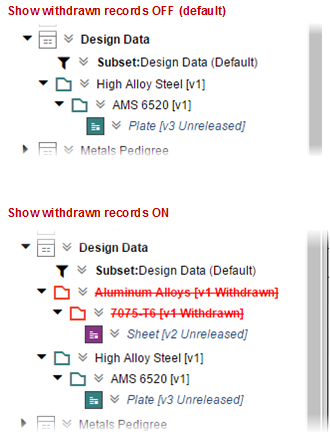
- Are not visible in Read mode.
- Are visible in Edit mode if the Show Withdrawn Records option is enabled in Settings>Application Options.
-
Locate the Released record, folder, or Table in the Contents tree and and
click Edit
 on the
  item menu button.
- In the Version Control panel, click Withdraw this record
- If the selected item contains other folders and/or records that is, it has descendant
records), choose whether to withdraw all of its descendant records as well.
- Withdraw this record and all descendants - choose this option to withdraw the selected item and all records and folders it contains.
- Withdraw this record only - (default option) choose this option to withdraw only the selected item; the version state of the records/folder in it will not be changed.
- (Optional) Type some notes about the change you are making in the box provided. The notes will apply to all folders and records being changed.
- Click OK.