
Initial Meshing Method
HFSS 3D Layout designs have three meshers, and four choices, available to generate the initial mesh (i.e., Auto, Phi, Phi Plus, and Classic).
The Phi and Phi Plus meshers are advanced layout-based meshing technologies that can produce meshes rapidly and generate fast and accurate results. The Phi mesher is a special-purpose fast mesher designed for purely layered structures. In contrast, Phi Plus works with all types of layout models, particularly those containing bondwires, solder balls, or 3D Components (MCAD).
The Classic mesher uses a Bowyer algorithm to create compact meshes for the model with very large length scales. It represents the model very accurately.
The Auto mesher analyzes the geometry of the design and automatically selects the most chosen meshing approach, picking the Phi mesher whenever possible and using the Classic mesher as a fallback, based on the analysis of the geometry. Override the selection by choosing Classic or Phi to make the initial mesh. Depending upon the model, sometimes Classic converges with fewer resources whereas Phi may converge faster. Whatever mesh is selected, the converged results are accurate. Ansys recommends using Auto, whenever possible.
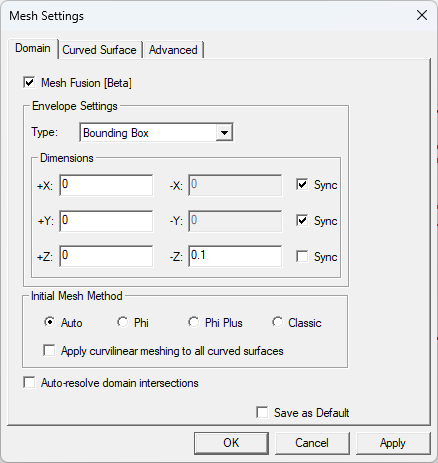
Access the Mesh Settings Window
To choose an initial meshing method, access the Mesh Settings window by completing these steps.
-
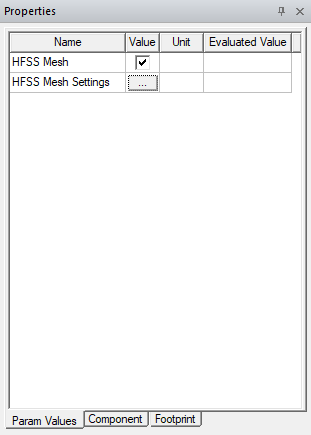
From the Layout Editor, select the active design to make its parameters appear in the Properties window.
-
If appropriate, click on the Param Values tab in the Properties window. Then click the HFSS Mesher Settings [...] button to open the Mesh Settings window.
-
Choose one of the meshers available in the Initial Mesh Method area.
-
Click Apply.
-
Click OK to close the Mesh Settings window.
The procedure is complete.