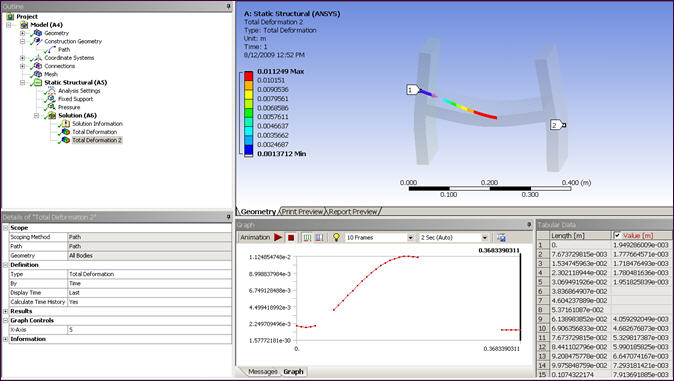
... The path is not entirely contained within the finite element mesh.
To solve a Linearized Stress result, a necessary condition is that the associated path be totally contained within the model.
If the start/endpoints of the path are not within the model (likely to occur when the mesh is coarse and when using the XYZ option for picking), you can use the Snap to mesh nodes feature to adjust the endpoints to be coincident with the nearest nodes in the mesh.
Occasionally however, other internal "knots" of the path are not inside the model due to a hole or other missing material in the model. These situations can prevent the solving of a Linearized Stress result and cause this error message to appear, even after using the Snap to mesh nodes feature.
To verify that a discontinuity is the cause of the error, apply a result other than a Linearized Stress result to that path, and solve it. By doing so you will take advantage of the fact that other results do not require that the full path be inside the model. The results are displayed and discontinuities are indicated by any gaps or missing fields shown in the Graph and Tabular Data windows. The following example illustrates a Total Deformation result where gaps in the Graph window and empty fields in the Tabular Data window provide evidence of discontinuities.