
Set Current Source Option
This feature allows configuration of current-source conformance and thinning that applies to all SBR+ sources defined by a distribution of current sources. These are global settings, but they can be overridden for particular SBR+ Sources in the HFSS with Hybrid and Arrays Solution Type and particular near-field linked sources in the SBR+ Solution Type, as explained below. Solutions are invalidated if you change the Current Conformance or Current Reduction settings, whether at the global or local level. The behaviors and intended usages for these features are further explained in the HFSS Technical Notes for Excitations for SBR+ and Current Conformance and Array Conformance in SBR+.
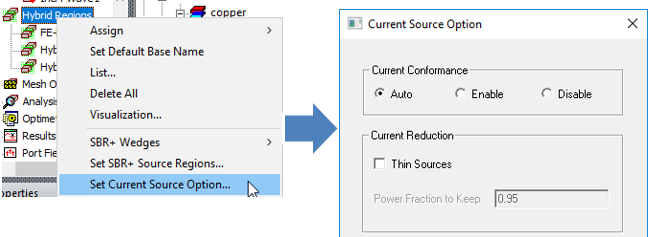
For the HFSS with Hybrid and Arrays Solution Type, you can right click on the Hybrid Regions icon in the Project tree and access the Set Current Source Option... dialog.
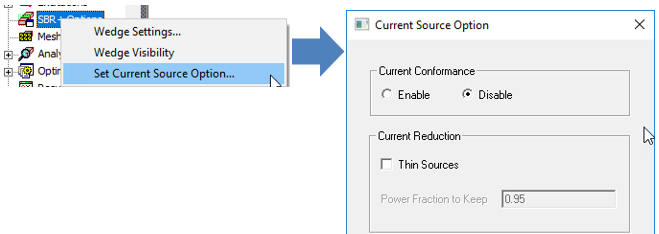
For the SBR+ Solution Type, you can also access Set Current Sources Option… through the SBR+ Options.
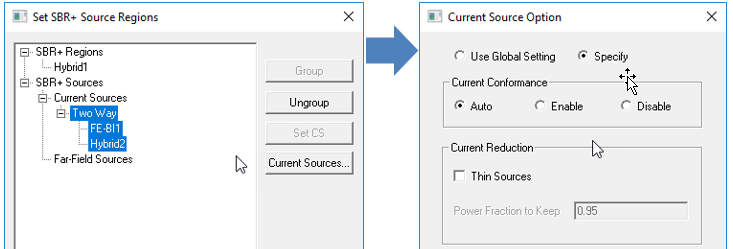
In the HFSS with Hybrid and Arrays Solution Type, you can override the global Set SBR+ Source Regions settings for a particular source through Set SBR+ Source Regions by clicking Current Sources… in the dialog.
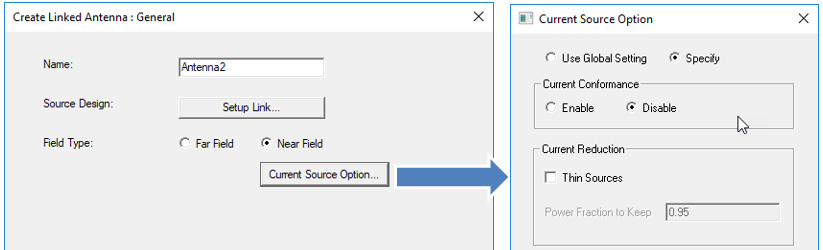
For the SBR+ Solution Type, you can override the global Current Source Option settings when you create aNear Field antenna from a driven Modal design to SBR+.
Current Conformance Settings
For ground-plane backed sources you intend to conform to an SBR+ region, you should place them very near the metallic surface of the SBR+ region to which they will be conformed, and this should be a high-conductivity metal surface or Perfect E boundary. While the conformance algorithm is designed to handle imprecise vertical placement of the source, one should strive to precisely place the source on the intended surface point of the SBR+ region. Also, the conformance algorithm has no ability (or knowledge) to compensate for imprecision in the horizontal placement of the source. Here, “vertical” and “horizontal” mean perpendicular and parallel to the SBR+ region placement surface, respectively.
In the case of sources enclosed by FE-BI boundaries (or Radiation boundaries for SBR+ Solution Type), you should also place a Perfect E infinite ground plane on the enclosure face nearest the placement surface of the SBR+ region. This ground plane serves two purposes. First, when the source is solved separately and in isolation from the SBR+ region (i.e., in one-way hybrid coupling or near-field link context), it will experience a grounding environment that best represents the presence of the metallic SBR+ region. Second, this ground plane establishes the reference plane against which current source original heights are measured. When conformance shifts the current sources down toward the SBR+ region placement surface, it will maintain these original heights relative to each underlying point on the SBR+ region placement surface, as explained and illustrated in Current Conformance and Array Conformance in SBR+. Also, when the current sources are generated along the enclosing boundary faces from their fields during the SBR+ component of the analysis, no current sources will be generated along this ground-plane face, nor are they required.
The options for Current Conformance are Enable and Disable; additionally, the HFSS with Hybrid and Arrays Solution Type provides a third option: Auto. When set to Disable, conformance is switched off and neither the absolute nor relative positioning of current sources of the SBR+ source are altered.
When Current Conformance is set to Enable, HFSS will attempt to conform the current sources of the ground-plane backed SBR+ hybrid or near-field linked source to the nearest surface of the SBR+ region, even in cases where the SBR+ source is far displaced from any SBR+ region. Only select this option when the source defined by current sources is a ground-plane backed antenna that is intended to sit atop and conform to a metallic surface of the SBR+ region.
When Current Conformance is set to Auto, the recommended and default setting in the HFSS with Hybrid and Arrays Solution Type, HFSS will automatically determine whether the SBR+ source is a good candidate for conformance. The qualifying criterion is that the source be placed within a small tolerance separation from the nearest SBR+ region surface, this tolerance being determined as one-twentieth (1/20) of the diagonal displacement of source’s bounding box. In addition, in the case of a source enclosed by FE-BI boundaries, if none of its enclosing faces is assigned a Perfect E infinite ground plane, Auto conformance will automatically insert one on the face nearest the SBR+ region.
Current Reduction Settings
Enabling Thin Sources lets you specify a Power Fraction to Keep between 0 and 1, with lower values implying more thinning, faster solutions, and less accuracy; setting this below 0.9 is not recommended due to the potential excessive accuracy loss. Power Fraction to Keep should not be confused with directly controlling the fraction of current sources to retain; for SBR+ sources with a large number of current sources (e.g., a large FE-BI antenna), substantial thinning far exceeding 10% can be achieved with Power Fraction to Keep set at 0.9 or higher.