


Model from MATLAB/Simulink/Stateflow can be imported for traceability and transformation. Moreover, you can also perform safety analyses for the (software) model. For the safety analysis please refer to:
The integration with MATLAB/Simulink takes place by importing Simulink files (.slx). Thereby, a model representation is created by extracting all relevant data from the .slx file. For navigation, this file is also stored inside the project and can be opened e.g. by double-clicking on the Simulink model in the Model Browser. The most recent version of MATLAB/Simulink will be used for browsing.
Note that releases prior to version 2022 R2 provided a UI integration (embedding MATLAB windows) to browse the imported file. This integration feature is discontinued so that no dedicated MATLAB/Simulink tool istallation is required.
In order to import a Simulink model, select "Import -> Simulink Model" from the context menu of the "System Design" package or any sub-package of it. After completing the import, you can see all elements of the Simulink model in the Model Browser.
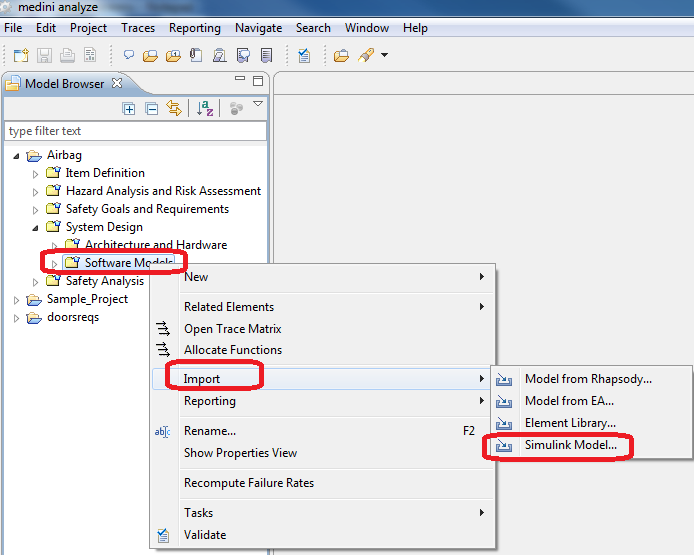
Note, in order to perform the import it is not required to have a licensed MATLAB installation on the computer where you use medini analyze.
The import of a Simulink model into a medini analyze produces a project copy of the original model in the medini analyze workspace. As the original Simulink model may be changed later, an update of the local copy in the medini analyze project may be necessary.
The update of a MATLAB/Simulink model is initiated by choosing the entry "Update Simulink Model" from the context menu of a Simulink model node in the Model Browser. After loading the newer version of the model medini analyze attempts to match elements of the original model to elements of the newer version. During this update process all traces to/from elements of the Simulink model will be preserved, unless elements are no longer existing in the incoming model. Note that if elements are deleted all traces and FTA events are removed automatically so that project integrity is guaranteed.
medini analyze stores details of imported Simulink models. See Metadata of Imported Models for details.