


You can share the ACP (Pre) setup cell across multiple models, enabling you to apply the same composite layup to models with different geometries and meshes. The shared setup is well suited for design studies that assess varying geometries with a consistent composite definition. It also supports submodeling workflows where maintaining consistency in layup data is important.
The ACP shared workflow is shown in Figure 1.40: Illustrates Two Analyses Sharing the Same ACP (Pre) Setup. In this workflow, one ACP (Pre) setup shell is linked to another, creating an ACP (shared) cell. The downstream cell inherits the composite definition from the upstream source, and ACP automatically maps as much information as possible to the second model. Using common named selections and consistent engineering data across models improves mapping accuracy.
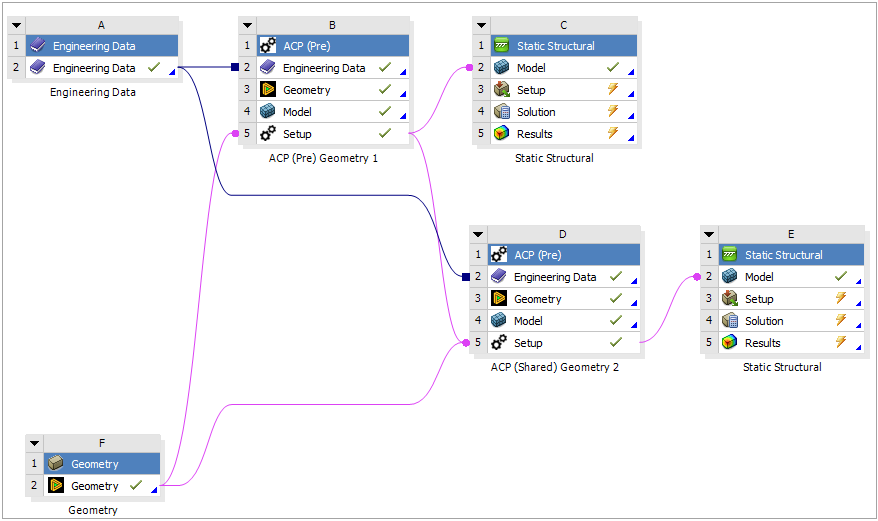
Behavior of Shared ACP Cells:
The layup definition in an ACP (shared) cell (such as D5 in the figure above) automatically reflects any updates made to its source cell (B5, above).
Establishing a shared connection replaces any existing layup definition in the target cell. Previous definitions are not retained.
Certain ACP objects, such as solid models, can still be added to an ACP (shared) cell. This flexibility is particularly useful in submodeling workflows, where localized model details may differ from the source.