


To perform refinement using boundary, first you should select one or more geometries
(wall boundaries) to be part of the refinement process. Moreover, there are two
parameters to be set, Refinement Distance Factor and
Refinement Level. The first parameter determines a region where the
SPH elements will be refined, in other words, a refinement distance is computed as the
product of Refinement Distance Factor times initial SPH
Size ( ), where d is Refinement Distance
Factor and s the SPH Element Size. For each triangle on
your geometry this distance is computed, forming a refinement region in all triangles
from the selected geometries in the SPH Adaptive Sizing Tab. To
illustrate this concept see Figure 2.4: Refinement using boundary proximity.
), where d is Refinement Distance
Factor and s the SPH Element Size. For each triangle on
your geometry this distance is computed, forming a refinement region in all triangles
from the selected geometries in the SPH Adaptive Sizing Tab. To
illustrate this concept see Figure 2.4: Refinement using boundary proximity.
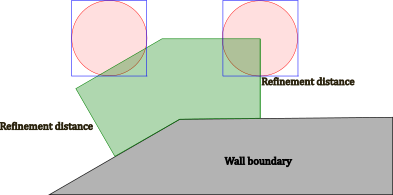
The second parameter (Refinement Level) alters the SPH Size. Once the SPH elements were selected to be refined, the new SPH elements will be created according to this parameter as described in SPH Adaptive Sizing Method Overview. Recall that the refined elements will have SPH Element Size equals to division of the initial SPH Element Size and Refinement Level.
Besides that,  new SPH elements are created, where n stands for Refinement
Level setted in the FreeFlow UI (SPH Adaptive Sizing
tab). As explained in SPH Adaptive Sizing Method Overview, for each refinement level the
volume of an SPH element will be reduced by
new SPH elements are created, where n stands for Refinement
Level setted in the FreeFlow UI (SPH Adaptive Sizing
tab). As explained in SPH Adaptive Sizing Method Overview, for each refinement level the
volume of an SPH element will be reduced by  , then in order to maintain the total volume constant, new
 SPH elements will be created.