


First, define the Life Cycle in the Sherlock application.
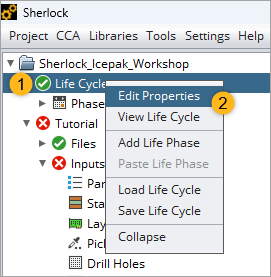
Right-click Life Cycle in the Project Tree. Then select Edit Properties in the context menu. This opens the Life Cycle Editor.
In the Life Cycle Editor:
Set the Reliability Metric to
20, and select Prob. of Failure % from the dropdown menu.Set Service Life to
10years.
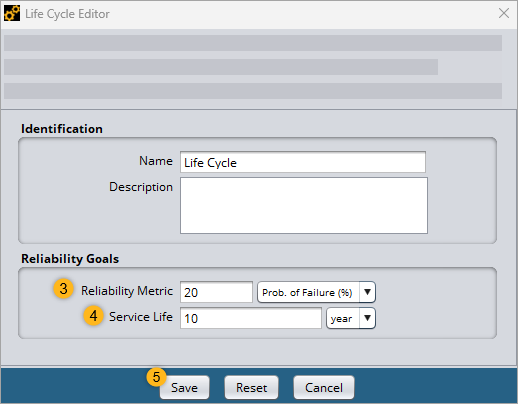
Click Save.
Next, define the Thermal Event.
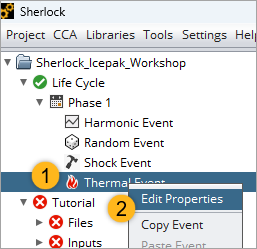
In the Project Tree, right-click Thermal Event under Phase 1 of the Life Cycle and select in the context menu. This opens the Thermal Event Editor.
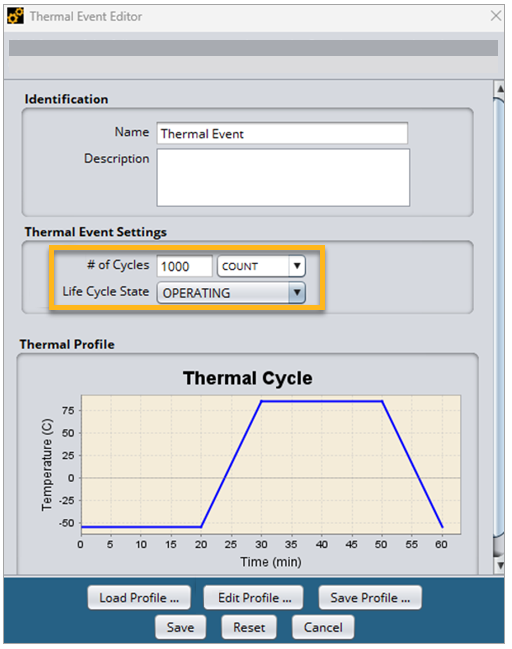
In the Thermal Event Editor shown below,
Set the # of Cycles to 1000 and select COUNT from the drop-down menu.
Set the Life Cycle State to OPERATING.
Click . Then click the Edit Profile... button. This opens the Thermal Profile Editor. Enter the following Steps (A) in the Thermal Cycle as shown in the image below.
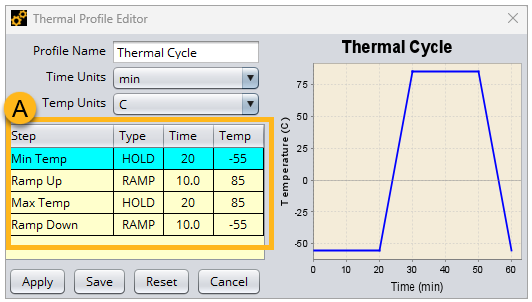
When finished, click Save. Then close the editor.