


Various simulation results can be displayed by using the contour, as shown in the table below.
Figure 3.48: Simulation Results Using a Contour
| Object | Mapping Type | Characteristics | Solution | |
| Dynamics | Eigenvalue | |||
| FE & EF Body | Node (Averaged across body) | Displacement | O | X |
| Velocity | O | X | ||
| Acceleration | O | X | ||
| Deformation | O | O | ||
| Thermal | O | X | ||
| Stress | O | X | ||
| T Strain | O | X | ||
| E Strain | O | X | ||
| P Strain | O | X | ||
| Top T Strain | O | X | ||
| Top E Strain | O | X | ||
| Top P Strain | O | X | ||
| Bottom T Strain | O | X | ||
| Bottom E Strain | O | X | ||
| Bottom P Strain | O | X | ||
| Contact | O | X | ||
| Top Contact | O | X | ||
| Bottom Contact | O | X | ||
| FE Body | Element (Unaveraged) | Stress | O | X |
| T Strain | O | X | ||
| E Strain | O | X | ||
| P Strain | O | X | ||
| Top T Strain | O | X | ||
| Top E Strain | O | X | ||
| Top P Strain | O | X | ||
| Bottom T Strain | O | X | ||
| Bottom E Strain | O | X | ||
| Bottom P Strain | O | X | ||
| Rigid Body | Node (Averaged across body) | Contact | O | X |
| FE & EF Body | Element (Unaveraged) | Fatigue | O | X |
| FE & EF Body | Node (Unaveraged) | Top Stress | O | X |
| Top Strain | O | X | ||
| Node (Averaged within material) | Top Stress | O | X | |
| Top Strain | O | X | ||
| All Contacts | Contact | Pressure | O | X |
| Normal Force | O | X | ||
| Penetration | O | X | ||
| DPenetration | O | X | ||
| Friction Force | O | X | ||
| Tangent Velocity | O | X | ||
| Friction Coefficient | O | X | ||
| Stiction Slip | O | X | ||
| Slip Ratio | O | X | ||
| Force Magnitude | O | X | ||
| Spring Force | O | X | ||
| Damping Force | O | X | ||
| Potential Energy | O | X | ||
| Contact Loss | O | X | ||
| Sliding Loss | O | X | ||
| Beam Group | Beam Group | Displacement | O | X |
| Velocity | O | X | ||
| Acceleration | O | X | ||
| Deformation | O | X | ||
| Chained System | Chained System | Tension Magnitude | O | X |
| Tension Longitudinal | O | X | ||
| Bending Loss | O | X | ||
| Bending Loss Secondary | O | X | ||
| Vibration Loss Tensile | O | X | ||
| Vibration Loss Shear | O | X | ||
| Vibration Loss Shear Scondary | O | X | ||
| Slip Loss | O | X | ||
| Stiction Slip | O | X | ||
| Normal Force | O | X | ||
| Penetration | O | X | ||
| DPenetration | O | X | ||
| Friction Force | O | X | ||
| Tangent Velocity | O | X | ||
| Friction Coefficent | O | X | ||
| User Subroutine | Ball Placing | Diameter | O | X |
| Kinetic Energy | O | X | ||
| Rotational Energy | O | X | ||
| CVT | Penetration | O | X | |
| Penetration Dot | O | X | ||
| Contact Stiffness | O | X | ||
| Contact Damping Coefficient | O | X | ||
| Normal Force | O | X | ||
| Tangent Relative Velocity | O | X | ||
| Tangent Friction Coefficient | O | X | ||
| Tangent Friction Force | O | X | ||
| Radial Relative Velocity | O | X | ||
| Radial Friction Coefficient | O | X | ||
| Radial Friction Force | O | X | ||
| Contact Radius | O | X | ||
Displacement is used to display the displacement of nodes or a body and supports several components as shown in the table below.
Figure 3.49: Displacement in Contour
| Component | Description |
| Magnitude | Magnitude of displacement vector |
| X | X component of displacement vector |
| Y | Y component of displacement vector |
| Z | Z component of displacement vector |
Velocity is used to display the translational velocity of nodes or a body and supports several components as shown in the table below.
Figure 3.50: Velocity in Contour
| Component | Description |
| Magnitude | Magnitude of velocity vector |
| X | X component of velocity vector |
| Y | Y component of velocity vector |
| Z | Z component of velocity vector |
Acceleration is used to display the translational acceleration of nodes or a body and supports several components as shown in the table below.
Figure 3.51: Acceleration in Contour
| Component | Description |
| Magnitude | Magnitude of acceleration vector |
| X | X component of acceleration vector |
| Y | Y component of acceleration vector |
| Z | Z component of acceleration vector |
Deformation is used to display the translational and rotational deformations of nodes and supports several components as shown in the table below.
Figure 3.52: Deformation in Contour
| Component | Description |
| Magnitude | Magnitude of deformation vector |
| X | X component of deformation vector |
| Y | Y component of deformation vector |
| Z | Z component of deformation vector |
| RM | Magnitude of rotational deformation |
| RX | X component of rotational deformation |
| RY | Y component of rotational deformation |
| RZ | Z component of rotational deformation |
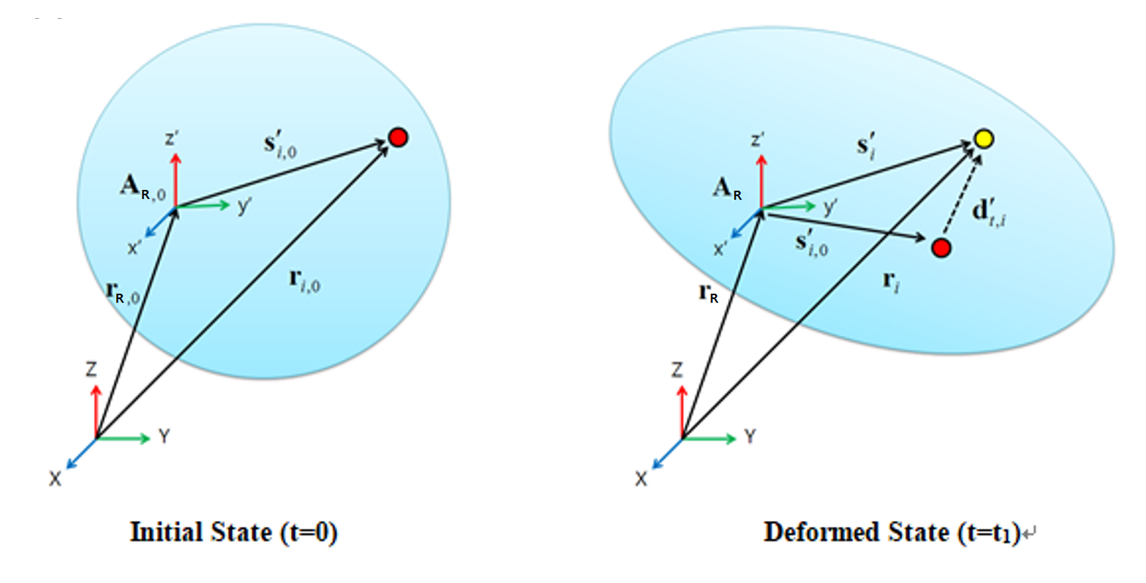
Definition of Deformation
The deformation vector is calculated with the difference between current position and initial position. If the reference frame is defined for the deformation, the deformation vector is transformed into the reference frame. At initial state and current state, the relative displacement vectors of a node relative to the center position can be defined by the following equations.


where,  and
and  are the nodal position vector and the position of the
reference frame at initial time and
are the nodal position vector and the position of the
reference frame at initial time and  is the orientation matrix of the reference frame. The
deformation can be calculated with the relative displacement vectors as
follows.
is the orientation matrix of the reference frame. The
deformation can be calculated with the relative displacement vectors as
follows.

The vectors of  and
and  are the nodal position vector and the position of the
reference frame at the current time, respectively.
are the nodal position vector and the position of the
reference frame at the current time, respectively.

The reference frame can be defined as the coordinate system in the flexible body.
Deformation scale ( ) is derived as follows:
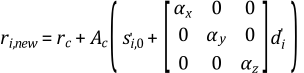
Where,  and
and  are the position of the reference marker and are
 ,
,  ,
,  scale values.
 is Initial relative node position vector in Initial reference
frame and
is Initial relative node position vector in Initial reference
frame and  is deformation vector of i-th node in deformed state.
Contact is used to display the contact results on the contacted action nodes as shown in the table below. For shell elements, the contact results can also be reported in the direction of the top or bottom contact face.
Figure 3.53: Contact Results
| Component | Description |
| Pressure |
Used to display the pressure due to contact force. The pressure can be calculated from the elementary force divided by surface area of adjacent elements as follows. where, |
| Normal Force | Use to display the contact normal forces. The force can be calculated as following equation. where |
| Penetration | Use to display the contact penetration, which is equivalent to a deformation at the contact points in the normal direction. Note: According to Equation 6–19 in the Motion Theory Reference, contact penetration is calculated as negative by the solver, and negative contact penetration is reported with a positive sign to aid user comprehension. |
| DPenetration | Use to display the contact penetration velocity, which is equivalent to the first order time derivative of penetration. Note: According to Equation 6–54 in the Motion Theory Reference, contact penetration velocity that increases contact penetration is calculated as negative by the solver. In order to aid user comprehension and indicate penetration velocity that increases contact penetration with a positive sign, negative penetration velocity is reported. |
| Friction Force |
Used to display the contact friction forces. The force can be calculated using the following equation. where, |
| Tangent Velocity | Used to display the tangential velocities, which are the relative velocities at the contact points in the tangential direction. |
| Friction Coefficient | Use to display the contact friction coefficients at contact points. |
| Stiction Slip |
Used to display the stick-slip status at a contacted node. The stick-slip status can be represented as follows.
|
| Slip Ratio | Use to display the contact slip ratio at contact points. |
| Force Magnitude |
Use to display the contact force at contact points as following equation.
where |
| Spring Force |
Use to display the contact spring force at contact points as following equation. |
| Damping Force |
Use to display the contact damping force at contact points as following equation. |
| Potential Energy |
Use to display the potential energy due to contact as in the following equation: where |
| Contact Loss |
Use to display the contact damping as following equation. |
| Sliding Loss |
Use to display the friction force as following equation. where |
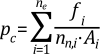





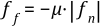







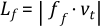

Figure 3.54: Contact Component
| Item | Description |
| Both | Used to display the contour results on the action and base geometry. |
| Base | Used to display the contour results on the base geometry. |
| Action | Used to display the contour results on the action geometry. |
Thermal is used to display the thermal results of nodes after the heat transfer analysis and supports several components as shown in the table below.
Figure 3.55: Thermal Results in Contour
| Component | Description |
| Temperature | Temperature |
| Directional Heatflux X | X component of heat flux vector |
| Directional Heatflux Y | Y component of heat flux vector |
| Directional Heatflux Z | Z component of heat flux vector |
| Total Heatflux | Magnitude of heat flux vector |
| Thermal Strain | Thermal strain due to temperature change |
Stress is used to display the nodal or elementary stress of FE and EF (EasyFlex) bodies and supports several components as shown in the table below. For an EF body, only nodal stress is available.
Figure 3.56: Stress Component



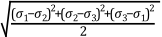



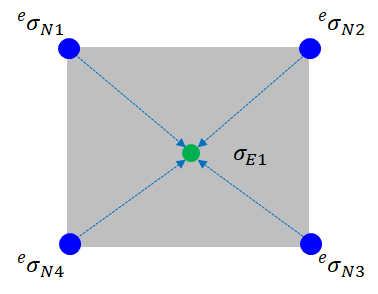
The stress is first calculated at the Gauss points of an element, and then they are extrapolated to get the nodal stress for each element as shown in the figure and equation below.

where,  is the stress at the jth Gauss
point and
is the stress at the jth Gauss
point and  is the ith extrapolated nodal
stress.
is the ith extrapolated nodal
stress.  is the number of nodes which belong to the element.
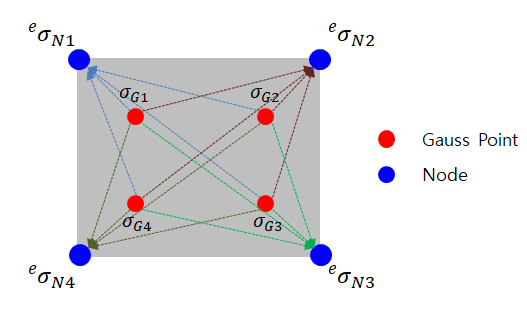
The element stress of the jth element can be taken by averaging the stresses of nodes which belong to the element as shown in the figure and equation below.
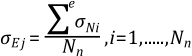
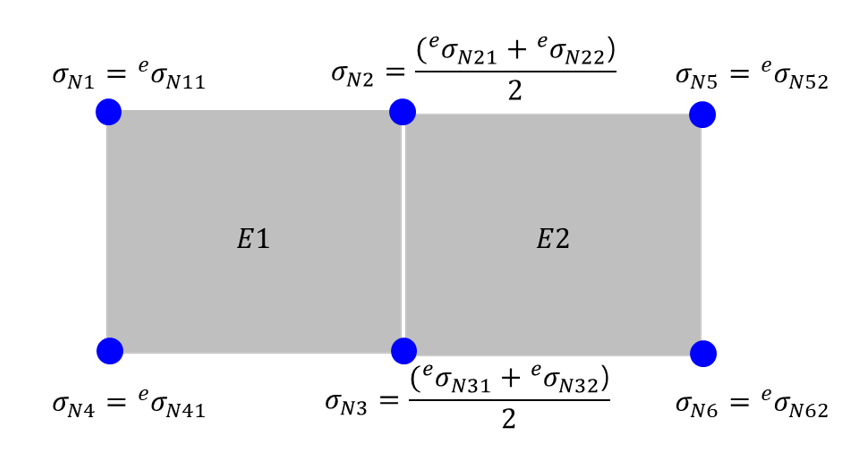
The node stress of ith node can be taken by averaging the stresses of elements which contain the node as shown in the figure and equation below.
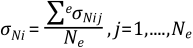
where,  is the number of elements which include the
ith node.
is the number of elements which include the
ith node.
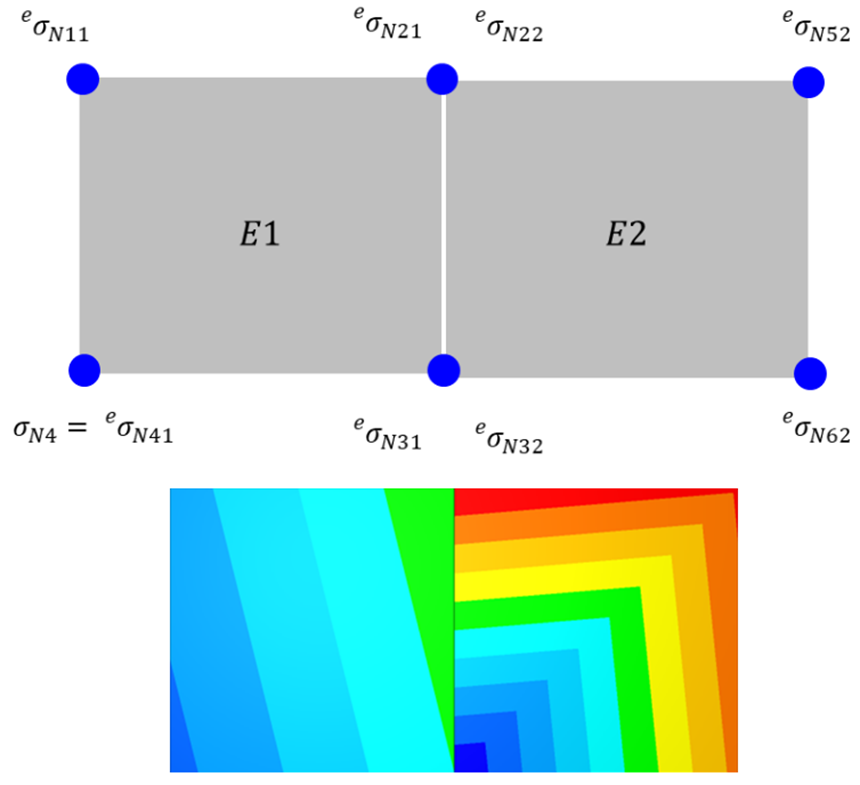
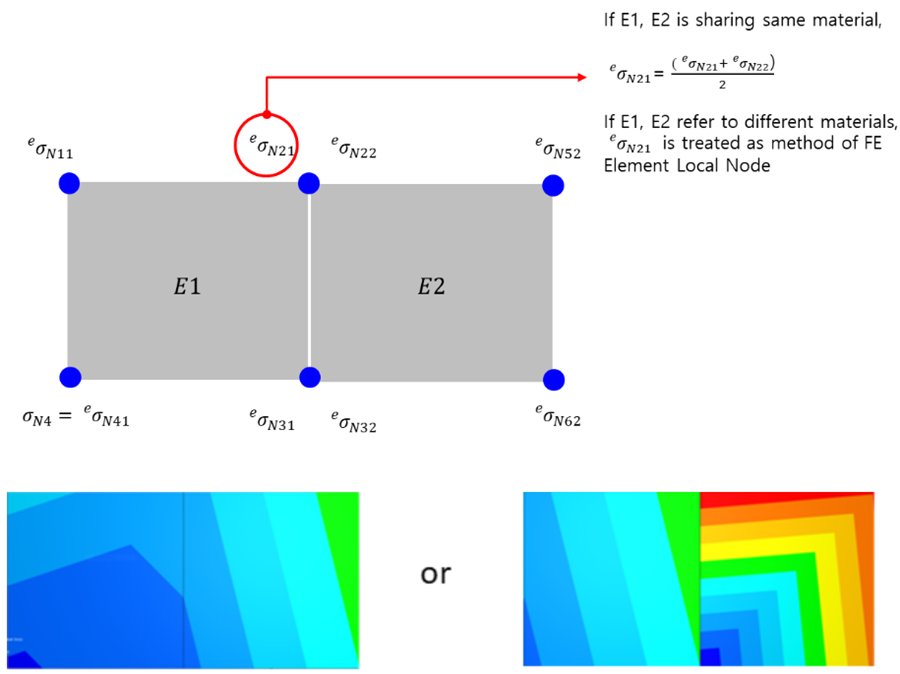
The element node is one of the mapping types for displaying the results from an element on a contour. The stress of ith element node can be taken from local node stress of elements which contain the node. This is available for EF or FE bodies which refer to a linear material. Depending on the type of the method or condition, the equation can be different as shown in the figures below.
T Strain is used to display the nodal or elementary strain of FE and EF (EasyFlex) bodies. T Strain means total strain, which can be calculated as the sum of elastic strain and plastic strain by following equation.

T Strain supports several components as shown in the table below. For an EF body, only nodal strain is available.
Figure 3.62: Strain Component




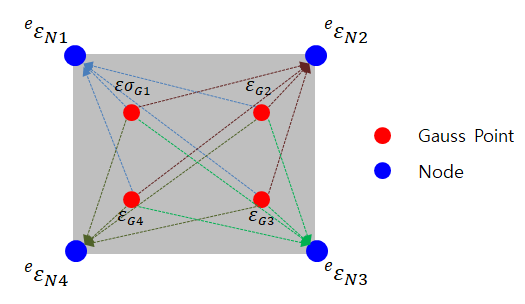
The strain can be calculated in the same way as stress. First, the strain is calculated at the Gauss points of an element, and then they are extrapolated to get the nodal strain for each element as shown in the figure and equation below.

where,  is the strain at the jth Gauss
point and
is the strain at the jth Gauss
point and  is the ith extrapolated nodal
strain.
is the ith extrapolated nodal
strain.  is the number of nodes which belong to the element.
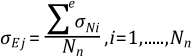
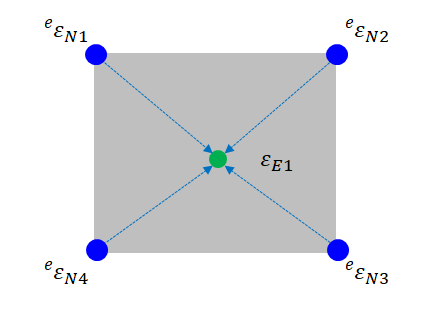
The element strain of jth element can be taken by averaging the strains of nodes which belong to the element as shown in the figure and equation below.
The node strain of ith node can be taken by averaging the strains of elements which contain the node as shown in the figure and equation below.
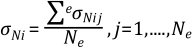
where,  is the number of elements which include the
ith node.
is the number of elements which include the
ith node.
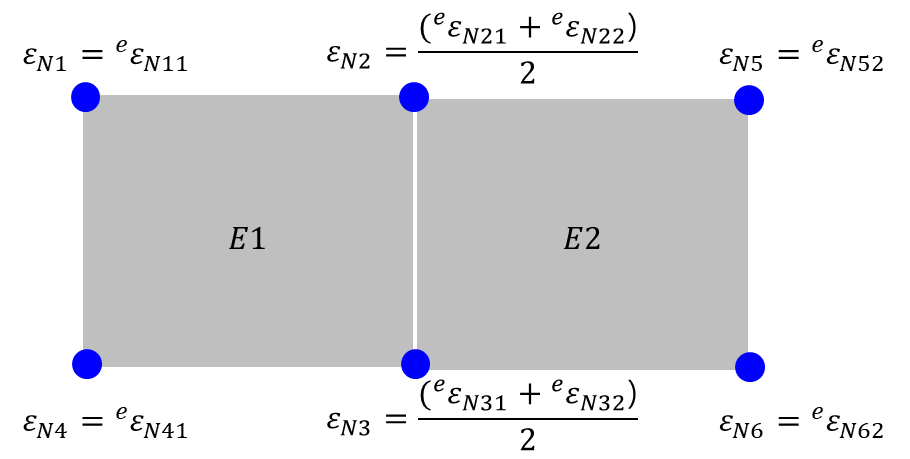
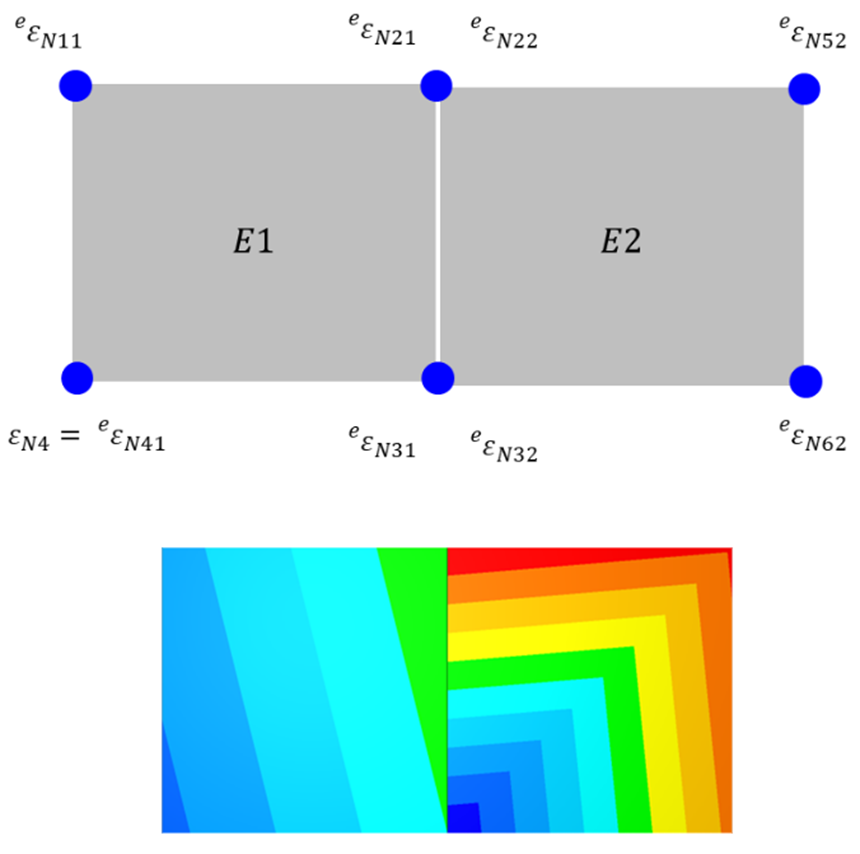
The element node is one of the mapping types for displaying the results from an element on a contour. The strain of ith element node can be taken from the local node strain of elements which contain the node. This is available for EF or FE bodies refering to a linear material. Depending upon the type of the method or condition, the equation can be different as shown in the figure below.
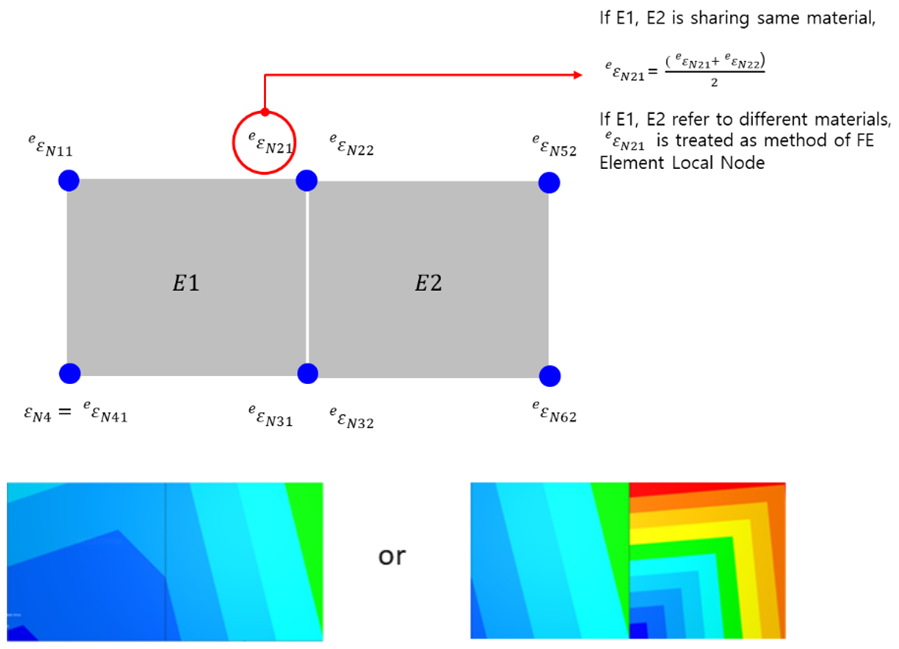
E Strain is used to display the elastic strain of nodes and elements, and supports several components (the same components as T Strain). For an EF body, only nodal strain is available.
P Strain is used to display the plastic strain of nodes and elements by permanent deformation, and supports several components (the same components as T Strain). For an EF body, only nodal strain is available.
Fatigue is used to display the simulation results after fatigue analysis and supports several components as shown in the table below.
Figure 3.68: Fatigue Component
| Component | Description |
| Life Cycle | Used to define the number of loading cycles that a body sustains before failure of a specified nature occurs. |
| Damage | Used to define the inverse of the life cycle. As the value becomes larger, the possibility of failure is increased. |
Chained System is used to display the simulation results of CPlacing and supports several characteristics as shown in the table below.
Figure 3.69: Chained System Characteristics



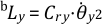


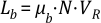





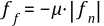

Each characteristic of a chained system supports two components as shown in the table below.
Figure 3.70: Chained System Component
| Characteristic | Description |
| Value | Used to display the values of simulation results. |
CVT is used to display the simulation results of a CVT system and supports several characteristics as shown in the table below.
Figure 3.71: CVT System Characteristics
| Characteristic | Description |
| Penetration | Used to display the penetration. It is the penetration between Pin and Pulley. |
| Penetration Dot | Used to display the first-order time derivative of penetration between Pin and Pulley. This value is 0 without contact. |
| Contact Stiffness |
Used to display the contact stiffness. The contact stiffness can be calculated using following equation
where |
| Contact Damping Coefficient | Used to display the contact damping coefficient, which
can be calculated using following equation
where, |
| Normal Force | Used to display the normal force. |
| Tangent Relative Velocity | Used to display the tangential relative velocity of Pin with respect to Pulley at the contact point. |
| Tangent Friction Coefficient | Used to display the tangential friction coefficient at the contact point. |
| Tangent Friction Force | Used to display the applied tangential friction force for Pin with respect to Pulley at the contact point. |
| Radial Relative Velocity | Used to display the radial relative velocity of Pin with respect to Pulley at the contact point. |
| Radial Friction Coefficient | Used to display the radial friction coefficient at the contact point. |
| Radial Friction Force | Use to display the applied radial friction force for Pin with respect to Pulley at the contact point. |
| Contact Radius | Use to display the contact radius. This is the minimum distance between the axis of rotation and the contact point. |


Ball Placing is used to display the simulation results of a system with many ball bearings and supports several characteristics as shown in the table below.
Figure 3.72: Ball Placing System Characteristics
| Characteristic | Description |
| Diameter | Used to display the diameter of balls in Ball Placing entity. |
| Kinetic Energy | Used to display the kinetic energy of balls in Ball Placing entity. The kinetic energy can be calculated using following equation. where, m and v are the mass of the ball and velocity of the ball, respectively. |
| Rotational Energy | Used to display the rotational energy of balls in Ball Placing entity. The rotational energy can be calculated as following equation. where, J and |


