Set up a working directory on your computer.
Download the
2dpipe_junct.zipfile here .Unzip the
2dpipe_junct.zipfile you have downloaded to your working directory.Start Ansys ICEM CFD and create a new project in your working directory. Use an appropriate name, for example
Hexa2D_Pipe.>
Open the geometry file (
geometry.tin).> >
Note: If you want Ansys ICEM CFD to behave exactly as this tutorial describes, you should go to the Menu, click , and disable Auto Pick Mode in the DEZ. Most experienced ICEM CFD users prefer to enable Auto Pick Mode as it improves efficiency. See in the > > for more detail.
Blocking Strategy
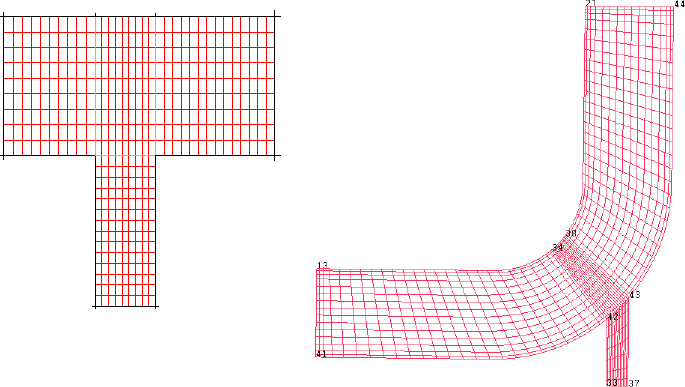
The blocking strategy for the 2D pipe geometry involves creating a T-shaped blocking and fitting it to the geometry. The 2D pipe geometry is equivalent to a T shape with the right side of the blocking crossbar bent upward to resemble the geometry. You will fit the T-shaped blocking to the geometry by creating associations between the edges of the blocks and the curves in the geometry, and then moving the vertices of the blocks onto the corners of the geometry. This procedure will be described in subsequent steps.