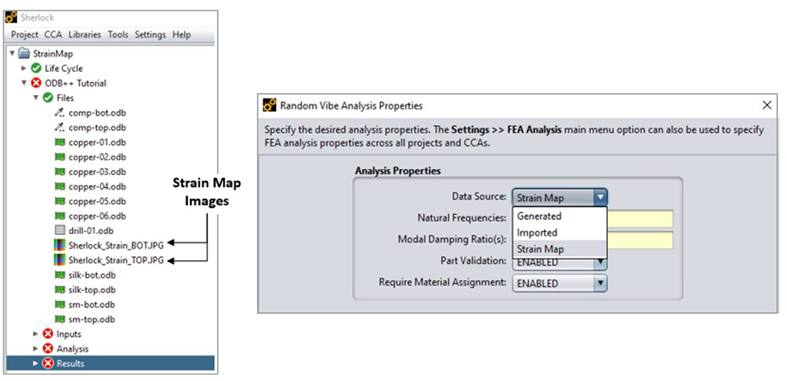
All the analysis modules provided by Sherlock that make use of FEA allow you to specify the Data Source used to acquire the FEA data, supporting Generated and Imported data sources. The Generated data source indicates that Sherlock should handle all aspects of FEA processing, whereas the Imported data source indicates that the user will handle FEA processing tasks and Sherlock will handle only pre-processing and post-processing tasks. Sherlock also supports a third type of Data Source called Strain Map, that becomes available only if strain map files are available under Files in Sherlock.
If the Data Source property is set to Generated then Sherlock will:
Create a new FEA model based on the currently defined PCB, components, drill holes, etc.
Submit the model with appropriate commands to the FEA engine for analysis
Import the results from the FEA engine and
Generate reliability results based on the FEA results
This approach is the most common and easiest method for FEA processing, with Sherlock doing all the work.
If the Data Source property is set to Imported then Sherlock will:
Import the designated model and results files from the FEA engine and
Generate reliability results based on the FEA results
This allows advanced users to create their own FEA models and/or modify an FEA model created by Sherlock to include elements, constraints and external forces that are not directly supported by Sherlock. After performing the analysis using the FEA engine, users can then import the FEA results into Sherlock to perform the reliability analysis.
Limitation:
Imported FEA results for Leads, Mount Points, and Wirebonds using NxNastran are not supported.
Pre-stressed analysis results are not supported.
When LS-DYNA is selected as the Data Source for a Mechanical Shock analysis, Sherlock will not calculate strain results for orthotropic materials. See LS-DYNA Imported Data Source.
Note: Sherlock will attempt to extract displacement and strain data for each component defined in the circuit card, even if those components were not included in the FEA model itself. In such cases, all result data found near the component will be used to calculate the reliability results.
If you prefer to limit results to modeled parts only, you can select that option in the Analysis Properties form. Choose Generated for the Data Source. Select the Part Modeling tab and set Filtered Part Results to DISABLED. See FEA Model Properties for additional information.
The Strain Mapping feature is available for the Random Vibration and the Mechanical Shock analyses. The feature gives you the flexibility to run board level predictions from images of strain contour or from CSV files. Once these files are added to a Sherlock project, the Strain Map option is available under the Data Source dropdown menu as shown below. For more information on Strain Mapping, see Strain Mapping in Sherlock.