


The Coordination Number module allows you to see the coordination number for each particle present in the simulation. The coordination number is defined as the number of contacts per particle and it can be especially useful for mixing simulations to evaluate the homogeneity and for powder compression simulations to evaluate the packing efficiency.
Figure 7.1: Example application of grains packing using the Coordination Number module. shows an example of how this module can be applied. Initially, the grains inside the cylinder present low coordination number (left) values. As the grains are compressed, the coordination numbers increase and represent a higher packing level (right).
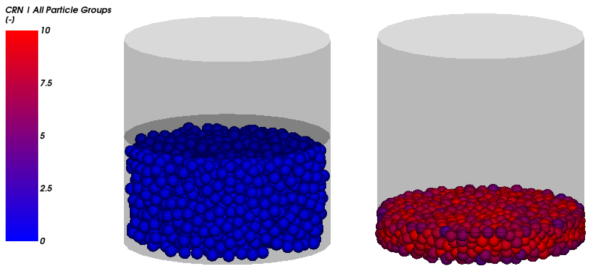
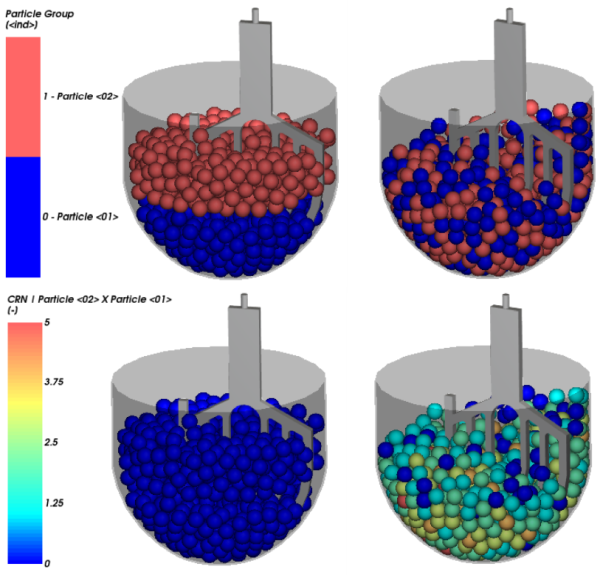
Figure 7.2: Example application of particle mixing using the Coordination Number module. shows another example of this module application. Initially, particles of two different particle groups are placed separately inside the bowl (left), when there is low interaction between the particles and consequently low coordination numbers. After some time of mixing, we can see higher coordination numbers for most of the particles, indicating a mixing homogeneity (right).
The Coordination Number module works by computing the instantaneous coordination number, or the number of contact points, for each particle present in the simulation. The module also calculates the coordination number averages for each particle along the time and it gives you the option to compute the instantaneous coordination numbers for all the combinations of particle group pairs present in the simulation. The coordination numbers for pairs of particle groups only consider the contacts between particles from the two groups, ignoring all other contacts.
This module is not compatible with Multiple Element (flexible) particles nor with Coarse Grain Modeling (CGM).
This module has one option you can enable (Figure 7.3: Coordination Number module options.). See the section below for details.
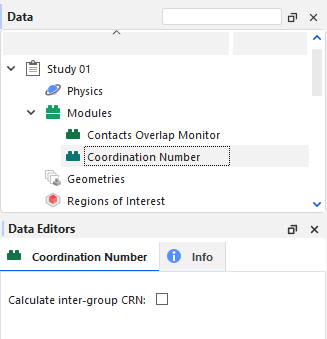
Calculate inter-group CRN: When disabled, the module will calculate the instantaneous coordination number for each particle present in the simulation and the average value for each particle. When enabled, the module will also calculate instantaneous coordination numbers for all the combinations of particle group pairs present in the simulation.
Range: [Turns on or off]
After processing your simulation, you can analyze the results using the same particle-related properties that are available by default in Rocky.
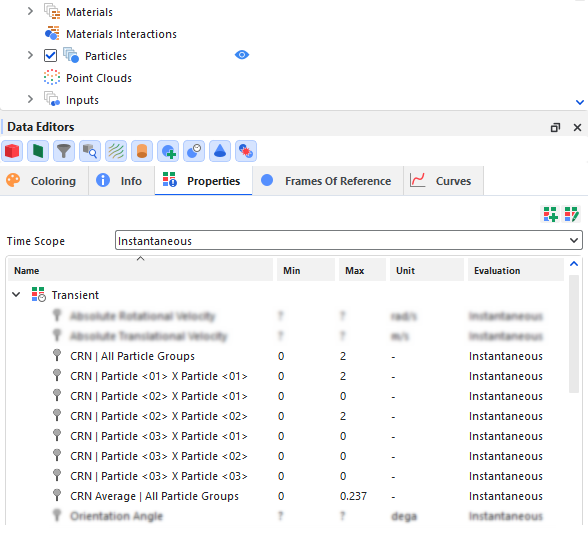
In addition, some extra particle properties are available if you enabled the module to process your simulation, as shown in Figure 7.4: Coordination Number module options. and explained below.
Note: Properties generated by this module will only appear if the Upscaling is disabled.Refer to Rocky User Manual (5.1.7. About Meshed Particles Upscaling) for more details.
CRN | All Particle Groups: This provides the average coordination number considering all particle groups. The contacts between the particles from all particle groups are considered for the coordination number calculation.
CRN Average | All Particle Groups: This provides the time average coordination number considering all particle groups.
CRN | Particle <01> X Particle <01>: This provides the coordination number considering only the particle group Particle <01>. In other words, only the contacts between the particles from the particle group Particle <01> are considered for the coordination number calculation.
Note: This property's name composition carries the same name(s) you have defined for the particle group(s).
This property will be available only if the option Calculate inter-group CRN is enabled.
A new property is created for each particle group pair, so the coordination number is calculated for all the particle group combinations.
CRN | Particle <02> X Particle <01>: This provides the coordination number considering the particle groups Particle <02> and Particle <01>. In other words, only the contacts between the particles from the particle group Particle <02> and particles from the particle group Particle <01>are considered for the coordination number calculation.
Note: This property's name composition carries the same name(s) you have defined for the particle group(s).
This property will be available only if the option Calculate inter-group CRN is enabled.
A new property is created for each particle group pair, so the coordination number is calculated for all the particle group combinations.
To use/set up the module, follow the steps described below:
Ensure that the module is enabled. (From the Data panel, select Modules and then from the Data Editors panel, ensure the Coordination Number checkbox is enabled.)
According to your needs, enable or not the module option Calculate inter-group CRN.
Set up and process the simulation as you normally would.
When you are ready to analyze your simulation results, you may choose to make use of any particle-related property and may also make use of the additional module-related property.
The Coordination Number module provides the number of particle to particle contact points of each particle, defined as coordination number. At each simulation timestep and for each particle, the module determines how many particles are in contact with each particle and show the instantaneous value in a new particle-related property. Also, a weighted average of the coordination number along the time is calculated for each particle, considering the instantaneous coordination number values of each simulation timestep.
 | (7–1) |
where:
 is the average coordination number at the current simulation timestep.
 is the average coordination number at the previous simulation timestep.
 is the instantaneous coordination number at the current simulation timestep.
 is the current number of simulation timesteps.
Additional calculations are performed by the module to show the instantaneous coordination numbers related to each particle group pairs, so you can know the number of contact points of each particle from a particle group with particles from other specific particle group.
The number of particle group pairs,  , is calculated by:
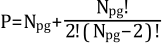 | (7–2) |
where:
 is the number of particle group pairs.
 is the number of particle groups present in the simulation.