


Default File Locations
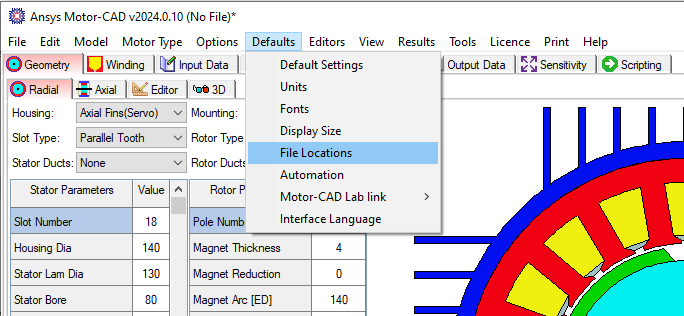
When the Default File Locations Pull Down Menu command is initiated it brings up the form shown below.
This shows the location for all the files that Motor-CAD reads and writes to the file.
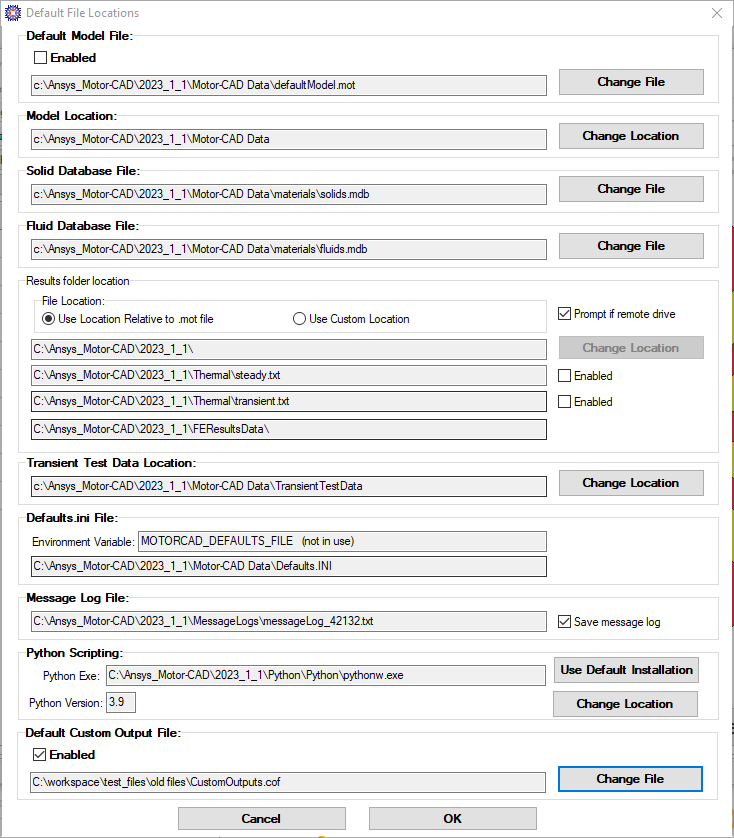
The form options are:
- Change Location - to change the file location.
- Change File - to change a file.
- Cancel - to exit without saving changes
- OK - to save the default folder and files in Defaults.INI
The different selections are:
Default Model File - when the checkbox is enabled the file is loaded automatically when Motor-CAD is started.
Model Location - Used to set the default model location where an Open or Save As (see Pull Down Menu) starts when opening or saving a *.mot datafile.
Solid Database File - the solid database file used
Fluid Database File - the fluid database file used
Results folder Location
Use Location Relative to .mot file - Motor-CAD results files are usually stored in a folder with the same name as the .mot file in the same location as the .mot file.
Note: This can cause Motor-CAD to run slowly if the .mot file is on a server as the results files may take some time to be saved.
Use Custom Location - Motor-CAD results are stored in the location specified. This can be useful if the .mot file is saved on a server to allow calculations to run faster.
Steady State Results File - when enabled the steady state temperatures are stored in the file each time the steady state calculation is run.
Transient Results file - when enabled the transient temperatures, capacitances and power values are stored in the file whenever the transient calculation is run.
Caution: this file can get very large. This data can be viewed using the Transient Results File Analysis.
Duty Cycle File Location - the location where the duty cycles are loaded from by default.
Transient Test Data Location - the location where the thermal transient test data is loaded from by default.
FE Results Data Location - the location of result files created by the Finite element module.
Defaults.ini file File - the location of the ini being used.
- The MOTORCAD_DEFAULTS_FILE Windows Environment Variable can be set to specify a custom folder location for this file.
Message Log File - When enabled the messages displayed by Motor-CAD are automatically saved to a file. This file location is in the same folder as the Motor-CAD file loaded. This can be useful when running many different designs using optimization tools like Ansys OptiSlang for viewing the solving details for each design created.
Python Scripting - the location of the files used for the internal Python scripting.
Default Custom Output File - This file is loaded into the Python Custom Outputs when a new file is created or a file without outputs is loaded.
See also Default.INI.